
XL Delete - X 64-bit Download
Popular x64 Tags
- internet x64 download
- delete x64 download
- cookies x64 download
- password x64 download
- lock x64 download
- hide x64 download
- keylogger x64 download
- shredder x64 download
- history x64 download
- wipe x64 download
- security x64 download
- clean x64 download
- cache x64 download
- files x64 download
- protect x64 download
- data x64 download
- erase x64 download
- secure x64 download
- lost password x64 download
- software x64 download
- utility x64 download
- file x64 download
- privacy x64 download
- recovery x64 download
- forgotten password x64 download
- shred x64 download
- erase history x64 download
- remove x64 download
- registry repair programs x64 download
- evidence x64 download
XL Delete 2.9.2
Sponsored links:

-XL- Development

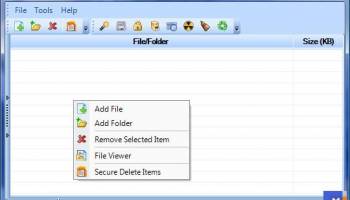
XL Delete is a powerful secure delete tool that will permanently delete files using its powerful wipe engine. XL Delete can permanently remove any type of file, entire folders, and even your Internet Explorer and Firefox cookies, history, and cache files.
Why use XL Delete?
Many people believe that emptying the recycle bin will delete a file forever. This is not true, when you delete a file and empty it from the recycle bin, the file is in fact still on your hard drive. The only thing that happens when you empty the recycle bin is that Windows marks the area where the file is on the hard drive as overwriteable so that it can reuse the space when necessary. This allows special data recovery software to be able to actually undelete the file and view all of its original contents. Prevent hackers and identity thieves from going through your deleted files and finding your passwords, credit card numbers, and other private information.
When you delete a file with XL Delete, the file data will actually be overwritten several times using specialized methods to prevent data recovery software from being able to undelete the file. XL Delete will also incorporate several obfuscation techniques to hide the original file name and file size from data recovery software.
You can be assured that once you delete a file with XL Delete, it will be gone for good.
Feature Overview
Built in file explorer helps you easily locate the files that you want to delete.
12 Different wipe methods to choose from including Peter Gutmann's method.
Define your own custom wipe methods.
Easy to use wizard. Delete any file or folder in 3 simple steps.
Shell integration, including integration with the Recycle Bin.
Ability to wipe all the free space of any selected hard drive.
Ability to purge old file names from any selected hard drive.
Ability to securely lock the free space of any selected hard drive.
Long path tool allows you to easily remove files and folders with path names that are too long for Windows.
Integrated scheduler that allows you to schedule the secure wiping of files and folders.
Works on memory cards, usb drives, and other types of removable media.
Use the Long Path tool to remove stubborn files with names that are too long for Windows to delete.
Drag and drop support for files and folders.
Cryptographically secure random number generator for maximum protection.
Ability to force wipe non-system files that are in use.
Integrated file viewer lets you inspect a file before deleting it.
Wipe Index.dat files.
Why use XL Delete?
Many people believe that emptying the recycle bin will delete a file forever. This is not true, when you delete a file and empty it from the recycle bin, the file is in fact still on your hard drive. The only thing that happens when you empty the recycle bin is that Windows marks the area where the file is on the hard drive as overwriteable so that it can reuse the space when necessary. This allows special data recovery software to be able to actually undelete the file and view all of its original contents. Prevent hackers and identity thieves from going through your deleted files and finding your passwords, credit card numbers, and other private information.
When you delete a file with XL Delete, the file data will actually be overwritten several times using specialized methods to prevent data recovery software from being able to undelete the file. XL Delete will also incorporate several obfuscation techniques to hide the original file name and file size from data recovery software.
You can be assured that once you delete a file with XL Delete, it will be gone for good.
Feature Overview
Built in file explorer helps you easily locate the files that you want to delete.
12 Different wipe methods to choose from including Peter Gutmann's method.
Define your own custom wipe methods.
Easy to use wizard. Delete any file or folder in 3 simple steps.
Shell integration, including integration with the Recycle Bin.
Ability to wipe all the free space of any selected hard drive.
Ability to purge old file names from any selected hard drive.
Ability to securely lock the free space of any selected hard drive.
Long path tool allows you to easily remove files and folders with path names that are too long for Windows.
Integrated scheduler that allows you to schedule the secure wiping of files and folders.
Works on memory cards, usb drives, and other types of removable media.
Use the Long Path tool to remove stubborn files with names that are too long for Windows to delete.
Drag and drop support for files and folders.
Cryptographically secure random number generator for maximum protection.
Ability to force wipe non-system files that are in use.
Integrated file viewer lets you inspect a file before deleting it.
Wipe Index.dat files.
Homepage: XL Delete
OS: Windows XP, Windows Vista, Windows Vista x64, Windows 7, Windows 7 x64, Windows 8, Windows 8 x64, Windows 10, Windows 10 x64
Requirements: .NET 2.0 framework
Add Your Review or 64-bit Compatibility Report
Top Other 64-bit downloads


Windows Defender Definition Updates March 27, 2026

Essential security updates for Windows Defender.
Freeware


2FAGuard 1.7.2
Secure your accounts effortlessly with 2FAGuard's intuitive two-factor authentication.
Open Source

IPVanish 4.3.9.1
Secure and fast VPN service with user-friendly interface and robust features.
Shareware


Process Magic 2.0
Command-line Tool to Hide any Windows Process or Launch New Process in Invisible
Freeware

O&O SafeErase Server x64 18.4.611
Deletes sensitive data so securely that a reconstruction
Trialware | $199.00
Members area
Top 64-bit Downloads
-
OpenVPN x64 2.6.11
x64 open source download -
VSCryptoHash 64-bit 2.5.3.509
x64 freeware download -
Prevent Restore 119.00
x64 freeware download -
O&O SafeErase Server
x64 18.4.611
x64 trialware download -
Wipe 2603.00
x64 freeware download -
Microsoft Standalone
System Sweeper (x64 bit) 1.0.856.0 Beta
x64 freeware download -
Hash Suite 4.0
x64 shareware download -
Secret Disk 320.00
x64 freeware download -
Romaco Timeout x64 3.1.4.0
x64 freeware download -
Trend Micro Internet
Security Pro 2010 (x64
bit)
x64 trialware download
Top Downloads
-
OpenVPN x64 2.6.11
open source download -
Aiseesoft Android
Unlocker 1.1.16
shareware download -
ClamWin Portable 0.103.2.1
open source download -
CmosPwd 5.0
freeware download -
NordVPN 7.56.2.0
demo download -
SymlexVPN 3.1.7
shareware download -
Video Padlock 1.20
demo download -
Portable SafeInCloud 24.14.1
freeware download -
OSV-Scanner 2.3.5
open source download -
WebPost Tools 1.0.0.412
freeware download -
CRYPTO! Build 9695
freeware download -
GhostVolt 1.3.3.0
demo download -
abylon KEYSAFE 23.60.1
shareware download -
Windows Defender
Definition Updates March 27, 2026
freeware download -
Portmaster 2.1.12
open source download