
Autoconverter - X 64-bit Download
Popular x64 Tags
- calculator x64 download
- tool x64 download
- freeware x64 download
- free x64 download
- software x64 download
- download x64 download
- radio x64 download
- data x64 download
- ebook x64 download
- home inventory x64 download
- planner x64 download
- windows x64 download
- free numerology software x64 download
- free numerology x64 download
- reg software x64 download
- numerology software x64 download
- numerology x64 download
- auto repair help x64 download
- passwords x64 download
- chicken coop plans x64 download
- numerology reading x64 download
- blood pressure x64 download
- automobile x64 download
- github x64 download
- 3d modeling x64 download
- viewer x64 download
- automation x64 download
- open source x64 download
- auto x64 download
- open-source x64 download
Autoconverter 2.3.5
Sponsored links:
license: Demo ($62.69)
downloads: 48
size: 51.40 MB
updated: 2026-01-09
tags: Autoconverter, download Autoconverter, Autoconverter free download, 3D converter, model viewer, convert model, model, converter, STL2OBJ, OBJ2STL
Add to Basket

Automapki

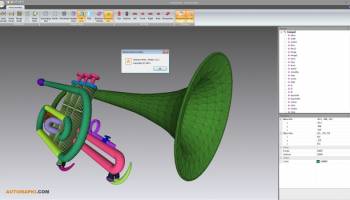
Autoconverter by Automapki is a versatile and powerful software solution designed to streamline the process of converting, viewing, and editing 3D CAD models. Tailored for professionals in engineering, architecture, and design, Autoconverter stands out for its robust functionality and user-friendly interface.
At its core, Autoconverter excels in converting a wide array of 3D file formats, including but not limited to STEP, IGES, STL, and OBJ. This extensive compatibility ensures that users can seamlessly transition between different software ecosystems without the usual headaches associated with file incompatibility. Whether you are working with complex assemblies or simple part models, Autoconverter handles the task with precision and efficiency.
One of the standout features of Autoconverter is its intuitive 3D viewer. This tool allows users to inspect models in great detail, providing various visualization options such as wireframe, shaded, and transparent views. The viewer supports dynamic rotation, zooming, and panning, making it easy to examine intricate details and validate design integrity before proceeding with further modifications or conversions.
Editing capabilities in Autoconverter are both comprehensive and accessible. Users can perform a range of operations, from basic transformations like scaling and rotating to more advanced functions such as Boolean operations and mesh repair. The software's editing tools are designed to be straightforward, reducing the learning curve and enabling users to make quick adjustments on the fly.
Performance is another area where Autoconverter shines. The software is optimized to handle large files and complex geometries without compromising speed or stability. This makes it an ideal choice for professionals who need reliable performance under tight deadlines.
Autoconverter also boasts a clean, modern interface that enhances user experience. The layout is logically organized, with easy access to all major functions and tools. This thoughtful design ensures that both novice users and seasoned professionals can navigate the software with ease.
In addition to its core functionalities, Autoconverter offers a range of customization options. Users can tailor the software to their specific needs through configurable settings and preferences. This flexibility ensures that Autoconverter can adapt to various workflows and project requirements.
Support and documentation are robust, with comprehensive guides and responsive customer service available to assist users with any issues or questions. This commitment to user support underscores Automapki's dedication to providing a high-quality, reliable product.
In summary, Autoconverter by Automapki is a top-tier 3D CAD conversion and editing tool that combines extensive format compatibility, powerful editing features, and exceptional performance. Its user-friendly interface and robust support make it a valuable asset for professionals in various fields, ensuring that they can work more efficiently and effectively. Whether you are converting files for interoperability, viewing models for inspection, or making precise edits, Autoconverter delivers the tools you need with reliability and ease.
At its core, Autoconverter excels in converting a wide array of 3D file formats, including but not limited to STEP, IGES, STL, and OBJ. This extensive compatibility ensures that users can seamlessly transition between different software ecosystems without the usual headaches associated with file incompatibility. Whether you are working with complex assemblies or simple part models, Autoconverter handles the task with precision and efficiency.
One of the standout features of Autoconverter is its intuitive 3D viewer. This tool allows users to inspect models in great detail, providing various visualization options such as wireframe, shaded, and transparent views. The viewer supports dynamic rotation, zooming, and panning, making it easy to examine intricate details and validate design integrity before proceeding with further modifications or conversions.
Editing capabilities in Autoconverter are both comprehensive and accessible. Users can perform a range of operations, from basic transformations like scaling and rotating to more advanced functions such as Boolean operations and mesh repair. The software's editing tools are designed to be straightforward, reducing the learning curve and enabling users to make quick adjustments on the fly.
Performance is another area where Autoconverter shines. The software is optimized to handle large files and complex geometries without compromising speed or stability. This makes it an ideal choice for professionals who need reliable performance under tight deadlines.
Autoconverter also boasts a clean, modern interface that enhances user experience. The layout is logically organized, with easy access to all major functions and tools. This thoughtful design ensures that both novice users and seasoned professionals can navigate the software with ease.
In addition to its core functionalities, Autoconverter offers a range of customization options. Users can tailor the software to their specific needs through configurable settings and preferences. This flexibility ensures that Autoconverter can adapt to various workflows and project requirements.
Support and documentation are robust, with comprehensive guides and responsive customer service available to assist users with any issues or questions. This commitment to user support underscores Automapki's dedication to providing a high-quality, reliable product.
In summary, Autoconverter by Automapki is a top-tier 3D CAD conversion and editing tool that combines extensive format compatibility, powerful editing features, and exceptional performance. Its user-friendly interface and robust support make it a valuable asset for professionals in various fields, ensuring that they can work more efficiently and effectively. Whether you are converting files for interoperability, viewing models for inspection, or making precise edits, Autoconverter delivers the tools you need with reliability and ease.
OS: Windows 11, Windows 10 64 bit
Add Your Review or 64-bit Compatibility Report
Top Other 64-bit downloads


Flexify 2.1.64

Flexify: A versatile tool for seamless data manipulation and integration.
Open Source


Rocrail 2026-03-15 Revision
Rocrail: Open-source model railroad control software for automation and control.
Open Source

stretchly 1.20.0
Boost productivity with Stretchly, a break reminder app for healthier work.
Open Source


WinStars 3.0.304 (2025
Explore the cosmos with WinStars, your interactive astronomy software.
Freeware

Offline Map Maker 8.381
Create detailed offline maps from online sources with ease and precision.
Demo | $79.00

Members area
Top 64-bit Downloads
-
Fitbit Connect 2.0.2.7066
x64 freeware download -
MyTourbook 64-bit 19.6.1
x64 open source download -
JAWS 64-bit 14.0.5005
x64 trialware download -
Money Manager Ex
Portable x64 1.8.0
x64 freeware download -
Moneydance x64 2017.8 (1691)
x64 trialware download -
Deeproot Plant Base X64 2.2.0
x64 shareware download -
Money Manager Ex x64 1.8.0
x64 freeware download -
Parabator 2 1.0
x64 freeware download -
Parabator 2 -
"perk" booster
mod 1.0
x64 freeware download -
Parabator 2
"perkk"
booster mod 1.0
x64 freeware download
Top Downloads
-
Netron 8.9.7
open source download -
Flexify 2.1.64
open source download -
Easy-PC 25.0.3.85
demo download -
Rocrail 2026-03-15 Revision
open source download -
stretchly 1.20.0
open source download -
fsmapper 1.6.5
open source download -
WinStars 3.0.304 (2025
freeware download -
Offline Map Maker 8.381
demo download -
Anki 25.07.2
open source download -
IRIS 5.59
freeware download -
dwgConvert 2024 A.11
demo download -
WriteMapper 4.5.0
demo download -
OpenComic 1.6.5
open source download -
Desktop Projector 3.4.7
freeware download -
CyberSky 5.1.1
shareware download