
AVI ReComp - X 64-bit Download
Popular x64 Tags
- video x64 download
- video converter x64 download
- avi x64 download
- internet tv x64 download
- divx x64 download
- dvd x64 download
- online tv x64 download
- mov x64 download
- mpeg x64 download
- converter x64 download
- xvid x64 download
- 3gp converter x64 download
- psp x64 download
- download x64 download
- ipod x64 download
- mp4 x64 download
- wmv x64 download
- ipod video x64 download
- dvd ripper x64 download
- dvd to 3gp x64 download
- dvd to ipod x64 download
- swf x64 download
- dvd to psp x64 download
- 3gp x64 download
- asf x64 download
- iphone x64 download
- dat x64 download
- mpg x64 download
- video to ipod x64 download
- flv x64 download
AVI ReComp 1.5.6
Sponsored links:

Mateusz Gola

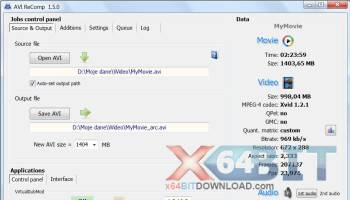
The program allows you to recompress your AVI files. The application supports not only files containing audio streams but AVIs without any audio as well. For the time being the program uses only Xvid codec for the recompression process (versions: 1.0.3 or newer). The installation pack contains all required components (the newest versions of: VirtualDubMod, AviSynth and Xvid). AVI ReComp can be very useful for users who want to clear their AVIs out of GMC or Qpel functions to prepare their clips for standalone DVD players. The program contains the feature of embedding subtitles into video. So if you want burnt in subtitles, you can use this software. Additionally the newest versions allow you to add black borders to your movie and place your subtitles on them. You can also adjust all settings for ssa and ass subtitles (style, colour, position). AVI ReComp enables batch encoding, getting detailed information about AVI files and adding own logo to the movie. You can also change a resolution and aspect ratio of your video clip. The Cropping tool can be used to crop existing black borders or just change video aspect ratio. It is also possible to convert all audio streams of your movie choosing one of available encoding modes (VBR, ABR, CBR) and bitrates. AVI ReComp supports AVIs with the following audio formats: mp3, wav, ac3, dts, ogg. Supported subtitle formats: TMPlayer (.txt), MicroDVD (.txt / .sub), SubViewer2 (.sub), SubRip (.srt), Advanced SubStation Alpha (.ass), SubStation Alpha (.ssa), VobSub (.sub/.idx). The program includes multilingual interface (for the time being: Arabic, British, Bulgarian, Czech, Dutch, French, German, Greek, Hebrew, Hungarian, Italian, Polish, Portuguese, Russian, Serbian, Slovak, Slovenian, Spanish, Swedish, Thai and Turkish). Starting with version 1.4.1 ARC is Windows Vista compatible. In the future I'm going to create many new and very useful features.
Recompressing (reencoding) AVI clips using Xvid codec.
-new AVI size
-new fourCC code
Adjusting all encoding parameters for best standalone DVD players compatibility.
-no QPEL
-no GMC
-max. cons. BVOPs = 1 (or B frames disabled)
-bitrate spikes control
Adding your own subtitles (they will be burnt in).
Supported subtitle formats:
-TMPlayer (.txt)
-MicroDVD (.txt / .sub)
-SubViewer2 (.sub)
-SubRip (.srt)
-Advanced SubStation Alpha (.ass)
-SubStation Alpha (.ssa)
-VobSub (.sub/.idx)
Adjusting subtitle settings (works only for SSA and ASS subtitles!):
-position
-font
-size
-color
-outline
-shadow
-style (bold, italic, underline)
Creating custom subtitle presets (for SSA and ASS formats).
Adding own logo bitmaps (watermarks).
You can adjust the following settings for your logo:
-position
-start time
-duration
-fade in and fade out time
-alpha blending
Preview.
You can use this feature to preview your movie with all new settings.
Resizing.
You can change the resolution of your movie
-resizing preview
-'keep aspect ratio' option
Cropping.
-You can crop the source image
-cropping preview
-aspect ratio display
Audio conversion.
You can convert audio streams of your movie
-ac3 to mp3 and mp3 to mp3
-multiple-audio support
-VBR, ABR, CBR modes available
-sampling rate conversion available
-volume level adjustment tool
Batch encoding.
You can enqueue all your jobs (move them up and down, delete and abort jobs).
Command line option for loading video files.
AVI file association.
It is possible to associate AVI ReComp with *.avi extension so that your files can be loaded using the right-click context menu option.
Automatic version checking.
You can enable automatic update notifications or you can manually check for new releases.
Recompressing (reencoding) AVI clips using Xvid codec.
-new AVI size
-new fourCC code
Adjusting all encoding parameters for best standalone DVD players compatibility.
-no QPEL
-no GMC
-max. cons. BVOPs = 1 (or B frames disabled)
-bitrate spikes control
Adding your own subtitles (they will be burnt in).
Supported subtitle formats:
-TMPlayer (.txt)
-MicroDVD (.txt / .sub)
-SubViewer2 (.sub)
-SubRip (.srt)
-Advanced SubStation Alpha (.ass)
-SubStation Alpha (.ssa)
-VobSub (.sub/.idx)
Adjusting subtitle settings (works only for SSA and ASS subtitles!):
-position
-font
-size
-color
-outline
-shadow
-style (bold, italic, underline)
Creating custom subtitle presets (for SSA and ASS formats).
Adding own logo bitmaps (watermarks).
You can adjust the following settings for your logo:
-position
-start time
-duration
-fade in and fade out time
-alpha blending
Preview.
You can use this feature to preview your movie with all new settings.
Resizing.
You can change the resolution of your movie
-resizing preview
-'keep aspect ratio' option
Cropping.
-You can crop the source image
-cropping preview
-aspect ratio display
Audio conversion.
You can convert audio streams of your movie
-ac3 to mp3 and mp3 to mp3
-multiple-audio support
-VBR, ABR, CBR modes available
-sampling rate conversion available
-volume level adjustment tool
Batch encoding.
You can enqueue all your jobs (move them up and down, delete and abort jobs).
Command line option for loading video files.
AVI file association.
It is possible to associate AVI ReComp with *.avi extension so that your files can be loaded using the right-click context menu option.
Automatic version checking.
You can enable automatic update notifications or you can manually check for new releases.
OS: Windows XP, Windows Vista, Windows Vista x64, Windows 7, Windows 7 x64, Windows 8, Windows 8 x64, Windows 10, Windows 10 x64
Add Your Review or 64-bit Compatibility Report
Top Video Tools 64-bit downloads


Screenbits 9.13.1.0
Screenbits: High-quality screen recording with intuitive controls and features.
Trialware

VLC Media Player x64 3.0.20
VLC x64 is a free and open source multimedia 64bit player for Windows x64
Open Source

MonitorTest 4.0 Build 1002
Comprehensive tool for testing and calibrating monitor performance.
Trialware

Video Jaguar 1.0
Video Jaguar is the world's easiest video ad maker for businesses and agencies.
Shareware | $8.99

CamStudio 2.7.4 r354
You can use it to create demonstration videos for any software program
Open Source

4Videosoft MTS Converter 6.2.22
Convert video to audio or convert audio to AAC, AC3 , AIFF, AMR, AU, and more
Shareware | $16.16


VideoPad Free Movie and Video Editor 18.16

Free Video Editor and Movie Making Software for Windows anyone can use.
Freeware
tags: video editor, free video editor, movie maker, free movie maker, video editing, video editing software, free video editing software, free movie making software, free film editing, video editing software free pc, best video editing apps free, video cutting software mac, video production software, windows video editor, open source video editor, video and audio editing software, free video editing apps for pc, video capture and editing software, video and audio editor

MP4 Converter 6.3.0
Effortlessly convert videos to MP4 with high quality and fast processing.
Trialware | $29.99
Members area
Top 64-bit Downloads
-
Media Player Classic -
HomeCinema - 64 bit 2.3.0
x64 open source download -
VLC Media Player x64 3.0.20
x64 open source download -
MCEBuddy 2.6.3
x64 trialware download -
PotPlayer 64bit 1.7.21397
x64 freeware download -
Adobe PhotoShop CC x64 2024 25.9.1
x64 trialware download -
GUITAR RIG 5 PRO 7.0.2
x64 demo download -
Voxengo Stereo Touch x64 2.17
x64 freeware download -
Voxengo Crunchessor x64 2.19
x64 demo download -
Drumazon x64 2.0.5
x64 shareware download -
Devastor x64 2.3.2
x64 demo download
Top Downloads
-
FreeTube 0.23.15 Beta
open source download -
Little AlterBoy 5.4.1
trialware download -
Auremo 0.24.9
open source download -
ft2-clone 2.12
open source download -
Nero 7 Ultra Edition 7.10.1
shareware download -
Screenbits 9.13.1.0
trialware download -
Melodics 5.0.139.0
demo download -
Media Player Classic -
HomeCinema - 64 bit 2.3.0
open source download -
Screenbox 0.18.0
open source download -
FineCut 1.0.2
demo download -
Audio Reader XL 2026 26.1.3
shareware download -
VLC Media Player x64 3.0.20
open source download -
Syrah 23.07.0.50310
trialware download -
DSP Filters 1.18.9
demo download -
Cyclop 1.3.7
demo download