
Beaver Notes - X 64-bit Download
Popular x64 Tags
- docx to pdf x64 download
- to pdf x64 download
- pdf converter x64 download
- xlsx to pdf x64 download
- pdf to word x64 download
- doc to pdf x64 download
- excel to pdf x64 download
- pdf to text x64 download
- word to jpg x64 download
- convert office x64 download
- powerpoint converter x64 download
- excel converter x64 download
- image converter x64 download
- pdf conversion x64 download
- word to pdf x64 download
- editor x64 download
- rtf to pdf x64 download
- pdf to doc x64 download
- text x64 download
- txt converter x64 download
- word converter x64 download
- convert word to pdf x64 download
- jpg converter x64 download
- office converter x64 download
- txt to pdf x64 download
- htm html converter x64 download
- powerpoint to pdf x64 download
- rtf converter x64 download
- docm to pdf x64 download
- xlsm to pdf x64 download
Beaver Notes 4.3.0
Sponsored links:
license: Open Source
downloads: 41
size: 170.00 MB
updated: 2026-02-12
tags: Beaver Notes, download Beaver Notes, Beaver Notes free download, note-taking app, word processor, offline editing, note-taking, word, ext, processor
Add to Basket

Daniele Rolli

**Beaver Notes: Streamlined Note-Taking for Modern Professionals**
Beaver Notes, developed by Daniele Rolli, is a sophisticated note-taking application designed to cater to the needs of today's busy professionals and students. This software stands out in the crowded field of productivity tools by offering a seamless blend of simplicity, efficiency, and powerful features.
**User Interface and Experience**
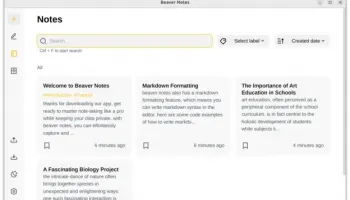
One of the first things you'll notice about Beaver Notes is its clean, intuitive interface. The design is minimalistic yet functional, allowing users to focus on their notes without unnecessary distractions. The application is easy to navigate, with a well-organized layout that ensures all features are readily accessible. This makes it an excellent choice for both tech-savvy users and those who prefer a straightforward approach.
**Core Features**
Beaver Notes offers a robust set of features that enhance the note-taking experience:
1. **Rich Text Editing**: Users can format their notes with bold, italics, bullet points, and more, making it easy to organize information and highlight key points.
2. **Tagging and Categorization**: The ability to tag and categorize notes allows for efficient organization and quick retrieval of information. This is particularly useful for users managing large volumes of notes.
3. **Search Functionality**: The powerful search feature ensures that users can find specific notes or information within seconds, saving valuable time.
4. **Cross-Platform Syncing**: Beaver Notes supports synchronization across multiple devices, ensuring that your notes are always up-to-date and accessible, whether you're using a smartphone, tablet, or computer.
5. **Offline Access**: Users can access and edit their notes even without an internet connection, making it a reliable tool for on-the-go productivity.
6. **Security**: With built-in encryption, Beaver Notes ensures that your data remains secure and private, giving users peace of mind.
**Performance**
Beaver Notes is designed to be lightweight and fast. It performs smoothly even with extensive use, which is crucial for users who rely on it for daily note-taking and information management. The application is regularly updated, ensuring that any bugs are promptly fixed and new features are continually added.
**Integration and Compatibility**
The software integrates well with other productivity tools and platforms, enhancing its versatility. Whether you're exporting notes to a PDF, sharing them via email, or syncing with cloud storage services, Beaver Notes makes it easy to incorporate your notes into your broader workflow.
**Conclusion**
Beaver Notes by Daniele Rolli is a standout note-taking application that combines simplicity with powerful features. Its user-friendly interface, robust functionality, and reliable performance make it an excellent choice for professionals and students alike. Whether you're jotting down quick thoughts, organizing detailed project notes, or managing a comprehensive study guide, Beaver Notes provides the tools you need to stay productive and organized.
Beaver Notes, developed by Daniele Rolli, is a sophisticated note-taking application designed to cater to the needs of today's busy professionals and students. This software stands out in the crowded field of productivity tools by offering a seamless blend of simplicity, efficiency, and powerful features.
**User Interface and Experience**
One of the first things you'll notice about Beaver Notes is its clean, intuitive interface. The design is minimalistic yet functional, allowing users to focus on their notes without unnecessary distractions. The application is easy to navigate, with a well-organized layout that ensures all features are readily accessible. This makes it an excellent choice for both tech-savvy users and those who prefer a straightforward approach.
**Core Features**
Beaver Notes offers a robust set of features that enhance the note-taking experience:
1. **Rich Text Editing**: Users can format their notes with bold, italics, bullet points, and more, making it easy to organize information and highlight key points.
2. **Tagging and Categorization**: The ability to tag and categorize notes allows for efficient organization and quick retrieval of information. This is particularly useful for users managing large volumes of notes.
3. **Search Functionality**: The powerful search feature ensures that users can find specific notes or information within seconds, saving valuable time.
4. **Cross-Platform Syncing**: Beaver Notes supports synchronization across multiple devices, ensuring that your notes are always up-to-date and accessible, whether you're using a smartphone, tablet, or computer.
5. **Offline Access**: Users can access and edit their notes even without an internet connection, making it a reliable tool for on-the-go productivity.
6. **Security**: With built-in encryption, Beaver Notes ensures that your data remains secure and private, giving users peace of mind.
**Performance**
Beaver Notes is designed to be lightweight and fast. It performs smoothly even with extensive use, which is crucial for users who rely on it for daily note-taking and information management. The application is regularly updated, ensuring that any bugs are promptly fixed and new features are continually added.
**Integration and Compatibility**
The software integrates well with other productivity tools and platforms, enhancing its versatility. Whether you're exporting notes to a PDF, sharing them via email, or syncing with cloud storage services, Beaver Notes makes it easy to incorporate your notes into your broader workflow.
**Conclusion**
Beaver Notes by Daniele Rolli is a standout note-taking application that combines simplicity with powerful features. Its user-friendly interface, robust functionality, and reliable performance make it an excellent choice for professionals and students alike. Whether you're jotting down quick thoughts, organizing detailed project notes, or managing a comprehensive study guide, Beaver Notes provides the tools you need to stay productive and organized.
OS: Windows 11, Windows 10 32/64 bit
Add Your Review or 64-bit Compatibility Report
Top Text / Document Editors 64-bit downloads


Vim 9.2.0136

A highly configurable text editor built to enable efficient text editing
Open Source
tags: Vim, download Vim, Vim free download, text editor, Unix console, Windows Terminal, console, Unix, script, Terminal

sttr 0.2.30
Streamline your text transformation tasks effortlessly with sttr.
Open Source
tags: sttr, download sttr, sttr free download, Format String, Process Text, Text to base64, Format, String, base64, MD5

BowPad 2.9.5
Lightweight text editor with syntax highlighting and customizable features.
Open Source


BabelPad 15.1.0.4
Text editor for Win that supports the proper rendering of most complex scripts
Freeware


CudaText 1.223.0.5
CudaText: A versatile, cross-platform text editor with syntax highlighting.
Open Source

Markdown Monster 4.2.0.0
Markdown Monster: A powerful Markdown editor with live preview and syntax highlighting.
Open Source | $79.00
Members area
Top 64-bit Downloads
-
EasyTune6 B24.0119.1
x64 freeware download -
HWMonitor (64-bit) 1.53
x64 freeware download -
7z SFX Builder x64 2.1
x64 freeware download -
PhotoRenamer 4.1
x64 freeware download -
XtraTools Professional
x64 26.2.1
x64 shareware download -
Windows 7 x64
x64 trialware download -
PKZIP 64-bit 14.40.0028
x64 trialware download -
CIB pdf brewer 4.20.0
x64 freeware download -
O&O DiskImage Server
Edition x64 18.2.199
x64 trialware download -
GRBackPro Professional
Backup x64 11.1.0
x64 shareware download
Top Downloads
-
Open Files from XLSX to
XLS 5.2
shareware download -
AnyMP4 Data Recovery 1.5.12
shareware download -
EaseUS Key Finder 4.1.6 Build 20240910
demo download -
Office 365 Backup 3.0
shareware download -
DRevitalize 4.10
demo download -
Caffeine 1.98
freeware download -
FMDiff 4.0.5
demo download -
SyncBreeze 17.8.26
freeware download -
GoodSync 12.9.26
freeware download -
Pitara 4.0.9565.41082
open source download -
AnyMP4 DVD Creator 7.3.28
trialware download -
Nomad.NET 3.2.0.2890
freeware download -
WinFR 5.60 S Build 2031
trialware download -
GainTools OST to PST
Converter 1.0.1
shareware download -
Exchange EDB To PST
Converter 5.0
shareware download