
Black Menu for Wikipedia for Opera - X 64-bit Download
Popular x64 Tags
- mozilla x64 download
- internet explorer toolbar x64 download
- browser x64 download
- netscape x64 download
- toolbar x64 download
- ie toolbar x64 download
- firefox x64 download
- free toolbar x64 download
- favorites organizer x64 download
- internet explorer x64 download
- favorites x64 download
- internet x64 download
- bookmarks x64 download
- add ons x64 download
- browser toolbar x64 download
- bookmark manager x64 download
- explorer x64 download
- theme x64 download
- addons x64 download
- cache x64 download
- skin x64 download
- web x64 download
- backup x64 download
- golf x64 download
- anarchy bar anarchy x64 download
- golf pro x64 download
- mhfs rss rss feed reader x64 download
- golf leader x64 download
- womens golf x64 download
- ladies golf x64 download
You are here: X-64-bit Download
\ Network & Internet
\ Browser Tools \ Black Menu for Wikipedia for Opera
Black Menu for Wikipedia for Opera 6.7.0
Sponsored links:
license: Freeware
downloads: 85
size: 51 kB
updated: 2025-11-21
tags: Black Menu for Wikipedia for Opera, download Black Menu for Wikipedia for Opera, Black Menu for Wikipedia for Opera free download, Research Menu, Wikipedia Extension, Wikipedia Browser, Wikipedia, Research, Browse, Wiki
Add to Basket

Carlos Jeurissen

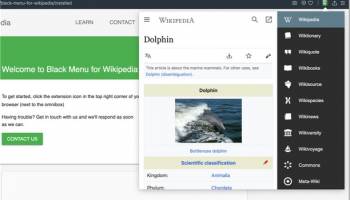
"Black Menu for Wikipedia for Opera" is an innovative browser extension developed by Carlos Jeurissen, designed to enhance your Wikipedia browsing experience. This intuitive tool integrates seamlessly with the Opera browser, providing users with a powerful and efficient way to access Wikipedia's vast repository of knowledge without the need to navigate away from their current webpage.
At its core, Black Menu for Wikipedia offers a sleek, unobtrusive drop-down menu that can be activated with a simple click on the toolbar icon. This menu is meticulously organized to provide quick access to Wikipedia's main sections, including articles, images, and categories. The extension's user-friendly interface ensures that even those unfamiliar with Wikipedia's structure can easily find the information they need.
One of the standout features of Black Menu for Wikipedia is its search functionality. Users can perform quick searches directly from the extension, with results displayed in real-time as they type. This feature not only saves time but also makes it incredibly convenient to find specific information without opening a new tab or window.
In addition to its robust search capabilities, the extension also offers a variety of customization options. Users can tailor the appearance and behavior of the menu to suit their preferences, including adjusting the font size, theme, and layout. This level of personalization ensures that the extension can cater to a wide range of user needs and preferences.
Another notable feature is the ability to preview articles directly within the menu. This allows users to quickly skim through content and determine its relevance before committing to a full read. The preview function is particularly useful for researchers, students, and anyone who frequently references Wikipedia for information.
Moreover, Black Menu for Wikipedia supports multiple languages, making it an invaluable tool for non-English speakers or those who frequently switch between languages. This multilingual support underscores the extension's versatility and broad appeal.
Performance-wise, the extension is lightweight and efficient, ensuring that it does not slow down your browsing experience. It runs smoothly in the background, ready to be summoned whenever you need it. The developer, Carlos Jeurissen, has ensured that the extension is regularly updated to maintain compatibility with the latest versions of the Opera browser and to introduce new features and improvements.
In summary, Black Menu for Wikipedia for Opera is a must-have extension for anyone who values quick, easy, and efficient access to Wikipedia. Its combination of powerful search capabilities, customization options, and user-friendly interface makes it an indispensable tool for enhancing your online research and browsing experience. Whether you're a student, researcher, or casual browser, this extension is sure to become an essential part of your digital toolkit.
At its core, Black Menu for Wikipedia offers a sleek, unobtrusive drop-down menu that can be activated with a simple click on the toolbar icon. This menu is meticulously organized to provide quick access to Wikipedia's main sections, including articles, images, and categories. The extension's user-friendly interface ensures that even those unfamiliar with Wikipedia's structure can easily find the information they need.
One of the standout features of Black Menu for Wikipedia is its search functionality. Users can perform quick searches directly from the extension, with results displayed in real-time as they type. This feature not only saves time but also makes it incredibly convenient to find specific information without opening a new tab or window.
In addition to its robust search capabilities, the extension also offers a variety of customization options. Users can tailor the appearance and behavior of the menu to suit their preferences, including adjusting the font size, theme, and layout. This level of personalization ensures that the extension can cater to a wide range of user needs and preferences.
Another notable feature is the ability to preview articles directly within the menu. This allows users to quickly skim through content and determine its relevance before committing to a full read. The preview function is particularly useful for researchers, students, and anyone who frequently references Wikipedia for information.
Moreover, Black Menu for Wikipedia supports multiple languages, making it an invaluable tool for non-English speakers or those who frequently switch between languages. This multilingual support underscores the extension's versatility and broad appeal.
Performance-wise, the extension is lightweight and efficient, ensuring that it does not slow down your browsing experience. It runs smoothly in the background, ready to be summoned whenever you need it. The developer, Carlos Jeurissen, has ensured that the extension is regularly updated to maintain compatibility with the latest versions of the Opera browser and to introduce new features and improvements.
In summary, Black Menu for Wikipedia for Opera is a must-have extension for anyone who values quick, easy, and efficient access to Wikipedia. Its combination of powerful search capabilities, customization options, and user-friendly interface makes it an indispensable tool for enhancing your online research and browsing experience. Whether you're a student, researcher, or casual browser, this extension is sure to become an essential part of your digital toolkit.
OS: Windows 11, Windows 10 32/64 bit, Windows 8 32/64 bit, Windows 7 32/64 bit
Add Your Review or 64-bit Compatibility Report
Top Browser Tools 64-bit downloads


Scener for Chrome 7.1.2
Enhance your streaming experience with Scener for Chrome's synchronized viewing.
Freeware

Chrono Download Manager 0.13.10
Effortlessly manage and accelerate your downloads with Chrono Download Manager.
Freeware

PurgeIE Pro 5.02
Professional edition of PurgeIE - Purge Cache, Cookies and Tracks for I. E.
Shareware | $29.95
tags: vista, protected mode, secure erase, secure delete, plugins, purgeie, purge, index.dat, userdata, internet, explorer, cache, cookie, cookies, history, cookie blocking, typed urls, tracks, privacy, autocomplete, strays, washer, wash, tif, searches


NoScript for Firefox 13.5.12

NoScript for Firefox: Ultimate protection against malicious web scripts.
Open Source


Steam Inventory Helper 2.9.9
Optimize your Steam inventory management with Steam Inventory Helper.
Freeware

Checker Plus for Google Calendar 45.0.3
Effortlessly manage your Google Calendar with this feature-rich extension.
Freeware

Quero Toolbar 8
Enhanced Navigation Bar and Ad Blocker for Internet Explorer
Freeware
tags: Internet Explorer, IE6, IE7, IE8, IE9, IE10, IE11, Toolbar, Ad Blocker, Address Bar, Navigation Bar, AdBlock, Tracking Protection List
Members area
Top 64-bit Downloads
-
Adobe Flash Player 10
for 64-bit Windows Preview 2
x64 freeware download -
Internet Explorer 8 for
Windows Vista 64-bit and
Windows Server 2008
64-bit
x64 freeware download -
PTP Track Hound 1.0.9
x64 freeware download -
Microsoft Web Platform
Installer 64bit 5.1
x64 freeware download -
Cortona3D Viewer 64-bit 10.0
x64 freeware download -
Win10Pcap 10.2.5002
x64 freeware download -
Firefox 64bit x64 127.0.2
x64 open source download -
Google Chrome x64 bit 126.0.6478.127
x64 freeware download -
Fix for Cisco VPN Client
x64 3.6
x64 freeware download -
iFolder x64 3.8.0.3
x64 freeware download
Top Downloads
-
Adobe Flash Player 10
for 64-bit Windows Preview 2
freeware download -
Internet Explorer 8 for
Windows Vista 64-bit and
Windows Server 2008
64-bit
freeware download -
Yandex Browser 24.6.1.766
freeware download -
Thorium Browser 138.0.7204.300 Win 1
open source download -
Mypal 74.1.4
open source download -
SHAREit 5.1.0.7
freeware download -
PTP Track Hound 1.0.9
freeware download -
Globus VPN Browser 1.0.0.45
freeware download -
Neat Download Manager
Windows 1.2
freeware download -
StreamFab 7.0.1.1
trialware download -
uTorrent (µTorrent) 3.6.0 B47124
open source download -
Scener for Chrome 7.1.2
freeware download -
Chrono Download Manager 0.13.10
freeware download -
Slimjet Portable Version 10.0.5.0
freeware download -
Opera GX 126.0.5750.88
freeware download