
Chords Maker - X 64-bit Download
Popular x64 Tags
- calculator x64 download
- tool x64 download
- freeware x64 download
- free x64 download
- software x64 download
- download x64 download
- radio x64 download
- data x64 download
- ebook x64 download
- home inventory x64 download
- planner x64 download
- windows x64 download
- free numerology software x64 download
- free numerology x64 download
- reg software x64 download
- numerology software x64 download
- numerology x64 download
- auto repair help x64 download
- passwords x64 download
- chicken coop plans x64 download
- numerology reading x64 download
- blood pressure x64 download
- automobile x64 download
- github x64 download
- 3d modeling x64 download
- viewer x64 download
- automation x64 download
- open source x64 download
- auto x64 download
- open-source x64 download
Chords Maker 5.1
Sponsored links:
license: Freeware
downloads: 34
size: 410 kB
updated: 2024-09-08
tags: download Chords Maker, Carl Peeraer, Chords Maker free download, Chords Maker, Piano, Scale Chord, Chord, Piano Chords, chord generator, online tool, Musical Scale, Notation, Chords, music software, music composition
Add to Basket

Carl Peeraer

**Chords Maker by Carl Peeraer: A Comprehensive Tool for Musicians**
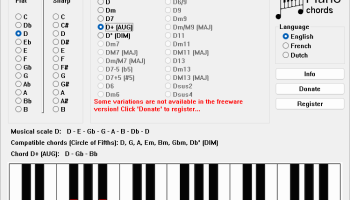
Chords Maker, developed by Carl Peeraer, is an innovative software designed to be an indispensable tool for musicians, songwriters, and music educators. This intuitive application stands out for its user-friendly interface and robust feature set, making it accessible to both beginners and seasoned professionals.
**User Interface and Experience**
Chords Maker boasts a clean, straightforward interface that prioritizes ease of use. The layout is intuitive, allowing users to navigate through its features effortlessly. The software's design ensures that even those with minimal technical skills can quickly get up to speed, making it an ideal choice for musicians who prefer to focus on creativity rather than getting bogged down by complex software.
**Core Features**
1. **Chord Generation and Customization**: At its heart, Chords Maker excels in generating and customizing chords. Users can easily create chords by selecting the root note and chord type. The software supports a wide range of chord types, from basic major and minor chords to more complex variations like diminished, augmented, and seventh chords.
2. **Chord Progressions**: One of the standout features is the ability to create and save chord progressions. This is particularly useful for songwriters looking to experiment with different harmonic structures. The software provides a seamless way to string together chords, offering suggestions and allowing for easy modifications.
3. **Instrument Compatibility**: Chords Maker is versatile in its support for various instruments. Whether you're a guitarist, pianist, or play another chordal instrument, the software provides visual representations and finger positioning guides tailored to your instrument of choice.
4. **Educational Tools**: For music educators and students, Chords Maker includes a suite of educational tools. These features help users understand chord theory, practice ear training, and improve their overall musical knowledge. Interactive tutorials and exercises make learning both engaging and effective.
5. **Export and Integration**: The software allows users to export their chord charts and progressions in various formats, including PDF and MIDI. This makes it easy to integrate Chords Maker into your existing workflow, whether you're composing in a digital audio workstation (DAW) or preparing sheet music for a performance.
**Performance and Reliability**
Chords Maker is lightweight and performs smoothly on a wide range of devices. It is designed to be stable and reliable, ensuring that users can depend on it during live performances or critical composition sessions. Regular updates from Carl Peeraer ensure that the software remains current with new features and improvements based on user feedback.
**Conclusion**
Chords Maker by Carl Peeraer is a powerful, versatile, and user-friendly tool that caters to the needs of musicians at all levels. Its comprehensive feature set, combined with an intuitive interface, makes it an excellent choice for anyone looking to enhance their musical creativity and understanding. Whether you're composing your next hit song, teaching a music theory class, or simply exploring new chord possibilities, Chords Maker is a valuable addition to your musical toolkit.
Chords Maker, developed by Carl Peeraer, is an innovative software designed to be an indispensable tool for musicians, songwriters, and music educators. This intuitive application stands out for its user-friendly interface and robust feature set, making it accessible to both beginners and seasoned professionals.
**User Interface and Experience**
Chords Maker boasts a clean, straightforward interface that prioritizes ease of use. The layout is intuitive, allowing users to navigate through its features effortlessly. The software's design ensures that even those with minimal technical skills can quickly get up to speed, making it an ideal choice for musicians who prefer to focus on creativity rather than getting bogged down by complex software.
**Core Features**
1. **Chord Generation and Customization**: At its heart, Chords Maker excels in generating and customizing chords. Users can easily create chords by selecting the root note and chord type. The software supports a wide range of chord types, from basic major and minor chords to more complex variations like diminished, augmented, and seventh chords.
2. **Chord Progressions**: One of the standout features is the ability to create and save chord progressions. This is particularly useful for songwriters looking to experiment with different harmonic structures. The software provides a seamless way to string together chords, offering suggestions and allowing for easy modifications.
3. **Instrument Compatibility**: Chords Maker is versatile in its support for various instruments. Whether you're a guitarist, pianist, or play another chordal instrument, the software provides visual representations and finger positioning guides tailored to your instrument of choice.
4. **Educational Tools**: For music educators and students, Chords Maker includes a suite of educational tools. These features help users understand chord theory, practice ear training, and improve their overall musical knowledge. Interactive tutorials and exercises make learning both engaging and effective.
5. **Export and Integration**: The software allows users to export their chord charts and progressions in various formats, including PDF and MIDI. This makes it easy to integrate Chords Maker into your existing workflow, whether you're composing in a digital audio workstation (DAW) or preparing sheet music for a performance.
**Performance and Reliability**
Chords Maker is lightweight and performs smoothly on a wide range of devices. It is designed to be stable and reliable, ensuring that users can depend on it during live performances or critical composition sessions. Regular updates from Carl Peeraer ensure that the software remains current with new features and improvements based on user feedback.
**Conclusion**
Chords Maker by Carl Peeraer is a powerful, versatile, and user-friendly tool that caters to the needs of musicians at all levels. Its comprehensive feature set, combined with an intuitive interface, makes it an excellent choice for anyone looking to enhance their musical creativity and understanding. Whether you're composing your next hit song, teaching a music theory class, or simply exploring new chord possibilities, Chords Maker is a valuable addition to your musical toolkit.
OS: Windows 11, Windows 10 32/64 bit, Windows 8 32/64 bit, Windows 7 32/64 bit, Windows Vista, Windows XP 32/64 bit
Add Your Review or 64-bit Compatibility Report
Top Other 64-bit downloads


Flexify 2.1.64

Flexify: A versatile tool for seamless data manipulation and integration.
Open Source


Rocrail 2026-03-15 Revision
Rocrail: Open-source model railroad control software for automation and control.
Open Source

stretchly 1.20.0
Boost productivity with Stretchly, a break reminder app for healthier work.
Open Source


WinStars 3.0.304 (2025
Explore the cosmos with WinStars, your interactive astronomy software.
Freeware

Offline Map Maker 8.381
Create detailed offline maps from online sources with ease and precision.
Demo | $79.00

Members area
Top 64-bit Downloads
-
Fitbit Connect 2.0.2.7066
x64 freeware download -
MyTourbook 64-bit 19.6.1
x64 open source download -
JAWS 64-bit 14.0.5005
x64 trialware download -
Money Manager Ex
Portable x64 1.8.0
x64 freeware download -
Moneydance x64 2017.8 (1691)
x64 trialware download -
Deeproot Plant Base X64 2.2.0
x64 shareware download -
Money Manager Ex x64 1.8.0
x64 freeware download -
Parabator 2 1.0
x64 freeware download -
Parabator 2 -
"perk" booster
mod 1.0
x64 freeware download -
Parabator 2
"perkk"
booster mod 1.0
x64 freeware download
Top Downloads
-
Netron 8.9.7
open source download -
Flexify 2.1.64
open source download -
Easy-PC 25.0.3.85
demo download -
Rocrail 2026-03-15 Revision
open source download -
stretchly 1.20.0
open source download -
fsmapper 1.6.5
open source download -
Anki 25.07.2
open source download -
WinStars 3.0.304 (2025
freeware download -
dwgConvert 2024 A.11
demo download -
IRIS 5.59
freeware download -
Offline Map Maker 8.381
demo download -
OpenComic 1.6.5
open source download -
CyberSky 5.1.1
shareware download -
Desktop Projector 3.4.7
freeware download -
WriteMapper 4.5.0
demo download