
Clonezilla - X 64-bit Download
Popular x64 Tags
- windows x64 download
- backup x64 download
- files x64 download
- data x64 download
- file backup x64 download
- file recovery x64 download
- file x64 download
- zip x64 download
- transfer x64 download
- restore x64 download
- outlook x64 download
- mail x64 download
- ftp x64 download
- office x64 download
- address x64 download
- data recovery x64 download
- backup software x64 download
- disk x64 download
- data backup x64 download
- contacts x64 download
- synchronize x64 download
- bookmarks x64 download
- storage x64 download
- save x64 download
- offsite backup x64 download
- express x64 download
- book x64 download
- outlook backup x64 download
- online backup x64 download
- remote backup x64 download
Clonezilla 3.1.3-16
Sponsored links:
license: Open Source
downloads: 1146
size: 377.00 MB
updated: 2024-07-17
tags: open-source, system recovery, clone disk, disk imaging, restore, download Clonezilla, backup software, backup partition, Clonezilla Live, clone, Clonezilla free download, recovery, disk cloning, Clonezilla, backup
Add to Basket

Clonezilla Team

Clonezilla, developed by the Clonezilla Team, is a robust, open-source disk imaging and cloning software that has garnered a reputation for its efficiency and reliability. Designed to cater to both individual and enterprise-level needs, Clonezilla stands out with its powerful features and user-centric approach.
At its core, Clonezilla offers two primary versions: Clonezilla Live and Clonezilla SE (Server Edition). Clonezilla Live is ideal for single machine backup and restore operations, while Clonezilla SE is tailored for large-scale deployments, capable of cloning over 40 computers simultaneously. This versatility makes Clonezilla a go-to solution for IT professionals, system administrators, and tech enthusiasts alike.
One of Clonezilla's standout features is its support for a wide range of file systems, including ext2, ext3, ext4, reiserfs, xfs, jfs for Linux, FAT, NTFS for Windows, and HFS+ for macOS. This extensive compatibility ensures that users can clone and restore systems across different operating environments without hassle. Additionally, Clonezilla supports both MBR and GPT partition formats, further enhancing its flexibility.
Clonezilla excels in its efficient use of resources. By employing a block-level cloning approach, it only copies the used portions of the disk, significantly reducing the time and storage space required for backup operations. This method also ensures that the integrity and consistency of the data are maintained, providing users with reliable and accurate clones.
Security is a paramount concern for Clonezilla. The software includes robust encryption options to protect sensitive data during the cloning process. Users can choose to encrypt their images with AES-256, ensuring that backups remain secure from unauthorized access. Furthermore, Clonezilla supports multicast, making it an excellent choice for network-based cloning tasks, where efficiency and security are critical.
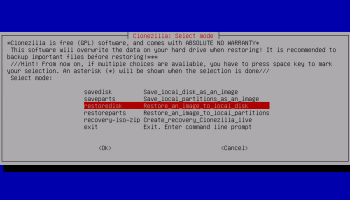
The user interface of Clonezilla, while not the most visually appealing, is straightforward and functional. It provides clear instructions and prompts, guiding users through the cloning process with ease. For those who prefer automation, Clonezilla offers comprehensive command-line options, allowing advanced users to script and schedule cloning tasks effortlessly.
Another significant advantage of Clonezilla is its active and supportive community. The Clonezilla Team, along with its user base, continuously contributes to the software's development and improvement. Regular updates and a wealth of online resources, including detailed documentation and forums, ensure that users have access to the latest features and support.
In summary, Clonezilla is a powerful, reliable, and versatile disk imaging and cloning solution. Its extensive file system support, efficient resource usage, robust security features, and active community make it an indispensable tool for anyone looking to perform backup and restore operations. Whether you're managing a single machine or an entire network of computers, Clonezilla provides the tools and confidence needed to safeguard your data effectively.
At its core, Clonezilla offers two primary versions: Clonezilla Live and Clonezilla SE (Server Edition). Clonezilla Live is ideal for single machine backup and restore operations, while Clonezilla SE is tailored for large-scale deployments, capable of cloning over 40 computers simultaneously. This versatility makes Clonezilla a go-to solution for IT professionals, system administrators, and tech enthusiasts alike.
One of Clonezilla's standout features is its support for a wide range of file systems, including ext2, ext3, ext4, reiserfs, xfs, jfs for Linux, FAT, NTFS for Windows, and HFS+ for macOS. This extensive compatibility ensures that users can clone and restore systems across different operating environments without hassle. Additionally, Clonezilla supports both MBR and GPT partition formats, further enhancing its flexibility.
Clonezilla excels in its efficient use of resources. By employing a block-level cloning approach, it only copies the used portions of the disk, significantly reducing the time and storage space required for backup operations. This method also ensures that the integrity and consistency of the data are maintained, providing users with reliable and accurate clones.
Security is a paramount concern for Clonezilla. The software includes robust encryption options to protect sensitive data during the cloning process. Users can choose to encrypt their images with AES-256, ensuring that backups remain secure from unauthorized access. Furthermore, Clonezilla supports multicast, making it an excellent choice for network-based cloning tasks, where efficiency and security are critical.
The user interface of Clonezilla, while not the most visually appealing, is straightforward and functional. It provides clear instructions and prompts, guiding users through the cloning process with ease. For those who prefer automation, Clonezilla offers comprehensive command-line options, allowing advanced users to script and schedule cloning tasks effortlessly.
Another significant advantage of Clonezilla is its active and supportive community. The Clonezilla Team, along with its user base, continuously contributes to the software's development and improvement. Regular updates and a wealth of online resources, including detailed documentation and forums, ensure that users have access to the latest features and support.
In summary, Clonezilla is a powerful, reliable, and versatile disk imaging and cloning solution. Its extensive file system support, efficient resource usage, robust security features, and active community make it an indispensable tool for anyone looking to perform backup and restore operations. Whether you're managing a single machine or an entire network of computers, Clonezilla provides the tools and confidence needed to safeguard your data effectively.
OS: Windows 10 32/64 bit, Windows 8 32/64 bit, Windows 7 32/64 bit
Add Your Review or 64-bit Compatibility Report
Top Backup & Restore 64-bit downloads


AnyMP4 Data Recovery 1.5.12
Recover or rescue data from computer, flash media drive and other devices
Shareware | $24.50

Software to Data Recovery 5.8.4.1
Download Software to Data Recovery for instant salvage of lost memorable snaps
Shareware | $79.00

PCtransfer 1.0.0.1033
the best free, secure and portable transfer assistant for Windows XP/Vista/7/8
Freeware

EaseUS Key Finder 4.1.6 Build 20240910
Effortlessly recover lost product keys for software and operating systems.
Demo


GRBackPro Server Backup x64 11.2.0
Server Backup Software, fast data back-up for Windows Server 2022/2019/2016/2012/2008 x64
Shareware | $199.00

Free Android Mobile Manager for Windows 1.0.4
The free software to sync android mobile's data while android connected with PC.
Freeware


GoodSync 12.9.26
Backup and synchronization software for all your important files and folders
Freeware

QuickMirror 1.71
QuickMirror provides quick updating of backups, synchronization, and mirroring.
Shareware | $25.00

Backup4all Monitor 1.2.292
Realtime and historical monitoring for Backup4all backups and other actions.
Shareware | $4.99
Members area
Top 64-bit Downloads
-
HWiNFO64 6.28 B4200
x64 freeware download -
GRBackPro Server Backup
x64 11.2.0
x64 shareware download -
Windows 7 x64
x64 trialware download -
EasyTune6 B24.0119.1
x64 freeware download -
XtraTools Professional
x64 26.2.1
x64 shareware download -
SoftPerfect RAM Disk 26.2
x64 shareware download -
7z SFX Builder x64 2.1
x64 freeware download -
BusDog x64 0.2
x64 freeware download -
PhotoRenamer 4.1
x64 freeware download -
DBX Converter 2.0
x64 shareware download
Top Downloads
-
FreeCommander XE
Portable 2026 Build 941
freeware download -
Open Files from XLSX to
XLS 5.2
shareware download -
FMDiff 4.0.5
demo download -
Vim 9.2.0198
open source download -
Shell Tools 2.0.1
freeware download -
WinFindr 1.8
shareware download -
Caffeine 1.98
freeware download -
AnyMP4 Data Recovery 1.5.12
shareware download -
Software to Data
Recovery 5.8.4.1
shareware download -
Clipstory 1.0
shareware download -
Tags4Docs 1.1
shareware download -
Nomad.NET 3.2.0.2890
freeware download -
FileMyster 1.2.5
freeware download -
Music Collection 3.9.7.1
freeware download -
File Compression 1.0
commercial download