
CurveExpert Professional - X 64-bit Download
Popular x64 Tags
- autocad x64 download
- solidworks x64 download
- intellicad x64 download
- dxf x64 download
- dwg x64 download
- architectural x64 download
- visualization x64 download
- cad x64 download
- home x64 download
- design x64 download
- hpgl x64 download
- progecad x64 download
- animation x64 download
- fence x64 download
- cam x64 download
- dwg to pdf x64 download
- architect x64 download
- vrml x64 download
- viz x64 download
- convert x64 download
- gear x64 download
- landscape x64 download
- deck x64 download
- strength check x64 download
- batch x64 download
- garden x64 download
- yard x64 download
- gardening x64 download
- landscaping x64 download
- backyard x64 download
CurveExpert Professional 2.7.3
Sponsored links:

Daniel G. Hyams

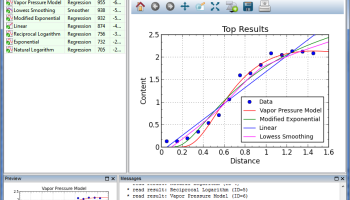
CurveExpert Professional is a cross-platform solution for curve fitting and data analysis. Data can be modelled using a toolbox of linear regression models, nonlinear regression models, smoothing methods, or various kinds of splines.
Over 60 models are built-in, but custom regression models may also be defined by the user. Full-featured publication-quality graphing capability allows thorough examination of the curve fit. The process of finding the best fit can be automated by letting CurveExpert compare your data to each model to choose the best curve. The software is designed with the purpose of generating high quality results and output while saving your time in the process.
The major features of the software are enumerated below:
Multiplatform: runs on Windows, Mac, and Linux. Saved files are portable between platforms.
Easy-to-use User Interface: most mathematically-intensive applications are very difficult to use. CurveExpert Professional has a very intuitive interface, which allows you to import your data, generate results, and create publication-quality plots with very minimal effort. In fact, to import a file takes only four clicks, and generating a battery of results with associated graphs takes two more.
Robust file import: data files come in many shapes and sizes, and CurveExpert Professional makes importing your data files very easy. The smart file reader avoids non-data areas of your file dynamically, and attempts to find labels for each column of data in your file.
Publication quality graphs: an arbitrary number of graphs can be created and saved. The rendering of the plots is of publication quality, with full antialiasing support and the ability to extensively customize each graph. Graphs can be saved to a variety of graphics file formats, and they may be directly copied and pasted into another application. For the purposes of 3D plotting, scatterplots, surfaces, and contour plots are supported. Graph themes allow you to customize a look that you prefer, and reuse it. Graphs are interactive, with zooming, panning, autoscaling, and view stack capability.
Multivariate: linear and nonlinear regressions can be computed for datasets with multiple independent variables, without any limits.
Multicore: put your extra CPU cores to work and compute results more quickly. A typical speedup is 3.5X on a 4 core system.
Built-in models: over 60 built-in nonlinear models, with high-quality automatic initial guesses, are available for use. The provided models cover all of the major families.
Detailed Result Query: parameter values and uncertainties, covariance matrix, parameter histories, residual plots. Forward and backward evaluation of the model’s value, differentiation, integration, and table generation.
Custom models: you can also define models yourself, using a very large library of built-in mathematical functions, and parameters in your models can take any name that you like. For more advanced users, a model can be as complex as necessary, as long as it can be expressed as a Python function. This allows the creation of extremely complicated models, instead of the normal one-line-equation models limitation in other software. Further, the number of parameters is unlimited.
Functions: much like models, a suite of built-in functions (over 40) can be evaluated, and you can define your own custom functions as well.
Ranking of results: results are automatically ranked by your choice of score, correlation coefficient, standard error, or coefficient of determination.
Validated: validated against the Statistical Reference Datasets Project of the National Institute of Standards and Technology. These datasets can be downloaded directly at homepage but are also included verbatim in the CurveExpert distribution for you to use yourself.
Quality spreadsheet: the built-in spreadsheet allows you to manually enter data and/or modify it with a suite of data transformation tools.
Over 60 models are built-in, but custom regression models may also be defined by the user. Full-featured publication-quality graphing capability allows thorough examination of the curve fit. The process of finding the best fit can be automated by letting CurveExpert compare your data to each model to choose the best curve. The software is designed with the purpose of generating high quality results and output while saving your time in the process.
The major features of the software are enumerated below:
Multiplatform: runs on Windows, Mac, and Linux. Saved files are portable between platforms.
Easy-to-use User Interface: most mathematically-intensive applications are very difficult to use. CurveExpert Professional has a very intuitive interface, which allows you to import your data, generate results, and create publication-quality plots with very minimal effort. In fact, to import a file takes only four clicks, and generating a battery of results with associated graphs takes two more.
Robust file import: data files come in many shapes and sizes, and CurveExpert Professional makes importing your data files very easy. The smart file reader avoids non-data areas of your file dynamically, and attempts to find labels for each column of data in your file.
Publication quality graphs: an arbitrary number of graphs can be created and saved. The rendering of the plots is of publication quality, with full antialiasing support and the ability to extensively customize each graph. Graphs can be saved to a variety of graphics file formats, and they may be directly copied and pasted into another application. For the purposes of 3D plotting, scatterplots, surfaces, and contour plots are supported. Graph themes allow you to customize a look that you prefer, and reuse it. Graphs are interactive, with zooming, panning, autoscaling, and view stack capability.
Multivariate: linear and nonlinear regressions can be computed for datasets with multiple independent variables, without any limits.
Multicore: put your extra CPU cores to work and compute results more quickly. A typical speedup is 3.5X on a 4 core system.
Built-in models: over 60 built-in nonlinear models, with high-quality automatic initial guesses, are available for use. The provided models cover all of the major families.
Detailed Result Query: parameter values and uncertainties, covariance matrix, parameter histories, residual plots. Forward and backward evaluation of the model’s value, differentiation, integration, and table generation.
Custom models: you can also define models yourself, using a very large library of built-in mathematical functions, and parameters in your models can take any name that you like. For more advanced users, a model can be as complex as necessary, as long as it can be expressed as a Python function. This allows the creation of extremely complicated models, instead of the normal one-line-equation models limitation in other software. Further, the number of parameters is unlimited.
Functions: much like models, a suite of built-in functions (over 40) can be evaluated, and you can define your own custom functions as well.
Ranking of results: results are automatically ranked by your choice of score, correlation coefficient, standard error, or coefficient of determination.
Validated: validated against the Statistical Reference Datasets Project of the National Institute of Standards and Technology. These datasets can be downloaded directly at homepage but are also included verbatim in the CurveExpert distribution for you to use yourself.
Quality spreadsheet: the built-in spreadsheet allows you to manually enter data and/or modify it with a suite of data transformation tools.
OS: Windows XP, Windows Vista x64, Windows 7 x64, Windows 8 x64, Windows 10 x64
Add Your Review or 64-bit Compatibility Report
Top CAD 64-bit downloads


Glise 1.7.1
A fast, clean, easy and extensible Catmull-Clark subdivision surfaces 3d modeler
Shareware | $119.00


ZWCAD 2020
ZWSOFT, an innovative supplier of CAD solutions to AEC and MCAD industries
Shareware | $799.00

Tracfoil 4.12.07
Edit and print your ribs and airfoils templates from data
Trialware
tags: Cad, model, aircraft, plane, airfoil plotting, rib plotting, airfoil to DXF, airfoil, plot, rib


XCircuit 3.8
Schematic drawing tool targeted at producing nice publishable schematic captures
Freeware

Automesher 64-bit 2.4.8
Import/Export 3D file formats, polyface mesh to solid and solid to mesh conversi
Trialware | $29.50
tags: AutoCad x64, graphic x64, format x64, 3D x64, convert x64, AutoCad, graphic, format, convert, Mesh exporter, Convert mesh, AutoCAD add-in, Export, Mesh, AutoCAD, Import

CrystalMaker 11.1.0
A full-featured scientific program, supporting the major database file formats
Demo | $499.00
Members area
Top 64-bit Downloads
-
cPicture (x64 bit) 4.1
x64 freeware download -
PhotoFiltre 11.6.1
x64 freeware download -
VanceAI 1.0.0.7
x64 shareware download -
Adobe Photoshop Elements 2024.3
x64 trialware download -
PDF Writer for Windows
2022 1.02
x64 shareware download -
HyperCam (x64 bit) 2.29.00
x64 freeware download -
Gimp for x64 Windows 2.10.38
x64 open source download -
ICO file format x64 2.1f1
x64 open source download -
Portable PhotoFiltre 11.6.1
x64 freeware download -
Blue Cat's Protector x64 2.31
x64 demo download
Top Downloads
-
CorelDRAW X5 2025 26.2.0.29
trialware download -
Fotosizer 3.21.0.594
freeware download -
CorelDRAW X6 16.4.0.1280
trialware download -
Scanahand 8.0.0.320
demo download -
MSU Subtitle Remover
VirtualDub plugin 3.0beta2
freeware download -
TinyPDF 3.00
freeware download -
cPicture (x64 bit) 4.1
freeware download -
PhotoFiltre 11.6.1
freeware download -
WinScan2PDF 9.55
freeware download -
PDF24 Creator 11.17.0
freeware download -
VanceAI 1.0.0.7
shareware download -
ReaConverter Standard 8.200
demo download -
FreeFotoWorks 2026 26.0.9
freeware download -
Anim8or 1.00
freeware download -
Screenpresso 2.2.4
shareware download