
Sweet Home 3D - X 64-bit Download
Popular x64 Tags
- autocad x64 download
- solidworks x64 download
- intellicad x64 download
- dxf x64 download
- dwg x64 download
- architectural x64 download
- visualization x64 download
- cad x64 download
- home x64 download
- design x64 download
- hpgl x64 download
- progecad x64 download
- animation x64 download
- fence x64 download
- cam x64 download
- dwg to pdf x64 download
- architect x64 download
- vrml x64 download
- viz x64 download
- convert x64 download
- gear x64 download
- landscape x64 download
- deck x64 download
- strength check x64 download
- batch x64 download
- garden x64 download
- yard x64 download
- gardening x64 download
- landscaping x64 download
- backyard x64 download
Sweet Home 3D 7.4
Sponsored links:
license: Open Source
downloads: 3404
size: 77.40 MB
updated: 2024-05-30
tags: interior design, interior design software, placing your furniture, free interior design software, 2D plan, 3D plan, 3D preview, free interior design, SweetHome 3D
Add to Basket

Sweethome3d

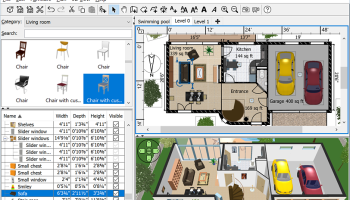
Sweet Home 3D is a free interior design application that helps you draw the plan of your house, arrange furniture on it and visit the results in 3D
Sweet Home 3D helps you to design your interior quickly and easily: draw the walls of your home upon the image of an existing plan, change the color or the texture of each room, and drag and drop furniture onto the plan from a catalog organized by categories (windows, doors, living room, kitchen), in which you can import 3D models created by yourself or downloaded from various Web sites.
All the changes made in the 2D plan are simultaneously reflected in a 3D view, and you can navigate in it either from an aerial view point, or from a virtual visitor view point. Finally, you can improve your home plan by adding dimensions and texts to it, print it along with the 3D view, create a photorealistic image of the 3D view, and export the plan to SVG format or the 3D view to OBJ format to import them in other 2D or 3D software.
Sweet Home 3D features
Draw straight, round or sloping walls with precise dimensions using the mouse or the keyboard.
Insert doors and windows in walls by dragging them in the plan, and let Sweet Home 3D compute their holes in walls.
Add furniture to the plan from a searchable and extensible catalog organized by categories such as kitchen, living room, bedroom, bathroom...
Change color, texture, size, thickness, location and orientation of furniture, walls, floors and ceilings.
While designing the home in 2D, simultaneously view it in 3D from an aerial point of view, or navigate into it from a virtual visitor point of view.
Annotate the plan with room areas, dimension lines, texts and show the North direction with a compass rose.
Create photorealistic images and videos with the ability to customize lights and control sunlight effect according to the time of day and geographic location.
Import home blueprint to draw walls upon it, 3D models to complete default catalog, and textures to customize surfaces.
Print and export PDFs, bitmap or vector graphics images, videos and 3D files in standard file formats.
Extend the features of Sweet Home 3D with plug-ins programmed in Java, or by developing a derived version based on its Model View Controller architecture.
Choose the language displayed in the user interface of Sweet Home 3D and its rich help from 23 languages.
Sweet Home 3D helps you to design your interior quickly and easily: draw the walls of your home upon the image of an existing plan, change the color or the texture of each room, and drag and drop furniture onto the plan from a catalog organized by categories (windows, doors, living room, kitchen), in which you can import 3D models created by yourself or downloaded from various Web sites.
All the changes made in the 2D plan are simultaneously reflected in a 3D view, and you can navigate in it either from an aerial view point, or from a virtual visitor view point. Finally, you can improve your home plan by adding dimensions and texts to it, print it along with the 3D view, create a photorealistic image of the 3D view, and export the plan to SVG format or the 3D view to OBJ format to import them in other 2D or 3D software.
Sweet Home 3D features
Draw straight, round or sloping walls with precise dimensions using the mouse or the keyboard.
Insert doors and windows in walls by dragging them in the plan, and let Sweet Home 3D compute their holes in walls.
Add furniture to the plan from a searchable and extensible catalog organized by categories such as kitchen, living room, bedroom, bathroom...
Change color, texture, size, thickness, location and orientation of furniture, walls, floors and ceilings.
While designing the home in 2D, simultaneously view it in 3D from an aerial point of view, or navigate into it from a virtual visitor point of view.
Annotate the plan with room areas, dimension lines, texts and show the North direction with a compass rose.
Create photorealistic images and videos with the ability to customize lights and control sunlight effect according to the time of day and geographic location.
Import home blueprint to draw walls upon it, 3D models to complete default catalog, and textures to customize surfaces.
Print and export PDFs, bitmap or vector graphics images, videos and 3D files in standard file formats.
Extend the features of Sweet Home 3D with plug-ins programmed in Java, or by developing a derived version based on its Model View Controller architecture.
Choose the language displayed in the user interface of Sweet Home 3D and its rich help from 23 languages.
OS: Windows XP, Windows Vista, Windows Vista x64, Windows 7, Windows 7 x64, Windows 8, Windows 8 x64, Windows 10, Windows 10 x64, Windows 11
Sweet Home 3D Reviews
| Software: | Sweet Home 3D 7.1 |
| Reviewed by: | mbah kendung (Mar 29, 2023) |
| Rating: |  |
| Review: | usefull software |
Add Your Review or 64-bit Compatibility Report
Top CAD 64-bit downloads


Glise 1.7.1
A fast, clean, easy and extensible Catmull-Clark subdivision surfaces 3d modeler
Shareware | $119.00

DICOMscope 3.5.1
A free DICOM viewer which can display uncompressed, monochrome DICOM images
Freeware

ZWCAD 2020
ZWSOFT, an innovative supplier of CAD solutions to AEC and MCAD industries
Shareware | $799.00

Tracfoil 4.12.07
Edit and print your ribs and airfoils templates from data
Trialware
tags: Cad, model, aircraft, plane, airfoil plotting, rib plotting, airfoil to DXF, airfoil, plot, rib


XCircuit 3.8
Schematic drawing tool targeted at producing nice publishable schematic captures
Freeware
Members area
Top 64-bit Downloads
-
cPicture (x64 bit) 4.1
x64 freeware download -
HyperCam (x64 bit) 2.29.00
x64 freeware download -
PhotoFiltre 11.6.1
x64 freeware download -
VanceAI 1.0.0.7
x64 shareware download -
Adobe Photoshop Elements 2024.3
x64 trialware download -
PDF Writer for Windows
2022 1.02
x64 shareware download -
Gimp for x64 Windows 2.10.38
x64 open source download -
ICO file format x64 2.1f1
x64 open source download -
Portable PhotoFiltre 11.6.1
x64 freeware download -
Blue Cat's Protector x64 2.31
x64 demo download
Top Downloads
-
CorelDRAW X5 2025 26.2.0.29
trialware download -
Fotosizer 3.21.0.594
freeware download -
CorelDRAW X6 16.4.0.1280
trialware download -
Scanahand 8.0.0.320
demo download -
MSU Subtitle Remover
VirtualDub plugin 3.0beta2
freeware download -
TinyPDF 3.00
freeware download -
PDF24 Creator 11.17.0
freeware download -
cPicture (x64 bit) 4.1
freeware download -
VueScan 9.8.52
demo download -
Scripthea 3.0.0
open source download -
PhotoFiltre 11.6.1
freeware download -
WinScan2PDF 9.55
freeware download -
VanceAI 1.0.0.7
shareware download -
ReaConverter Standard 8.200
demo download -
FreeFotoWorks 2026 26.0.9
freeware download