
Cyotek Slicr - X 64-bit Download
Popular x64 Tags
- photo editor x64 download
- software x64 download
- image editor x64 download
- image editing x64 download
- photos x64 download
- photoshop x64 download
- color x64 download
- design x64 download
- jpeg x64 download
- editor x64 download
- plugin x64 download
- image enhancement x64 download
- exif x64 download
- watermark x64 download
- rotate x64 download
- batch x64 download
- pictures x64 download
- graphics x64 download
- image x64 download
- digital camera x64 download
- photo x64 download
- graphic x64 download
- images x64 download
- resize x64 download
- paint x64 download
- camera x64 download
- digital x64 download
- digital imaging x64 download
- picture x64 download
- jpg x64 download
Cyotek Slicr 0.3.0.257 Beta
Sponsored links:

Cyotek

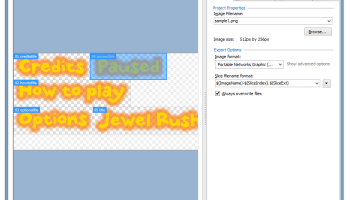
Cyotek Slicr is a free application that takes a source image and slices up into smaller ones. Using Slicr, you can take a given image and extract portions of that image to separate files with varying formats, file names and meta data.
Use the quick slice wizard to slice an image based on equal regions, or use the slice editor to cut up an image into as many shapes and sizes as you require. Slicr also includes a handy command line tool for use in batch scripts, build tools and other external processes, as well as a full API for programmatic access.
Features:
Drawing Tools
Split up your source images either by drawing individual segments, or full rectangles. Segments can then be moved, resized and nudged.
Automatic image slicing
As well as allowing you to draw your own slices, Slicr can split up an image based on sizing and spacing criteria that you specify. The Quick Slice wizard can be used to quickly setup a project, or the Add Slices wizard can do this to an existing project.
Custom fields and templates
Templates allow you to generate additional files when slicing your images, such as an XML document describing the images. Combined with custom fields that can be associated with slices, you have powerful content generation to suit your needs.
Command line client
The command line client is a console application that can be used to slice an existing project, or slice an image using the same options as the Quick Slice wizard. It can also save new projects generating from an existing image, and has various options for setting output formats, slice modes, and more.
Image export
Once you have defined the portions of the image to slice, and specified export options Slicr will generate the new images for you. You can specify the format of output options from a range of formats including PNG, JPG and TIFF, and can also control the file names of the export images.
Individual export options
In addition to setting export options for the project as a whole, you can also customise individual slices if required, allowing you to use different file name patterns of different image formats.
Use the quick slice wizard to slice an image based on equal regions, or use the slice editor to cut up an image into as many shapes and sizes as you require. Slicr also includes a handy command line tool for use in batch scripts, build tools and other external processes, as well as a full API for programmatic access.
Features:
Drawing Tools
Split up your source images either by drawing individual segments, or full rectangles. Segments can then be moved, resized and nudged.
Automatic image slicing
As well as allowing you to draw your own slices, Slicr can split up an image based on sizing and spacing criteria that you specify. The Quick Slice wizard can be used to quickly setup a project, or the Add Slices wizard can do this to an existing project.
Custom fields and templates
Templates allow you to generate additional files when slicing your images, such as an XML document describing the images. Combined with custom fields that can be associated with slices, you have powerful content generation to suit your needs.
Command line client
The command line client is a console application that can be used to slice an existing project, or slice an image using the same options as the Quick Slice wizard. It can also save new projects generating from an existing image, and has various options for setting output formats, slice modes, and more.
Image export
Once you have defined the portions of the image to slice, and specified export options Slicr will generate the new images for you. You can specify the format of output options from a range of formats including PNG, JPG and TIFF, and can also control the file names of the export images.
Individual export options
In addition to setting export options for the project as a whole, you can also customise individual slices if required, allowing you to use different file name patterns of different image formats.
OS: Windows Vista, Windows Vista x64, Windows 7, Windows 7 x64, Windows 8, Windows 8 x64, Windows 10, Windows 10 x64
Requirements: Microsoft .NET Framework 4.6
Add Your Review or 64-bit Compatibility Report
Top Editors 64-bit downloads


CorelDRAW X5 2025 26.2.0.29
Versatile graphic design suite for vector illustration and layout creation.
Trialware | $30.75


AKVIS Retoucher 6.0
AKVIS Retoucher is an efficient software for photo restoration and retouching.
Shareware | $87.00

Adobe Photoshop Elements 2024.3
Powerful yet easy-to-use photo editing software for print, e-mail, and the Web
Trialware | $99.99

FreeFotoWorks 2026 26.0.9

Photo editing software for beginners and pro. All well-known photo effects.
Freeware

Members area
Top 64-bit Downloads
-
cPicture (x64 bit) 4.1
x64 freeware download -
PhotoFiltre 11.6.1
x64 freeware download -
VanceAI 1.0.0.7
x64 shareware download -
Adobe Photoshop Elements 2024.3
x64 trialware download -
Fluid Mask for Mac 3.3.14
x64 trialware download -
CorelDRAW X7 (x64 bit) 17.4.0.887
x64 trialware download -
PDF Writer for Windows
2022 1.02
x64 shareware download -
HyperCam (x64 bit) 2.29.00
x64 freeware download -
Gimp for x64 Windows 2.10.38
x64 open source download -
ICO file format x64 2.1f1
x64 open source download
Top Downloads
-
CorelDRAW X5 2025 26.2.0.29
trialware download -
Fotosizer 3.21.0.594
freeware download -
CorelDRAW X6 16.4.0.1280
trialware download -
MSU Subtitle Remover
VirtualDub plugin 3.0beta2
freeware download -
TinyPDF 3.00
freeware download -
cPicture (x64 bit) 4.1
freeware download -
Glise 1.7.1
shareware download -
PhotoFiltre 11.6.1
freeware download -
WinScan2PDF 9.55
freeware download -
PDF24 Creator 11.17.0
freeware download -
VanceAI 1.0.0.7
shareware download -
Anim8or 1.00
freeware download -
CorelDRAW 2017 19.1.0.419
trialware download -
Zeus 1.5
freeware download -
Flash Catalog Free PDF
to HTML 1.8
shareware download