
CorelDRAW 2017 - X 64-bit Download
Popular x64 Tags
- photo editor x64 download
- software x64 download
- image editor x64 download
- image editing x64 download
- photos x64 download
- photoshop x64 download
- color x64 download
- design x64 download
- jpeg x64 download
- editor x64 download
- plugin x64 download
- image enhancement x64 download
- watermark x64 download
- exif x64 download
- rotate x64 download
- batch x64 download
- pictures x64 download
- graphics x64 download
- image x64 download
- digital camera x64 download
- photo x64 download
- graphic x64 download
- images x64 download
- resize x64 download
- paint x64 download
- camera x64 download
- digital x64 download
- digital imaging x64 download
- picture x64 download
- jpg x64 download
CorelDRAW 2017 19.1.0.419
Sponsored links:

Corel Corporation

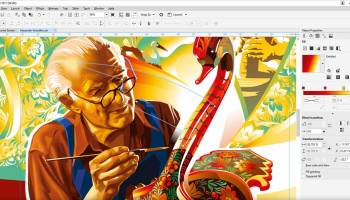
Our best just got better – CorelDRAW® Graphics Suite 2017 is our latest and most innovative graphic design program yet! Get all of our industry-acclaimed tools found in CorelDRAW Graphics Suite X8, plus so much more. Skip sketching and scanning from paper, and go right to our amazing new LiveSketch™ tool to capture your ideas the instant that creativity strikes. Our suite comes with cutting-edge features to help you create beautiful designs, graphics, photos, and websites with both ease and confidence. Whatever your design passion, talents or interests, CorelDRAW Graphics Suite 2017 delivers a collection of seven powerful applications to satisfy all types of creativity. You’ll be amazed by how many different types of original projects you can design! Whether you’re a first-time user or an experienced designer, CorelDRAW Graphics Suite 2017 makes it easy to get started. Learn the basics, see what’s new with a Startup tour, or transition to the suite with a special walkthrough designed just for Adobe users. Be productive immediately with a workspace that matches your workflow needs, and benefit from high-quality content and versatile in-product learning.
FEATURES:
LiveSketch tool
Sketch and design on the fly! LiveSketch is a revolutionary new tool based on the latest developments in Artificial Intelligence and Machine Learning. Free form sketching converts into precise vector curves on a touch-enabled device.
Custom node shapes
CorelDRAW 2017 simplifies shaping curves and objects by assigning each node type a unique shape, making it easy to identify smooth, cusp, and symmetrical nodes. You can also choose the node shapes that best suit your workflow.
Touch-friendly user interface
Tablet Mode support makes it easy to create quick adjustments using touch or a stylus. The new Touch workspace maximizes the size of your drawing window by displaying only the tools and commands used most often, plus you can pan and zoom with a single gesture.
Powerful stylus enhancements
Enjoy a more natural drawing experience and achieve more expressive results with the native support for Microsoft Surface, and advanced stylus support. A redesigned UI gives instant access to relevant controls and the ability to quickly choose which stylus properties to leverage. CorelDRAW Graphics Suite 2017 has been enhanced so you can take advantage of pressure, bearing, tilt, and rotation of your stylus to control a variety of tools and effects.
Import legacy workspaces
CorelDRAW Graphics Suite 2017 lets you seamlessly import CorelDRAW and Corel PHOTO-PAINT workspaces that were created in versions X6, X7, and X8. You have the flexibility of importing some workspace elements and excluding others. You also have the option of adding them to your current workspace or creating a totally new UI configuration. And choosing which workspace elements to import or export is faster than ever.
Microsoft Surface Dial support
CorelDRAW Graphics Suite 2017 offers native Microsoft Surface Dial support on Windows 10. Use the CorelDRAW and Corel PHOTO-PAINT applications in the suite, to experience one of the most unique ways to create and interact with technology.
Multi-monitor, 5K and Real-Time Stylus support
Take advantage of the new multi-monitor viewing and 5K displays support. Work quickly and efficiently with the added control from the Windows Real-Time Stylus pen-compatible tablets, such as the Microsoft Surface, in addition to the Wacom tablet and devices.
FEATURES:
LiveSketch tool
Sketch and design on the fly! LiveSketch is a revolutionary new tool based on the latest developments in Artificial Intelligence and Machine Learning. Free form sketching converts into precise vector curves on a touch-enabled device.
Custom node shapes
CorelDRAW 2017 simplifies shaping curves and objects by assigning each node type a unique shape, making it easy to identify smooth, cusp, and symmetrical nodes. You can also choose the node shapes that best suit your workflow.
Touch-friendly user interface
Tablet Mode support makes it easy to create quick adjustments using touch or a stylus. The new Touch workspace maximizes the size of your drawing window by displaying only the tools and commands used most often, plus you can pan and zoom with a single gesture.
Powerful stylus enhancements
Enjoy a more natural drawing experience and achieve more expressive results with the native support for Microsoft Surface, and advanced stylus support. A redesigned UI gives instant access to relevant controls and the ability to quickly choose which stylus properties to leverage. CorelDRAW Graphics Suite 2017 has been enhanced so you can take advantage of pressure, bearing, tilt, and rotation of your stylus to control a variety of tools and effects.
Import legacy workspaces
CorelDRAW Graphics Suite 2017 lets you seamlessly import CorelDRAW and Corel PHOTO-PAINT workspaces that were created in versions X6, X7, and X8. You have the flexibility of importing some workspace elements and excluding others. You also have the option of adding them to your current workspace or creating a totally new UI configuration. And choosing which workspace elements to import or export is faster than ever.
Microsoft Surface Dial support
CorelDRAW Graphics Suite 2017 offers native Microsoft Surface Dial support on Windows 10. Use the CorelDRAW and Corel PHOTO-PAINT applications in the suite, to experience one of the most unique ways to create and interact with technology.
Multi-monitor, 5K and Real-Time Stylus support
Take advantage of the new multi-monitor viewing and 5K displays support. Work quickly and efficiently with the added control from the Windows Real-Time Stylus pen-compatible tablets, such as the Microsoft Surface, in addition to the Wacom tablet and devices.
OS: Windows 7, Windows 7 x64, Windows 8, Windows 8 x64, Windows 10, Windows 10 x64
Add Your Review or 64-bit Compatibility Report
Top Editors 64-bit downloads


CorelDRAW X5 2026 v27.0.0.121
Versatile graphic design suite for vector illustration and layout creation.
Trialware | $269.00

FreeFotoWorks 2026 26.1.3

Photo editing software for beginners and pro. All well-known photo effects.
Freeware


jMonkeyEngine 3.9.0
jMonkeyEngine: Open-source 3D game development engine for Java developers.
Open Source

Members area
Top 64-bit Downloads
-
Fluid Mask for Mac 3.3.14
x64 trialware download -
ICO file format x64 2.1f1
x64 open source download -
Archicad 64bit 27 B3001
x64 demo download -
Portable MicroDicom x64 2024.2
x64 freeware download -
TopSpice 10.26a
x64 demo download -
Affinity Photo 2.5.3
x64 trialware download -
Adobe Photoshop Elements 2024.3
x64 trialware download -
ImageJ x64 1.54i
x64 freeware download -
Volocity 64bit 6.5.1
x64 demo download -
Potrace for Windows (x64
bit) 1.16
x64 open source download
Top Downloads
-
CorelDRAW X5 2026 v27.0.0.121
trialware download -
Tracfoil 4.12.07
trialware download -
oCam 428.0
freeware download -
Gyazo 5.9.1
demo download -
CodeLoader 4.19.0
freeware download -
SeiSee 2.22.6
freeware download -
MarvinSketch 23.16.0
freeware download -
MapInfo Professional 17.0.4
trialware download -
VueScan 9.8.52
demo download -
World Tools 2.0.6
shareware download -
Texmod 0.9b
freeware download -
iWisdom 0.0.0+2107~ga0785ce1
open source download -
sigTOOL 0.95
open source download -
LTpowerCAD 2.7.2
freeware download -
nanoCAD 5.1.2524.2017
freeware download