
Gyazo - X 64-bit Download
Popular x64 Tags
- snapshot x64 download
- video screen capture x64 download
- print screen x64 download
- software x64 download
- screen capture tool x64 download
- video capture x64 download
- free screen capture x64 download
- screen capture x64 download
- capture x64 download
- desktop x64 download
- picture x64 download
- print x64 download
- video x64 download
- screen recorder x64 download
- screen capture software x64 download
- wmv x64 download
- screen x64 download
- image x64 download
- screen capture program x64 download
- clipboard x64 download
- screenshot x64 download
- screencapture x64 download
- record x64 download
- screen shot x64 download
- avi x64 download
- screen recording x64 download
- printscreen x64 download
- flash x64 download
- window x64 download
- recorder x64 download
Gyazo 5.9.1
Sponsored links:
license: Demo ($4.99)
downloads: 108
size: 47.40 MB
updated: 2026-03-11
tags: Gyazo, download Gyazo, Gyazo free download, take screenshot, create GIF, share screenshot, capture, screenshot, snapshot, animation
Add to Basket

Toshiyuki Masui, Isshu Rakusai

Gyazo: Capturing Moments with Precision and Ease
Gyazo, developed by Toshiyuki Masui and Isshu Rakusai, is a versatile and user-friendly screenshot and screen recording tool that has garnered a loyal following for its simplicity and efficiency. Designed to streamline the process of capturing, sharing, and storing visual content, Gyazo stands out in a crowded market with its intuitive interface and robust functionality.
### Key Features
#### Effortless Capture
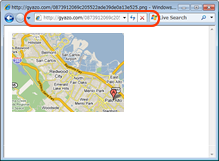
Gyazo excels in making the screenshot process as seamless as possible. With a single click or keyboard shortcut, users can capture any part of their screen. Whether it's a full-screen grab, a specific window, or a custom-selected area, Gyazo handles it all with aplomb. The captured images are instantly uploaded to the cloud, making them accessible from any device with an internet connection.
#### Instant Sharing
One of Gyazo's standout features is its immediate sharing capability. Once a screenshot is captured, it is automatically uploaded to Gyazo's servers, and a unique URL is generated. This URL can be shared instantly via email, social media, or any other communication platform, eliminating the need for cumbersome file attachments.
#### Screen Recording
In addition to static screenshots, Gyazo offers a screen recording feature that allows users to capture video clips of their screen activity. This is particularly useful for creating tutorials, recording gameplay, or documenting software bugs. The recorded videos are also uploaded to the cloud, ensuring they are easy to share and access.
#### Organizational Tools
Gyazo provides a suite of organizational tools that help users manage their captured content. Screenshots and videos are stored in a personal library, where they can be tagged, categorized, and searched with ease. This makes it simple to locate specific captures, even if they were taken months or years ago.
#### Cross-Platform Compatibility
Gyazo is available on multiple platforms, including Windows, macOS, and Linux, as well as iOS and Android. This cross-platform compatibility ensures that users can capture and share content regardless of the device they are using.
### User Experience
Gyazo's user interface is clean and straightforward, making it accessible to users of all skill levels. The installation process is quick, and the software runs smoothly without consuming significant system resources. The automatic upload feature is a major time-saver, and the ability to quickly generate shareable links is a boon for productivity.
### Use Cases
Gyazo is an invaluable tool for a wide range of users. Professionals can use it to capture and share important information quickly. Educators can create instructional content with ease. Gamers can record and share their gameplay moments. Even casual users will find it handy for everyday tasks like saving receipts or capturing snippets of online content.
### Conclusion
In a world where visual communication is increasingly important, Gyazo offers a powerful yet simple solution for capturing and sharing screen content. Its ease of use, combined with robust features and cross-platform support, makes it a top choice for anyone in need of a reliable screenshot and screen recording tool. Whether you're a professional, educator, gamer, or casual user, Gyazo is designed to meet your needs with precision and ease.
Gyazo, developed by Toshiyuki Masui and Isshu Rakusai, is a versatile and user-friendly screenshot and screen recording tool that has garnered a loyal following for its simplicity and efficiency. Designed to streamline the process of capturing, sharing, and storing visual content, Gyazo stands out in a crowded market with its intuitive interface and robust functionality.
### Key Features
#### Effortless Capture
Gyazo excels in making the screenshot process as seamless as possible. With a single click or keyboard shortcut, users can capture any part of their screen. Whether it's a full-screen grab, a specific window, or a custom-selected area, Gyazo handles it all with aplomb. The captured images are instantly uploaded to the cloud, making them accessible from any device with an internet connection.
#### Instant Sharing
One of Gyazo's standout features is its immediate sharing capability. Once a screenshot is captured, it is automatically uploaded to Gyazo's servers, and a unique URL is generated. This URL can be shared instantly via email, social media, or any other communication platform, eliminating the need for cumbersome file attachments.
#### Screen Recording
In addition to static screenshots, Gyazo offers a screen recording feature that allows users to capture video clips of their screen activity. This is particularly useful for creating tutorials, recording gameplay, or documenting software bugs. The recorded videos are also uploaded to the cloud, ensuring they are easy to share and access.
#### Organizational Tools
Gyazo provides a suite of organizational tools that help users manage their captured content. Screenshots and videos are stored in a personal library, where they can be tagged, categorized, and searched with ease. This makes it simple to locate specific captures, even if they were taken months or years ago.
#### Cross-Platform Compatibility
Gyazo is available on multiple platforms, including Windows, macOS, and Linux, as well as iOS and Android. This cross-platform compatibility ensures that users can capture and share content regardless of the device they are using.
### User Experience
Gyazo's user interface is clean and straightforward, making it accessible to users of all skill levels. The installation process is quick, and the software runs smoothly without consuming significant system resources. The automatic upload feature is a major time-saver, and the ability to quickly generate shareable links is a boon for productivity.
### Use Cases
Gyazo is an invaluable tool for a wide range of users. Professionals can use it to capture and share important information quickly. Educators can create instructional content with ease. Gamers can record and share their gameplay moments. Even casual users will find it handy for everyday tasks like saving receipts or capturing snippets of online content.
### Conclusion
In a world where visual communication is increasingly important, Gyazo offers a powerful yet simple solution for capturing and sharing screen content. Its ease of use, combined with robust features and cross-platform support, makes it a top choice for anyone in need of a reliable screenshot and screen recording tool. Whether you're a professional, educator, gamer, or casual user, Gyazo is designed to meet your needs with precision and ease.
OS: Windows 11, Windows 10 32/64 bit, Windows 8 32/64 bit, Windows 7 32/64 bit
Add Your Review or 64-bit Compatibility Report
Top Screen Capture 64-bit downloads


VueScan 9.8.53

VueScan: Powerful scanning software for enhanced image quality and versatility.
Demo | $29.96

Screenpresso 2.2.8
Screenpresso: Capture, edit, and share screenshots and videos effortlessly.
Shareware | $29.99

iTop Screenshot 1.2.3.544
iTop Screenshot is a free, lightweight, yet powerful screenshot tool.
Freeware
tags: Screenshot, screen capture


SD Snap Studio 1.0
First-class screen capture application with an advanced image editor
Shareware | $20.95

HyperSnap 9.7.3
Capture and edit screenshots effortlessly with powerful tools and features.
Demo | $49.95
Members area
Top 64-bit Downloads
-
Fluid Mask for Mac 3.3.14
x64 trialware download -
ICO file format x64 2.1f1
x64 open source download -
Archicad 64bit 27 B3001
x64 demo download -
TopSpice 10.26a
x64 demo download -
WellCAD x64 5.3 B625
x64 demo download -
Portable MicroDicom x64 2024.2
x64 freeware download -
Adobe Photoshop Elements 2024.3
x64 trialware download -
Potrace for Windows (x64
bit) 1.16
x64 open source download -
delaboratory x64 0.8
x64 open source download -
AcroPDF 6.2
x64 shareware download
Top Downloads
-
CorelDRAW X5 2026 v27.0.0.121
trialware download -
Tracfoil 4.12.07
trialware download -
oCam 428.0
freeware download -
Gyazo 5.9.1
demo download -
nanoCAD 5.1.2524.2017
freeware download -
MarvinSketch 23.16.0
freeware download -
MapInfo Professional 17.0.4
trialware download -
Scanahand 8.0.0.320
demo download -
iWisdom 0.0.0+2107~ga0785ce1
open source download -
CodeLoader 4.19.0
freeware download -
SeiSee 2.22.6
freeware download -
XnConvert 1.106.0
shareware download -
VueScan 9.8.53
demo download -
Topaz Simplify 4.1.1
trialware download -
World Tools 2.0.6
shareware download