
World Tools - X 64-bit Download
Popular x64 Tags
- image x64 download
- design x64 download
- size x64 download
- color x64 download
- graphics x64 download
- gif x64 download
- panorama x64 download
- photoshop x64 download
- software x64 download
- jpeg x64 download
- utility x64 download
- photo x64 download
- plugin x64 download
- cover x64 download
- tool x64 download
- rgb x64 download
- png x64 download
- jpg x64 download
- pictures x64 download
- images x64 download
- vanderlee x64 download
- bmp x64 download
- photos x64 download
- vdl x64 download
- picture x64 download
- scanner x64 download
- screen x64 download
- video x64 download
- scan x64 download
- dust x64 download
World Tools 2.0.6
Sponsored links:

In-Tools Solutions

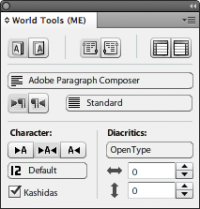
World Tools is an InDesign plug-in for CS4 and later created to allow designers using InDesign to work on right-to-left languages and writing scripts – especially Arabic and Hebrew.
The CS5 and CS5.5 and CS6 versions of World Tools improves upon the success of World Tools in CS4, and we offer a panel as well as much tighter integration into the standard InDesign dialogs.
If you need to compose Chinese, Japanese or Korean text as well as right-to-left text, World Tools Pro is probably more suited to your needs.
Some advantages of World Tools over the ME version of InDesign are:
Price – you don’t need to buy a whole new program just for right-to-left or CJK composition.
Timely updates – historically, the ME updates took much longer to be released than the regular ones. For example: at the time World Tools was released for CS5, the current CS4 ME version was 6.0.2, while the US version was updated to 6.0.5. There were quite a few bug fixes since version 6.0.2 that ME users were not able to benefit from. There is no reason to assume the situation will be any better for CS5.
Use of right-to-left functions in the CJK versions of InDesign – The ME versions and CJK versions of InDesign are mutually exclusive.
Localized interfaces – World Tools can be used with any version of InDesign – no matter what the language of the user interface might be. The ME version only has English (IE), French, Hebrew, and Arabic interfaces.
Additional Functionality – World Tools also includes the following functionality not present in InDesign: Spread Numbering, a function to straighten existing quotes, and the ability to intelligently apply character styles to texts of different languages.
The CS5 and CS5.5 and CS6 versions of World Tools improves upon the success of World Tools in CS4, and we offer a panel as well as much tighter integration into the standard InDesign dialogs.
If you need to compose Chinese, Japanese or Korean text as well as right-to-left text, World Tools Pro is probably more suited to your needs.
Some advantages of World Tools over the ME version of InDesign are:
Price – you don’t need to buy a whole new program just for right-to-left or CJK composition.
Timely updates – historically, the ME updates took much longer to be released than the regular ones. For example: at the time World Tools was released for CS5, the current CS4 ME version was 6.0.2, while the US version was updated to 6.0.5. There were quite a few bug fixes since version 6.0.2 that ME users were not able to benefit from. There is no reason to assume the situation will be any better for CS5.
Use of right-to-left functions in the CJK versions of InDesign – The ME versions and CJK versions of InDesign are mutually exclusive.
Localized interfaces – World Tools can be used with any version of InDesign – no matter what the language of the user interface might be. The ME version only has English (IE), French, Hebrew, and Arabic interfaces.
Additional Functionality – World Tools also includes the following functionality not present in InDesign: Spread Numbering, a function to straighten existing quotes, and the ability to intelligently apply character styles to texts of different languages.
OS: Windows XP, Windows Vista, Windows Vista x64, Windows 7, Windows 7 x64
Add Your Review or 64-bit Compatibility Report
Top Other 64-bit downloads


World Tools 2.0.6
An Adobe InDesign to work on right-to-left languages and writing scripts
Shareware | $99.00

iWisdom 0.0.0+2107~ga0785ce1
An application which helps you store small bits of wisdom, such as quotations
Open Source




Topaz DeJPEG 4.1.0
Gives you the ability to improve the quality of your JPEG images
Trialware | $29.99

Members area
Top 64-bit Downloads
-
ICO file format x64 2.1f1
x64 open source download -
Fluid Mask for Mac 3.3.14
x64 trialware download -
TopSpice 10.26a
x64 demo download -
Embird x64 2023 B10.86
x64 trialware download -
Archicad 64bit 27 B3001
x64 demo download -
Potrace for Windows (x64
bit) 1.16
x64 open source download -
delaboratory x64 0.8
x64 open source download -
AcroPDF 6.2
x64 shareware download -
Photo Ninja 64-bit 1.4.0c
x64 trialware download -
WellCAD x64 5.3 B625
x64 demo download
Top Downloads
-
CorelDRAW X5 2026 v27.0.0.121
trialware download -
Tracfoil 4.12.07
trialware download -
MarvinSketch 23.16.0
freeware download -
oCam 428.0
freeware download -
Gyazo 5.9.1
demo download -
nanoCAD 5.1.2524.2017
freeware download -
Scanahand 8.0.0.320
demo download -
VueScan 9.8.53
demo download -
MapInfo Professional 17.0.4
trialware download -
Screenpresso 2.2.9
shareware download -
World Tools 2.0.6
shareware download -
iWisdom 0.0.0+2107~ga0785ce1
open source download -
CodeLoader 4.19.0
freeware download -
sigTOOL 0.95
open source download -
SeiSee 2.22.6
freeware download