
Directory Opus - X 64-bit Download
Popular x64 Tags
- files x64 download
- file manager x64 download
- zip x64 download
- tool x64 download
- software x64 download
- ntfs x64 download
- remove x64 download
- disk x64 download
- free x64 download
- duplicate x64 download
- copy x64 download
- folder x64 download
- utility x64 download
- data recovery software x64 download
- undelete x64 download
- erase x64 download
- directory x64 download
- backup x64 download
- file x64 download
- hard x64 download
- data recovery x64 download
- delete x64 download
- recovery x64 download
- find x64 download
- file recovery x64 download
- unerase x64 download
- recover x64 download
- mp3 x64 download
- space x64 download
- search x64 download
Directory Opus 13.22
Sponsored links:
license: Trialware
downloads: 54
size: 27.00 MB
updated: 2026-03-19
tags: Directory Opus, download Directory Opus, Directory Opus free download, duplicate remover, file search, file manager, explorer, manager, duplicate, rename
Add to Basket

GPSoftware

Directory Opus, developed by GPSoftware, is a robust and versatile file manager designed to enhance productivity and streamline file management tasks. This software stands out with its highly customizable interface, allowing users to tailor the environment to their specific needs. Whether you're a power user or someone looking for a more efficient way to handle files, Directory Opus offers a comprehensive suite of features that cater to a wide range of requirements.
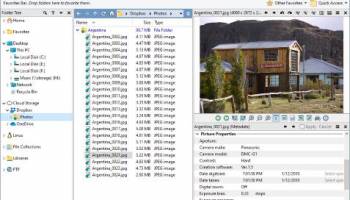
One of the most notable aspects of Directory Opus is its dual-pane interface, which simplifies the process of moving and copying files between directories. This feature alone can significantly reduce the time spent on file management tasks. Additionally, the software supports a tabbed interface, enabling users to keep multiple folders open simultaneously without cluttering the workspace.
Directory Opus also excels in its search capabilities. The advanced search function allows users to locate files quickly and accurately, even within large and complex directory structures. Coupled with its robust filtering options, finding specific files becomes a breeze.
Customization is a key strength of Directory Opus. Users can modify toolbars, menus, and keyboard shortcuts to create a personalized workflow. The software also supports scripting, allowing for the automation of repetitive tasks and further enhancing efficiency.
For those concerned with aesthetics, Directory Opus does not disappoint. It offers a range of themes and visual styles, ensuring that the interface is not only functional but also visually appealing. The software also includes a built-in image viewer and editor, making it easy to manage and edit photos without needing to switch to another application.
Security is another area where Directory Opus shines. It includes features such as file encryption and secure file deletion, providing users with peace of mind when handling sensitive information. Additionally, the software supports a wide range of archive formats, including ZIP, RAR, and 7-Zip, making it a versatile tool for managing compressed files.
Integration with cloud services is seamless, allowing users to manage files stored on platforms like Google Drive, Dropbox, and OneDrive directly from the Directory Opus interface. This feature is particularly useful for those who work across multiple devices and need a consistent file management experience.
In terms of performance, Directory Opus is highly efficient. It handles large directories and complex file operations with ease, ensuring that users do not experience significant slowdowns or crashes. The software is also regularly updated, with GPSoftware providing excellent support and addressing any issues promptly.
In conclusion, Directory Opus by GPSoftware is a powerful and flexible file manager that offers a wealth of features designed to improve productivity and streamline file management tasks. Its combination of a customizable interface, advanced search capabilities, robust security features, and seamless cloud integration makes it an invaluable tool for both casual users and professionals alike. Whether you're looking to enhance your file management efficiency or seeking a more personalized workflow, Directory Opus is a top-tier choice that delivers on all fronts.
One of the most notable aspects of Directory Opus is its dual-pane interface, which simplifies the process of moving and copying files between directories. This feature alone can significantly reduce the time spent on file management tasks. Additionally, the software supports a tabbed interface, enabling users to keep multiple folders open simultaneously without cluttering the workspace.
Directory Opus also excels in its search capabilities. The advanced search function allows users to locate files quickly and accurately, even within large and complex directory structures. Coupled with its robust filtering options, finding specific files becomes a breeze.
Customization is a key strength of Directory Opus. Users can modify toolbars, menus, and keyboard shortcuts to create a personalized workflow. The software also supports scripting, allowing for the automation of repetitive tasks and further enhancing efficiency.
For those concerned with aesthetics, Directory Opus does not disappoint. It offers a range of themes and visual styles, ensuring that the interface is not only functional but also visually appealing. The software also includes a built-in image viewer and editor, making it easy to manage and edit photos without needing to switch to another application.
Security is another area where Directory Opus shines. It includes features such as file encryption and secure file deletion, providing users with peace of mind when handling sensitive information. Additionally, the software supports a wide range of archive formats, including ZIP, RAR, and 7-Zip, making it a versatile tool for managing compressed files.
Integration with cloud services is seamless, allowing users to manage files stored on platforms like Google Drive, Dropbox, and OneDrive directly from the Directory Opus interface. This feature is particularly useful for those who work across multiple devices and need a consistent file management experience.
In terms of performance, Directory Opus is highly efficient. It handles large directories and complex file operations with ease, ensuring that users do not experience significant slowdowns or crashes. The software is also regularly updated, with GPSoftware providing excellent support and addressing any issues promptly.
In conclusion, Directory Opus by GPSoftware is a powerful and flexible file manager that offers a wealth of features designed to improve productivity and streamline file management tasks. Its combination of a customizable interface, advanced search capabilities, robust security features, and seamless cloud integration makes it an invaluable tool for both casual users and professionals alike. Whether you're looking to enhance your file management efficiency or seeking a more personalized workflow, Directory Opus is a top-tier choice that delivers on all fronts.
OS: Windows 11, Windows 10 64 bit, Windows 8 64 bit, Windows 7 64 bit
Add Your Review or 64-bit Compatibility Report
Top File & Disk Management 64-bit downloads


FreeCommander XE Portable 2026 Build 941
FreeCommander XE Portable: A versatile file manager with dual-pane interface.
Freeware

Open Files from XLSX to XLS 5.2
Convert XLSX to XLS with Open files from XLSX to XLS program
Shareware | $29.00

Pitara 5.0.9583.34420

Pitara: Your all-in-one solution for seamless project management and collaboration.
Open Source


WinFindr 1.9
Effortlessly locate files and folders with WinFindr's intuitive search.
Shareware | $23.00


tail for Windows 2.1
tail for Windows is a UNIX/Linux like tail DOS Command for Windows.
Shareware | $29.99


FileMyster 1.2.5
Admin tool for seamless automatic sychronization between folders and computers
Freeware

Members area
Top 64-bit Downloads
-
HWiNFO64 6.28 B4200
x64 freeware download -
Windows 7 x64
x64 trialware download -
GRBackPro Server Backup
x64 11.2.0
x64 shareware download -
Windows 10 x64 22H2
x64 trialware download -
XtraTools Professional
x64 26.3.1
x64 shareware download -
EasyTune6 B24.0119.1
x64 freeware download -
DAR 2.7.14
x64 open source download -
Processor X32 or X64 1.5
x64 freeware download -
O&O MediaRecovery
64-bit 14.0.17
x64 demo download -
BusDog x64 0.2
x64 freeware download
Top Downloads
-
FreeCommander XE
Portable 2026 Build 941
freeware download -
FURY CTRL 2.0.65.0
freeware download -
FMDiff 4.0.5
demo download -
Open Files from XLSX to
XLS 5.2
shareware download -
Vim 9.2.0265
open source download -
Shell Tools 2.0.1
freeware download -
HWiNFO64 6.28 B4200
freeware download -
EaseUS Key Finder 4.1.6 Build 20240910
demo download -
Pitara 5.0.9583.34420
open source download -
iSunshare iBypass Genius 3.1.2.1
shareware download -
AnyMP4 Data Recovery 1.5.12
shareware download -
PCtransfer 1.0.0.1033
freeware download -
Software to Data
Recovery 5.8.4.1
shareware download -
Music Collection 3.9.7.3
freeware download -
WinFindr 1.9
shareware download