
HashTools - X 64-bit Download
Popular x64 Tags
- files x64 download
- file manager x64 download
- zip x64 download
- tool x64 download
- software x64 download
- ntfs x64 download
- remove x64 download
- disk x64 download
- free x64 download
- duplicate x64 download
- copy x64 download
- folder x64 download
- utility x64 download
- data recovery software x64 download
- undelete x64 download
- erase x64 download
- directory x64 download
- backup x64 download
- file x64 download
- hard x64 download
- data recovery x64 download
- delete x64 download
- recovery x64 download
- find x64 download
- file recovery x64 download
- unerase x64 download
- recover x64 download
- mp3 x64 download
- space x64 download
- search x64 download
HashTools 4.8.3
Sponsored links:
license: Freeware
downloads: 317
size: 22.80 MB
updated: 2025-12-18
tags: HashTools, download HashTools, HashTools free download, calculate MD5, calculate SHA1, calculate SHA256, MD5, SHA1, SHA384, SHA256
Add to Basket

Binary Fortress Software

HashTools, developed by Binary Fortress Software, is a robust and user-friendly utility designed to streamline the process of calculating and verifying file hashes. This lightweight yet powerful tool is an essential addition to the toolkit of anyone who regularly works with large volumes of data, ensuring file integrity and security with ease.
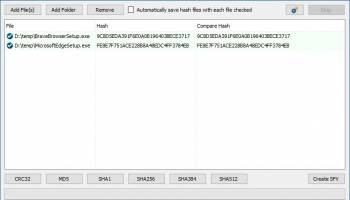
At its core, HashTools offers a straightforward interface that belies its comprehensive functionality. Users can effortlessly drag and drop files into the application, making it accessible even to those with minimal technical expertise. Once files are added, HashTools swiftly computes their hashes using a variety of algorithms, including MD5, SHA-1, SHA-256, SHA-384, SHA-512, and CRC32. This range of options ensures compatibility with a wide array of security and verification needs, from simple checksum comparisons to more complex cryptographic requirements.
One of HashTools' standout features is its ability to handle multiple files simultaneously, significantly enhancing productivity for users dealing with extensive data sets. The software's batch processing capability allows for the rapid calculation of hashes for numerous files, saving valuable time and reducing the potential for human error.
HashTools also excels in its integration with the Windows context menu, providing users with the convenience of calculating hashes directly from the file explorer. This seamless integration means that users can verify file integrity without needing to open the application, streamlining workflows and enhancing efficiency.
For those concerned with data security, HashTools offers a reliable method of ensuring that files have not been tampered with. By comparing the calculated hash values with known values, users can quickly ascertain whether a file has been altered, providing peace of mind in environments where data integrity is paramount.
Moreover, HashTools is a testament to Binary Fortress Software's commitment to user satisfaction, as it is offered free of charge. This accessibility does not come at the expense of quality, as the software is regularly updated to ensure compatibility with the latest operating systems and to incorporate user feedback.
In summary, HashTools is an indispensable utility for anyone needing a reliable, efficient, and easy-to-use solution for calculating and verifying file hashes. Its combination of a user-friendly interface, comprehensive algorithm support, and seamless integration with Windows makes it a standout choice in the realm of file verification tools. Whether you're a seasoned IT professional or a casual user, HashTools provides the functionality and reliability needed to ensure data integrity with minimal hassle.
At its core, HashTools offers a straightforward interface that belies its comprehensive functionality. Users can effortlessly drag and drop files into the application, making it accessible even to those with minimal technical expertise. Once files are added, HashTools swiftly computes their hashes using a variety of algorithms, including MD5, SHA-1, SHA-256, SHA-384, SHA-512, and CRC32. This range of options ensures compatibility with a wide array of security and verification needs, from simple checksum comparisons to more complex cryptographic requirements.
One of HashTools' standout features is its ability to handle multiple files simultaneously, significantly enhancing productivity for users dealing with extensive data sets. The software's batch processing capability allows for the rapid calculation of hashes for numerous files, saving valuable time and reducing the potential for human error.
HashTools also excels in its integration with the Windows context menu, providing users with the convenience of calculating hashes directly from the file explorer. This seamless integration means that users can verify file integrity without needing to open the application, streamlining workflows and enhancing efficiency.
For those concerned with data security, HashTools offers a reliable method of ensuring that files have not been tampered with. By comparing the calculated hash values with known values, users can quickly ascertain whether a file has been altered, providing peace of mind in environments where data integrity is paramount.
Moreover, HashTools is a testament to Binary Fortress Software's commitment to user satisfaction, as it is offered free of charge. This accessibility does not come at the expense of quality, as the software is regularly updated to ensure compatibility with the latest operating systems and to incorporate user feedback.
In summary, HashTools is an indispensable utility for anyone needing a reliable, efficient, and easy-to-use solution for calculating and verifying file hashes. Its combination of a user-friendly interface, comprehensive algorithm support, and seamless integration with Windows makes it a standout choice in the realm of file verification tools. Whether you're a seasoned IT professional or a casual user, HashTools provides the functionality and reliability needed to ensure data integrity with minimal hassle.
OS: Windows 11, Windows Server 2022, Windows Server 2019, Windows Server 2016, Windows 10 32/64 bit, Windows Server 2012, Windows 8 32/64 bit
Add Your Review or 64-bit Compatibility Report
Top File & Disk Management 64-bit downloads


FreeCommander XE Portable 2026 Build 941
FreeCommander XE Portable: A versatile file manager with dual-pane interface.
Freeware

Open Files from XLSX to XLS 5.2
Convert XLSX to XLS with Open files from XLSX to XLS program
Shareware | $29.00


WinFindr 1.8
Effortlessly locate files and folders with WinFindr's intuitive search.
Shareware | $23.00


FileMyster 1.2.5
Admin tool for seamless automatic sychronization between folders and computers
Freeware

Pitara 5.0.9576.2285

Pitara: Your all-in-one solution for seamless project management and collaboration.
Open Source

tail for Windows 2.1
tail for Windows is a UNIX/Linux like tail DOS Command for Windows.
Shareware | $29.99

Members area
Top 64-bit Downloads
-
HWiNFO64 6.28 B4200
x64 freeware download -
GRBackPro Server Backup
x64 11.2.0
x64 shareware download -
Windows 7 x64
x64 trialware download -
EasyTune6 B24.0119.1
x64 freeware download -
XtraTools Professional
x64 26.2.1
x64 shareware download -
SoftPerfect RAM Disk 26.2
x64 shareware download -
7z SFX Builder x64 2.1
x64 freeware download -
BusDog x64 0.2
x64 freeware download -
PhotoRenamer 4.1
x64 freeware download -
CIB pdf brewer 4.20.0
x64 freeware download
Top Downloads
-
FreeCommander XE
Portable 2026 Build 941
freeware download -
FMDiff 4.0.5
demo download -
Open Files from XLSX to
XLS 5.2
shareware download -
Shell Tools 2.0.1
freeware download -
Vim 9.2.0212
open source download -
AnyMP4 Data Recovery 1.5.12
shareware download -
Software to Data
Recovery 5.8.4.1
shareware download -
Music Collection 3.9.7.1
freeware download -
WinFindr 1.8
shareware download -
File Compression 1.0
commercial download -
FURY CTRL 2.0.65.0
freeware download -
Caffeine 1.98
freeware download -
PCtransfer 1.0.0.1033
freeware download -
EaseUS Key Finder 4.1.6 Build 20240910
demo download -
DiskCopy 1.4.2.0
freeware download