
IEToggle - X 64-bit Download
Popular x64 Tags
- free x64 download
- weather x64 download
- windows x64 download
- desktop x64 download
- news reader x64 download
- screen x64 download
- internet x64 download
- tray x64 download
- video x64 download
- monitor x64 download
- notes x64 download
- screen mate x64 download
- screen saver x64 download
- audio x64 download
- sports x64 download
- rss x64 download
- virtual girls x64 download
- dashboard x64 download
- virtual girl x64 download
- search x64 download
- desktop girls x64 download
- football x64 download
- college football x64 download
- deskmates x64 download
- virtua girl x64 download
- communicator x64 download
- college basketball x64 download
- olymipics x64 download
- usa x64 download
- athletics x64 download
IEToggle 1.3.0
Sponsored links:
license: Freeware
downloads: 376
size: 338 kB
updated: 2012-01-19
tags: quick launch website, quick launch application, assign IE hotj=key, quick launch, locate, launch
Add to Basket

Measurement and Conversion Software

IEToggle allows you to assign a hotkey or click an icon in the System Tray to either open, or immediately locate and pop to the forefront, open page(s) of a specified website / application running in Internet Explorer.
You can toggle between all open Internet Explorer browser instances containing pages of your chosen web site/application, by repeatedly pressing the hotkey or clicking on the dedicated icon in the System Tray.
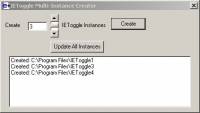
You can have multiple IEToggle instances running at once - ie multiple dedicated icons in the System Tray and/or hotkeys, each for a different web site/application. For your convenience, IEToggle comes packaged with a Multi-Instance Creator, which allows you to specify how many IEToggle instances you'd like to set up, and the application then goes and creates them, placing shortcuts to each instance under Start>Programs.
IEToggle was originally requested by a large Australian telecommunications company - where it is employed by Front Of House staff who use a variety of web-based applications through the day.
IEToggle has been shown to improve productivity in such Contact Centre environments, but is equally valuable for anyone who welcomes the use of shortcuts, and easier ways of navigating about their applications.
FEATURES:
-Set any hotkey combination of your choice (or click on a dedicated icon in the System Tray) to open, or locate and bring to the forefront, a specific web site/application.
-Toggle between all Internet Explorer browser instances running a particular web site/application, by pressing your chosen hotkey or clicking on a dedicated icon in the System Tray.
-Have multiple IEToggle instances running at once - ie multiple dedicated icons in the System Tray and/or hotkey combinations, each for a specific web site/application.
-'Multi-Instance Creator' allows you to specify how many IEToggle instances you'd like to set up, and it automatically creates them, placing shortcuts to each instance under Start>Programs.
You can toggle between all open Internet Explorer browser instances containing pages of your chosen web site/application, by repeatedly pressing the hotkey or clicking on the dedicated icon in the System Tray.
You can have multiple IEToggle instances running at once - ie multiple dedicated icons in the System Tray and/or hotkeys, each for a different web site/application. For your convenience, IEToggle comes packaged with a Multi-Instance Creator, which allows you to specify how many IEToggle instances you'd like to set up, and the application then goes and creates them, placing shortcuts to each instance under Start>Programs.
IEToggle was originally requested by a large Australian telecommunications company - where it is employed by Front Of House staff who use a variety of web-based applications through the day.
IEToggle has been shown to improve productivity in such Contact Centre environments, but is equally valuable for anyone who welcomes the use of shortcuts, and easier ways of navigating about their applications.
FEATURES:
-Set any hotkey combination of your choice (or click on a dedicated icon in the System Tray) to open, or locate and bring to the forefront, a specific web site/application.
-Toggle between all Internet Explorer browser instances running a particular web site/application, by pressing your chosen hotkey or clicking on a dedicated icon in the System Tray.
-Have multiple IEToggle instances running at once - ie multiple dedicated icons in the System Tray and/or hotkey combinations, each for a specific web site/application.
-'Multi-Instance Creator' allows you to specify how many IEToggle instances you'd like to set up, and it automatically creates them, placing shortcuts to each instance under Start>Programs.
OS: Windows XP, Windows Vista, Windows Vista x64, Windows 7, Windows 7 x64
Add Your Review or 64-bit Compatibility Report
Top Other 64-bit downloads


Limages 2.0
Limages is a mediaplayer & slideshow program that works directly on your desktop
Shareware | $10.00
tags: slideshow, desktop, windows, tiles, widget, mediaplayer, sound volume, audio, video, DVD, player, transparency, Images, scrolled, automatically, wallpaper, style, change, photo, view, fullscreen, multiwindow


uWidgets 0.6.0 Beta
uWidgets: A versatile toolkit for creating customizable UI components.
Open Source


EarthView 7.14.0
Stunning dynamic wallpapers showcasing Earth’s beauty in real-time.
Trialware | $25.00


LightBulb 2.7
LightBulb: Adjust screen color temperature to reduce eye strain and improve sleep.
Open Source
Members area
Top 64-bit Downloads
-
Persclock 2.0
x64 freeware download -
bbLean (x64bit) 1.17.1
x64 freeware download -
Pixelscope 8
x64 freeware download -
Save.me x64 2.4.0
x64 freeware download -
TrayCD x64 1.2
x64 open source download -
KillKeys x64 1.2
x64 open source download -
VSLogonScreenCustomizer
64-bit 1.15.3.297
x64 freeware download -
magayo World Time
Weather (64-bit) 1.0.2.1
x64 freeware download -
Vanga Rengi Mangaro 1.2.7.875
x64 trialware download -
WMP12 - BLUE Theme X64
x64 freeware download
Top Downloads
-
Bonzi Buddy 1.7.0
freeware download -
Cloks and Time 2.0
demo download -
CoordiPoint 1.0
freeware download -
Limages 2.0
shareware download -
MouseScribe 1.4
trialware download -
uWidgets 0.6.0 Beta
open source download -
Persclock 2.0
freeware download -
f.lux 4.104
freeware download -
IconPackager 10.03
trialware download -
iPadian 10.1
freeware download -
PictureRiver 1.7.4.2
shareware download -
EarthTime 6.32.1
trialware download -
Sim Aquarium FREE! 3.7.55
freeware download -
LightBulb 2.7
open source download -
DesktopSlides 3.1
freeware download