
InterFace for Windows - X 64-bit Download
Popular x64 Tags
- yahoo messenger x64 download
- free x64 download
- video chat software x64 download
- instant x64 download
- msn messenger x64 download
- lan x64 download
- live chat x64 download
- icq x64 download
- messenger x64 download
- chat x64 download
- instant messenger x64 download
- messaging x64 download
- webcam x64 download
- network x64 download
- instant messaging x64 download
- msn x64 download
- yahoo x64 download
- chat software x64 download
- funny pictures x64 download
- live support x64 download
- live messager x64 download
- aim x64 download
- record webcam x64 download
- freeware x64 download
- flash chat x64 download
- live help x64 download
- webcam recorder x64 download
- funny pictures game x64 download
- funny game x64 download
- funny captions x64 download
InterFace for Windows 1.3.0.1.37
Sponsored links:

Randolph Dohm

The open source Social Network with Instant Chat Messenger as Add-on for the Dooble Web Browser ..
There is a new CHESS online Messenger and Social Chess Network out:
InterFace is a Browser Addon and integrated into the Web Browser for Windows users both is integrated in the Installer, Linux users should install both: InterFace Chess and Dooble Browser.
Its an Application for Online Chess Friends and as well for Club Chess Friends as well, due to the social network function.
How to play chess with a friend:
1. Start Dooble Web Browser, higher than Version 1.26.1.
2. Click Addons: Start InterFace Addon.
3. Generate a Messenger-Profil with your Nickname.
4. Send your InterFace-Messenger-Key to a Chess-Friend and add the InterFace-Messenger-Key of your Friend into your own Messenger (Exchange needed).
5. Connect to each other within a minute.
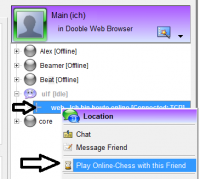
6. Click on the "+" Symbol at your friend to show the connection with the pipeline symbol: *Right* Mouseclick to see the context menu (shown only for online friends).
7. Click: Start Online Chess Game in this context menu.
8. On the Chess Tab: Invite your online Friend for a Chess Game. The Invited Friend always starts - with white. (Klick in the Image to enlarge it)
PS:
* You find your own Messenger Key in the button under the friendslist (Add Friend & Send my own Messenger-Key).
* The "People" Tab allows to add more friends with right mouseclick, so the whole chess club could online with you soon... Today dont look on a wooden chess plate, both look to each other with a laptop in front and play chess over InterFace - InterFace allows to leave the chess club for home and continue to play in the evenings or at any time..
* Forwarding a Port in the Firewall/Router helps to connect faster, if not forwarded, it might take a minute ot two for the initial handshake connection.
* Be sure to right click not on the friend, but on the connection pipeline under your friends name to use this connection (your friend can have several connections, e.g. one to his mobile laptop and the other to his chess desktop at home - so decide with which device you want to start a game).
There is a new CHESS online Messenger and Social Chess Network out:
InterFace is a Browser Addon and integrated into the Web Browser for Windows users both is integrated in the Installer, Linux users should install both: InterFace Chess and Dooble Browser.
Its an Application for Online Chess Friends and as well for Club Chess Friends as well, due to the social network function.
How to play chess with a friend:
1. Start Dooble Web Browser, higher than Version 1.26.1.
2. Click Addons: Start InterFace Addon.
3. Generate a Messenger-Profil with your Nickname.
4. Send your InterFace-Messenger-Key to a Chess-Friend and add the InterFace-Messenger-Key of your Friend into your own Messenger (Exchange needed).
5. Connect to each other within a minute.
6. Click on the "+" Symbol at your friend to show the connection with the pipeline symbol: *Right* Mouseclick to see the context menu (shown only for online friends).
7. Click: Start Online Chess Game in this context menu.
8. On the Chess Tab: Invite your online Friend for a Chess Game. The Invited Friend always starts - with white. (Klick in the Image to enlarge it)
PS:
* You find your own Messenger Key in the button under the friendslist (Add Friend & Send my own Messenger-Key).
* The "People" Tab allows to add more friends with right mouseclick, so the whole chess club could online with you soon... Today dont look on a wooden chess plate, both look to each other with a laptop in front and play chess over InterFace - InterFace allows to leave the chess club for home and continue to play in the evenings or at any time..
* Forwarding a Port in the Firewall/Router helps to connect faster, if not forwarded, it might take a minute ot two for the initial handshake connection.
* Be sure to right click not on the friend, but on the connection pipeline under your friends name to use this connection (your friend can have several connections, e.g. one to his mobile laptop and the other to his chess desktop at home - so decide with which device you want to start a game).
OS: Windows 2000, Windows 2003, Windows XP, Windows Vista, Windows Vista x64, Windows 7, Windows 7 x64
Add Your Review or 64-bit Compatibility Report
Top Chat & Instant Messaging 64-bit downloads


VSee 4.28 (52330)

VSee: Secure video conferencing & telehealth platform for healthcare professionals.
Shareware | $29.00

Paltalk 2.4.0 Build 112318
Paltalk: Engage in vibrant video chat and messaging with global communities.
Shareware

Windows Communicator 3.1
Voice and text communicator for corporate networks with web chat support
Shareware | $19.00

Beeper 4.2.653
Beeper unifies messaging across platforms, simplifying your communication.
Open Source

cwtch 1.16.2
Cwtch: A secure, decentralized messaging platform for privacy-focused users.
Open Source

PC SMS Software 8.0.1.3
Broadcast bulk messages notifications and alerts worldwide using PC SMS software
Shareware | $49.00

LINE 9.9.0 Build 3633
LINE: A versatile messaging app with rich features and engaging stickers.
Freeware

WebCord 4.12.1
WebCord is a versatile Discord client that enhances your messaging experience.
Open Source

Mass SMS 9.0.1.3
Advance utility to compose and send mass sms via PC on worldwide mobile services
Shareware | $49.00

SMS Marketing 7.2.5.4
Free bulk SMS sending wizard delivers unlimited message without internet gateway
Shareware | $45.00
tags: Free, text, messaging, program, broadcasts, massive, customized, SMS, business, promotions, advertisements, product, notifications, job, alerts, internet, gateway, national, international, Windows, mobile, phone, personal, computer, laptop, globally
Members area
Top 64-bit Downloads
-
Linphone 5.0.8
x64 freeware download -
WeChat 3.9.6
x64 freeware download -
MAPIViewer 64-bit 3.4
x64 freeware download -
MOBILedit Forensic
Express 7.4.1.21502
x64 demo download -
NK2Edit x64 3.46
x64 freeware download -
AdiIRC 64bit 4.4
x64 freeware download -
OutlookAddressBookView
x64 2.44
x64 freeware download -
KeyLemon 4.0.3
x64 trialware download -
Tweetings x64 1.4.5.0
x64 freeware download -
Netcam Studio x64 1.9.5.0
x64 freeware download
Top Downloads
-
Skype 8.150.0.125
freeware download -
VSee 4.28 (52330)
shareware download -
Paltalk 2.4.0 Build 112318
shareware download -
Find Unused Contacts 4.11
freeware download -
Clyton 37.0
shareware download -
Wavebox 10.146.26.2
demo download -
Total Webmail Converter 1.4
shareware download -
Linphone 5.0.8
freeware download -
Windows Communicator 3.1
shareware download -
LINE 9.9.0 Build 3633
freeware download -
Beeper 4.2.653
open source download -
cwtch 1.16.2
open source download -
Mail.dll 3.0
shareware download -
SMS4Mail 5.1
demo download -
TNGLive 1.1.0.5
demo download