
LauncherX - X 64-bit Download
Popular x64 Tags
- files x64 download
- file manager x64 download
- zip x64 download
- tool x64 download
- software x64 download
- ntfs x64 download
- remove x64 download
- disk x64 download
- free x64 download
- duplicate x64 download
- copy x64 download
- folder x64 download
- utility x64 download
- data recovery software x64 download
- undelete x64 download
- erase x64 download
- directory x64 download
- backup x64 download
- file x64 download
- hard x64 download
- data recovery x64 download
- delete x64 download
- recovery x64 download
- find x64 download
- file recovery x64 download
- unerase x64 download
- recover x64 download
- mp3 x64 download
- space x64 download
- search x64 download
LauncherX 2.1.1
Sponsored links:
license: Open Source
downloads: 37
size: 61.00 MB
updated: 2024-09-23
tags: LauncherX, application launcher, launch, organize, LauncherX free download, productivity, customization, software, website launcher, Matthias Wang, organizer, download LauncherX, file organizer, user-friendly, launcher
Add to Basket

Matthias Wang

**LauncherX: A Revolutionary Desktop Management Tool by Matthias Wang**
LauncherX, developed by the innovative mind of Matthias Wang, is a cutting-edge desktop management software designed to streamline and enhance your computing experience. This tool is crafted with the modern user in mind, offering a blend of simplicity and powerful functionality that sets it apart in the crowded field of desktop utilities.
**User Interface and Experience**
LauncherX boasts a sleek, intuitive interface that makes navigation a breeze. The design is clean and minimalistic, ensuring that users can focus on their tasks without unnecessary distractions. The software’s layout is highly customizable, allowing users to tailor their desktop environment to suit their personal preferences and workflow needs.
**Key Features**
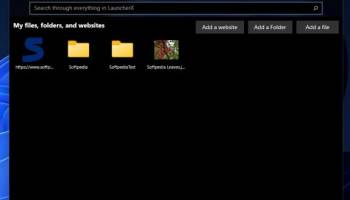
1. **Customizable Launchpad**: At the heart of LauncherX is its customizable launchpad, which allows users to organize and access their applications, files, and folders with ease. You can create groups, add shortcuts, and even assign hotkeys for quick access, making multitasking more efficient than ever.
2. **Smart Search Functionality**: The smart search feature is a standout, providing lightning-fast search results for applications, documents, and system settings. This eliminates the need to sift through cluttered directories, saving valuable time and effort.
3. **Resource Management**: LauncherX includes a built-in resource manager that monitors system performance in real-time. Users can keep an eye on CPU and memory usage, ensuring their system runs smoothly and efficiently.
4. **Integrated Widgets**: Enhance your desktop with a variety of integrated widgets, such as weather updates, calendar events, and system stats. These widgets are not only functional but also add a touch of personalization to your workspace.
5. **Seamless Integration**: One of LauncherX’s strengths is its seamless integration with other software and operating systems. Whether you’re using Windows, macOS, or Linux, LauncherX adapts effortlessly, providing a consistent experience across platforms.
6. **Security Features**: Security is a top priority for LauncherX. The software includes robust encryption and password protection for sensitive files and applications, ensuring your data remains secure.
**Performance and Reliability**
LauncherX is designed to be lightweight and efficient, minimizing its impact on system resources. Users report smooth performance even when running multiple applications simultaneously. The software is regularly updated, with Matthias Wang and his team committed to addressing bugs and introducing new features based on user feedback.
**Conclusion**
In a world where productivity and efficiency are paramount, LauncherX stands out as a must-have tool for anyone looking to optimize their desktop environment. Its blend of powerful features, user-friendly design, and robust performance make it an invaluable asset for both casual users and professionals alike. Matthias Wang has truly crafted a masterpiece that redefines desktop management.
Whether you’re a tech enthusiast or simply someone looking to improve your daily computing tasks, LauncherX is a worthy investment that promises to enhance your digital life.
LauncherX, developed by the innovative mind of Matthias Wang, is a cutting-edge desktop management software designed to streamline and enhance your computing experience. This tool is crafted with the modern user in mind, offering a blend of simplicity and powerful functionality that sets it apart in the crowded field of desktop utilities.
**User Interface and Experience**
LauncherX boasts a sleek, intuitive interface that makes navigation a breeze. The design is clean and minimalistic, ensuring that users can focus on their tasks without unnecessary distractions. The software’s layout is highly customizable, allowing users to tailor their desktop environment to suit their personal preferences and workflow needs.
**Key Features**
1. **Customizable Launchpad**: At the heart of LauncherX is its customizable launchpad, which allows users to organize and access their applications, files, and folders with ease. You can create groups, add shortcuts, and even assign hotkeys for quick access, making multitasking more efficient than ever.
2. **Smart Search Functionality**: The smart search feature is a standout, providing lightning-fast search results for applications, documents, and system settings. This eliminates the need to sift through cluttered directories, saving valuable time and effort.
3. **Resource Management**: LauncherX includes a built-in resource manager that monitors system performance in real-time. Users can keep an eye on CPU and memory usage, ensuring their system runs smoothly and efficiently.
4. **Integrated Widgets**: Enhance your desktop with a variety of integrated widgets, such as weather updates, calendar events, and system stats. These widgets are not only functional but also add a touch of personalization to your workspace.
5. **Seamless Integration**: One of LauncherX’s strengths is its seamless integration with other software and operating systems. Whether you’re using Windows, macOS, or Linux, LauncherX adapts effortlessly, providing a consistent experience across platforms.
6. **Security Features**: Security is a top priority for LauncherX. The software includes robust encryption and password protection for sensitive files and applications, ensuring your data remains secure.
**Performance and Reliability**
LauncherX is designed to be lightweight and efficient, minimizing its impact on system resources. Users report smooth performance even when running multiple applications simultaneously. The software is regularly updated, with Matthias Wang and his team committed to addressing bugs and introducing new features based on user feedback.
**Conclusion**
In a world where productivity and efficiency are paramount, LauncherX stands out as a must-have tool for anyone looking to optimize their desktop environment. Its blend of powerful features, user-friendly design, and robust performance make it an invaluable asset for both casual users and professionals alike. Matthias Wang has truly crafted a masterpiece that redefines desktop management.
Whether you’re a tech enthusiast or simply someone looking to improve your daily computing tasks, LauncherX is a worthy investment that promises to enhance your digital life.
OS: Windows 11, Windows 10 64 bit
Add Your Review or 64-bit Compatibility Report
Top File & Disk Management 64-bit downloads


FreeCommander XE Portable 2026 Build 941
FreeCommander XE Portable: A versatile file manager with dual-pane interface.
Freeware

Open Files from XLSX to XLS 5.2
Convert XLSX to XLS with Open files from XLSX to XLS program
Shareware | $29.00

Pitara 5.0.9582.21949

Pitara: Your all-in-one solution for seamless project management and collaboration.
Open Source


WinFindr 1.9
Effortlessly locate files and folders with WinFindr's intuitive search.
Shareware | $23.00


tail for Windows 2.1
tail for Windows is a UNIX/Linux like tail DOS Command for Windows.
Shareware | $29.99


FileMyster 1.2.5
Admin tool for seamless automatic sychronization between folders and computers
Freeware

Members area
Top 64-bit Downloads
-
HWiNFO64 6.28 B4200
x64 freeware download -
Windows 7 x64
x64 trialware download -
GRBackPro Server Backup
x64 11.2.0
x64 shareware download -
Windows 10 x64 22H2
x64 trialware download -
EasyTune6 B24.0119.1
x64 freeware download -
XtraTools Professional
x64 26.2.1
x64 shareware download -
O&O MediaRecovery
64-bit 14.0.17
x64 demo download -
DAR 2.7.14
x64 open source download -
BusDog x64 0.2
x64 freeware download -
PhotoRenamer 4.1
x64 freeware download
Top Downloads
-
FreeCommander XE
Portable 2026 Build 941
freeware download -
FURY CTRL 2.0.65.0
freeware download -
FMDiff 4.0.5
demo download -
Open Files from XLSX to
XLS 5.2
shareware download -
Vim 9.2.0261
open source download -
Shell Tools 2.0.1
freeware download -
HWiNFO64 6.28 B4200
freeware download -
Pitara 5.0.9582.21949
open source download -
iSunshare iBypass Genius 3.1.2.1
shareware download -
AnyMP4 Data Recovery 1.5.12
shareware download -
PCtransfer 1.0.0.1033
freeware download -
Software to Data
Recovery 5.8.4.1
shareware download -
EaseUS Key Finder 4.1.6 Build 20240910
demo download -
Music Collection 3.9.7.2
freeware download -
WinFindr 1.9
shareware download