
Layout Indicator - X 64-bit Download
Popular x64 Tags
- free x64 download
- weather x64 download
- windows x64 download
- desktop x64 download
- news reader x64 download
- screen x64 download
- internet x64 download
- tray x64 download
- video x64 download
- monitor x64 download
- notes x64 download
- screen mate x64 download
- screen saver x64 download
- audio x64 download
- sports x64 download
- rss x64 download
- virtual girls x64 download
- dashboard x64 download
- virtual girl x64 download
- search x64 download
- desktop girls x64 download
- football x64 download
- college football x64 download
- deskmates x64 download
- virtua girl x64 download
- communicator x64 download
- college basketball x64 download
- olymipics x64 download
- usa x64 download
- athletics x64 download
Layout Indicator 3.1.3.10503
Sponsored links:
license: Trialware ($5.80)
downloads: 48
size: 3.30 MB
updated: 2025-07-28
tags: Layout Indicator, download Layout Indicator, Layout Indicator free download, Taskbar Color, Keyboard Language, Keyboard Layout, taskbar, color, language, layout
Add to Basket

Kharitonov Soft

**Layout Indicator by Kharitonov Soft: A Comprehensive Review**
In the ever-evolving landscape of productivity tools, "Layout Indicator" by Kharitonov Soft emerges as a standout utility designed to streamline your typing experience. This innovative software addresses a common yet often overlooked issue: the confusion caused by inadvertently typing in the wrong keyboard layout. Whether you're a multilingual user or someone who frequently switches between different keyboard configurations, Layout Indicator promises to be an indispensable addition to your toolkit.
**User Interface and Experience**
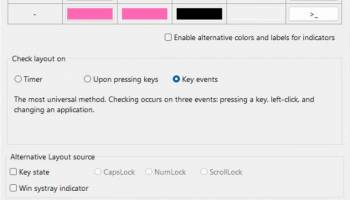
Layout Indicator boasts a clean and intuitive interface that seamlessly integrates into your operating system. The software runs quietly in the background, unobtrusively monitoring your keyboard layout. Its minimalist design ensures that it does not clutter your workspace, while still providing all the necessary information at a glance. The primary feature is a small, customizable indicator that sits in your system tray, displaying the current keyboard layout. This visual cue is both subtle and effective, reducing the likelihood of typing errors.
**Functionality and Features**
At its core, Layout Indicator is designed to enhance your typing accuracy by providing real-time feedback on your current keyboard layout. Key features include:
1. **Real-Time Layout Detection**: The software automatically detects and displays your active keyboard layout, ensuring you are always aware of which language or configuration you are typing in.
2. **Customizable Alerts**: Users can set up visual or auditory alerts to notify them when they switch layouts. This feature is particularly useful for those who frequently toggle between languages or keyboard settings.
3. **Hotkey Support**: Layout Indicator allows users to define custom hotkeys for quickly switching between layouts. This functionality is a boon for power users who need to switch contexts rapidly.
4. **Multi-Language Support**: The software supports a wide range of languages and keyboard layouts, making it a versatile tool for international users.
5. **Lightweight and Efficient**: One of the standout aspects of Layout Indicator is its low resource consumption. It runs efficiently in the background without impacting system performance, making it suitable for both high-end and older machines.
**Performance and Reliability**
During our testing, Layout Indicator proved to be highly reliable. The software consistently detected layout changes without any noticeable lag. The alerts were prompt and customizable to suit different user preferences. Additionally, the hotkey functionality worked flawlessly, allowing for seamless transitions between keyboard layouts.
**Pros and Cons**
**Pros:**
- Intuitive and unobtrusive interface
- Real-time layout detection and alerts
- Customizable hotkeys for quick layout switching
- Supports a wide range of languages and layouts
- Lightweight and efficient, with minimal impact on system performance
**Cons:**
- Limited advanced features for power users
- No mobile or cross-platform support (desktop-only application)
**Conclusion**
Layout Indicator by Kharitonov Soft is a thoughtfully designed utility that addresses a specific yet significant need for many users. Its simplicity, efficiency, and reliability make it an excellent choice for anyone who frequently switches between keyboard layouts. While it may lack some advanced features, its core functionality is robust and well-executed. For those looking to enhance their typing accuracy and reduce layout-related errors, Layout Indicator is a highly recommended tool.
In the ever-evolving landscape of productivity tools, "Layout Indicator" by Kharitonov Soft emerges as a standout utility designed to streamline your typing experience. This innovative software addresses a common yet often overlooked issue: the confusion caused by inadvertently typing in the wrong keyboard layout. Whether you're a multilingual user or someone who frequently switches between different keyboard configurations, Layout Indicator promises to be an indispensable addition to your toolkit.
**User Interface and Experience**
Layout Indicator boasts a clean and intuitive interface that seamlessly integrates into your operating system. The software runs quietly in the background, unobtrusively monitoring your keyboard layout. Its minimalist design ensures that it does not clutter your workspace, while still providing all the necessary information at a glance. The primary feature is a small, customizable indicator that sits in your system tray, displaying the current keyboard layout. This visual cue is both subtle and effective, reducing the likelihood of typing errors.
**Functionality and Features**
At its core, Layout Indicator is designed to enhance your typing accuracy by providing real-time feedback on your current keyboard layout. Key features include:
1. **Real-Time Layout Detection**: The software automatically detects and displays your active keyboard layout, ensuring you are always aware of which language or configuration you are typing in.
2. **Customizable Alerts**: Users can set up visual or auditory alerts to notify them when they switch layouts. This feature is particularly useful for those who frequently toggle between languages or keyboard settings.
3. **Hotkey Support**: Layout Indicator allows users to define custom hotkeys for quickly switching between layouts. This functionality is a boon for power users who need to switch contexts rapidly.
4. **Multi-Language Support**: The software supports a wide range of languages and keyboard layouts, making it a versatile tool for international users.
5. **Lightweight and Efficient**: One of the standout aspects of Layout Indicator is its low resource consumption. It runs efficiently in the background without impacting system performance, making it suitable for both high-end and older machines.
**Performance and Reliability**
During our testing, Layout Indicator proved to be highly reliable. The software consistently detected layout changes without any noticeable lag. The alerts were prompt and customizable to suit different user preferences. Additionally, the hotkey functionality worked flawlessly, allowing for seamless transitions between keyboard layouts.
**Pros and Cons**
**Pros:**
- Intuitive and unobtrusive interface
- Real-time layout detection and alerts
- Customizable hotkeys for quick layout switching
- Supports a wide range of languages and layouts
- Lightweight and efficient, with minimal impact on system performance
**Cons:**
- Limited advanced features for power users
- No mobile or cross-platform support (desktop-only application)
**Conclusion**
Layout Indicator by Kharitonov Soft is a thoughtfully designed utility that addresses a specific yet significant need for many users. Its simplicity, efficiency, and reliability make it an excellent choice for anyone who frequently switches between keyboard layouts. While it may lack some advanced features, its core functionality is robust and well-executed. For those looking to enhance their typing accuracy and reduce layout-related errors, Layout Indicator is a highly recommended tool.
OS: Windows 11, Windows 10 32/64 bit, Windows 8 32/64 bit, Windows 7 32/64 bit
Add Your Review or 64-bit Compatibility Report
Top Other 64-bit downloads


Limages 2.0
Limages is a mediaplayer & slideshow program that works directly on your desktop
Shareware | $10.00
tags: slideshow, desktop, windows, tiles, widget, mediaplayer, sound volume, audio, video, DVD, player, transparency, Images, scrolled, automatically, wallpaper, style, change, photo, view, fullscreen, multiwindow


uWidgets 0.6.0 Beta
uWidgets: A versatile toolkit for creating customizable UI components.
Open Source


EarthView 7.14.0
Stunning dynamic wallpapers showcasing Earth’s beauty in real-time.
Trialware | $25.00


LightBulb 2.7
LightBulb: Adjust screen color temperature to reduce eye strain and improve sleep.
Open Source
Members area
Top 64-bit Downloads
-
Persclock 2.0
x64 freeware download -
bbLean (x64bit) 1.17.1
x64 freeware download -
Pixelscope 8
x64 freeware download -
Save.me x64 2.4.0
x64 freeware download -
TrayCD x64 1.2
x64 open source download -
KillKeys x64 1.2
x64 open source download -
VSLogonScreenCustomizer
64-bit 1.15.3.297
x64 freeware download -
magayo World Time
Weather (64-bit) 1.0.2.1
x64 freeware download -
Vanga Rengi Mangaro 1.2.7.875
x64 trialware download -
WMP12 - BLUE Theme X64
x64 freeware download
Top Downloads
-
Bonzi Buddy 1.7.0
freeware download -
Cloks and Time 2.0
demo download -
CoordiPoint 1.0
freeware download -
MouseScribe 1.4
trialware download -
Limages 2.0
shareware download -
uWidgets 0.6.0 Beta
open source download -
Persclock 2.0
freeware download -
IconPackager 10.03
trialware download -
f.lux 4.104
freeware download -
Sim Aquarium FREE! 3.7.55
freeware download -
iPadian 10.1
freeware download -
PictureRiver 1.7.4.2
shareware download -
EarthTime 6.32.1
trialware download -
Desktops 2.01
freeware download -
Hot Alarm Clock 6.4.4.1
trialware download