
MD5 File Hasher - X 64-bit Download
Popular x64 Tags
- files x64 download
- file manager x64 download
- zip x64 download
- tool x64 download
- software x64 download
- ntfs x64 download
- remove x64 download
- disk x64 download
- free x64 download
- duplicate x64 download
- copy x64 download
- folder x64 download
- utility x64 download
- data recovery software x64 download
- undelete x64 download
- erase x64 download
- directory x64 download
- backup x64 download
- file x64 download
- hard x64 download
- data recovery x64 download
- delete x64 download
- recovery x64 download
- find x64 download
- file recovery x64 download
- unerase x64 download
- recover x64 download
- mp3 x64 download
- space x64 download
- search x64 download
MD5 File Hasher 1.3
Sponsored links:

Digital-Tronic

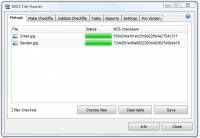
With MD5 File Hasher any file can be checked for changes, damage or manipulation. The speedy calculation of MD5 check sums of files or directories is efficient and can be completed rapidly. To check one or more files, the files can be selected effortlessly by dragging & dropping them into the program. The calculated MD5 checksums are displayed immediately. In addition, scheduled tasks allow for automated checks of any file or directory. The customization of filters and rules allows detailed customization based on your unique requirements. It is possible to create tasks, for example to run daily checks automatically. Therefore, changes to sensitive system files are detected immediately.
Create and compare checksums
Especially for downloaded files, it is important to compare the file with the original. To verify the integrity of the file reliably, MD5 File Hasher creates a checksum. If the hash value is not identical with the original file, the file has been modified, damaged, or, in the worst case, maliciously manipulated.
Not only downloaded files, any file on the PC is subject to damage or manipulation. For this purpose, MD5 File Hasher offers two options which allow for unlimited file checks:
Check sum comparison with Checkfiles
MD5 File Hasher can create so-called Checkfiles. The Checkfiles contain the check sums of all files within a folder which have been selected. The Checkfile is created once and is used for references purposes for later checks. If a subsequent check shows any modification, a report will be created. The report includes the number of changes and what files are affected. The report also indicates whether new files have been added or existing files have been removed from the directory.
Automatic checks and execution of user-defined tasks
MD5 File Hasher can create tasks which can run scheduled checks of specified files or entire directories. Filters can be customized, e.g. to only check or exclude certain file types (.dll, .exe, .txt etc.). The use of rules, filters and exceptions allows users to adjust tasks to the requirements of the user. Of course, reports and alerts can also be customized or deactivated.
Create and compare checksums
Especially for downloaded files, it is important to compare the file with the original. To verify the integrity of the file reliably, MD5 File Hasher creates a checksum. If the hash value is not identical with the original file, the file has been modified, damaged, or, in the worst case, maliciously manipulated.
Not only downloaded files, any file on the PC is subject to damage or manipulation. For this purpose, MD5 File Hasher offers two options which allow for unlimited file checks:
Check sum comparison with Checkfiles
MD5 File Hasher can create so-called Checkfiles. The Checkfiles contain the check sums of all files within a folder which have been selected. The Checkfile is created once and is used for references purposes for later checks. If a subsequent check shows any modification, a report will be created. The report includes the number of changes and what files are affected. The report also indicates whether new files have been added or existing files have been removed from the directory.
Automatic checks and execution of user-defined tasks
MD5 File Hasher can create tasks which can run scheduled checks of specified files or entire directories. Filters can be customized, e.g. to only check or exclude certain file types (.dll, .exe, .txt etc.). The use of rules, filters and exceptions allows users to adjust tasks to the requirements of the user. Of course, reports and alerts can also be customized or deactivated.
OS: Windows 2000, Windows 2003, Windows XP, Windows Vista, Windows Vista x64, Windows 7, Windows 7 x64
Add Your Review or 64-bit Compatibility Report
Top File & Disk Management 64-bit downloads


FreeCommander XE Portable 2026 Build 941
FreeCommander XE Portable: A versatile file manager with dual-pane interface.
Freeware

Open Files from XLSX to XLS 5.2
Convert XLSX to XLS with Open files from XLSX to XLS program
Shareware | $29.00

Pitara 5.0.9581.41149

Pitara: Your all-in-one solution for seamless project management and collaboration.
Open Source


WinFindr 1.9
Effortlessly locate files and folders with WinFindr's intuitive search.
Shareware | $23.00


tail for Windows 2.1
tail for Windows is a UNIX/Linux like tail DOS Command for Windows.
Shareware | $29.99


FileMyster 1.2.5
Admin tool for seamless automatic sychronization between folders and computers
Freeware

Members area
Top 64-bit Downloads
-
HWiNFO64 6.28 B4200
x64 freeware download -
GRBackPro Server Backup
x64 11.2.0
x64 shareware download -
Windows 7 x64
x64 trialware download -
Windows 10 x64 22H2
x64 trialware download -
EasyTune6 B24.0119.1
x64 freeware download -
XtraTools Professional
x64 26.2.1
x64 shareware download -
O&O MediaRecovery
64-bit 14.0.17
x64 demo download -
DAR 2.7.14
x64 open source download -
BusDog x64 0.2
x64 freeware download -
PhotoRenamer 4.1
x64 freeware download
Top Downloads
-
FreeCommander XE
Portable 2026 Build 941
freeware download -
FURY CTRL 2.0.65.0
freeware download -
FMDiff 4.0.5
demo download -
Open Files from XLSX to
XLS 5.2
shareware download -
Vim 9.2.0260
open source download -
Shell Tools 2.0.1
freeware download -
HWiNFO64 6.28 B4200
freeware download -
AnyMP4 Data Recovery 1.5.12
shareware download -
PCtransfer 1.0.0.1033
freeware download -
Software to Data
Recovery 5.8.4.1
shareware download -
EaseUS Key Finder 4.1.6 Build 20240910
demo download -
Pitara 5.0.9581.41149
open source download -
Music Collection 3.9.7.2
freeware download -
WinFindr 1.9
shareware download -
File Compression 1.0
commercial download