
Minikube - X 64-bit Download
Popular x64 Tags
- windows x64 download
- tool x64 download
- software x64 download
- view x64 download
- editor x64 download
- python x64 download
- xml x64 download
- sql x64 download
- dll x64 download
- resource x64 download
- compare x64 download
- csv x64 download
- dotnet x64 download
- uml x64 download
- table x64 download
- delphi x64 download
- xls x64 download
- perl x64 download
- html x64 download
- diff x64 download
- database x64 download
- query x64 download
- convert x64 download
- sql tools x64 download
- ide x64 download
- sql tool x64 download
- activestate x64 download
- doc x64 download
- txt x64 download
- mssql x64 download
Minikube 1.38.1
Sponsored links:
license: Open Source
downloads: 53
size: 48.30 MB
updated: 2026-02-20
tags: Minikube, download Minikube, Minikube free download, Run Kubernetes, Kubernetes Cluster, Kubernetes VM, Kubernetes, Run, Launcher, Run
Add to Basket

Kubernetes

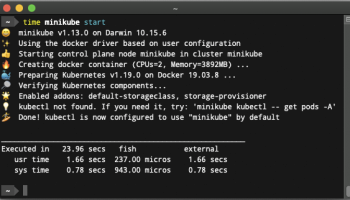
Minikube is an innovative and highly efficient tool developed by the Kubernetes team, designed to facilitate the local deployment of Kubernetes clusters. This lightweight yet powerful software is a game-changer for developers and IT professionals who need a reliable and straightforward way to test and develop Kubernetes applications on their local machines.
Minikube stands out for its simplicity and ease of use. It allows users to run a single-node Kubernetes cluster inside a virtual machine (VM) on their personal computers. This capability is particularly beneficial for those who are new to Kubernetes, as it provides a sandbox environment to experiment and learn without the complexities of a multi-node setup.
One of the key features of Minikube is its support for multiple hypervisors, including VirtualBox, VMware, Hyper-V, and KVM, among others. This flexibility ensures that Minikube can be used across various operating systems and environments, making it a versatile tool for a wide range of users.
Minikube also excels in its integration capabilities. It seamlessly integrates with Kubernetes CLI tools like kubectl, allowing users to manage their local clusters with the same commands and workflows they would use in a production environment. This consistency is invaluable for developers who want to ensure that their local development environment closely mirrors their production setup.
Performance is another area where Minikube shines. Despite its lightweight nature, it is optimized for speed and efficiency. The software includes features like the ability to start and stop clusters quickly, dynamic resource allocation, and support for persistent volumes, which enhance its usability and performance.
Moreover, Minikube is highly customizable. Users can configure various aspects of their local clusters, such as the Kubernetes version, the amount of CPU and memory allocated to the VM, and the network settings. This level of customization ensures that Minikube can meet the specific needs of different projects and workflows.
The Minikube community is active and vibrant, contributing to its continuous improvement and evolution. The software is open-source, and its development is driven by a collaborative effort from developers around the world. This community-driven approach ensures that Minikube remains up-to-date with the latest Kubernetes features and best practices.
In summary, Minikube is an indispensable tool for anyone working with Kubernetes. Its ease of use, flexibility, performance, and customization options make it an excellent choice for local Kubernetes development and testing. Whether you are a beginner looking to learn Kubernetes or an experienced developer needing a reliable local development environment, Minikube is a tool that should be in your toolkit.
Minikube stands out for its simplicity and ease of use. It allows users to run a single-node Kubernetes cluster inside a virtual machine (VM) on their personal computers. This capability is particularly beneficial for those who are new to Kubernetes, as it provides a sandbox environment to experiment and learn without the complexities of a multi-node setup.
One of the key features of Minikube is its support for multiple hypervisors, including VirtualBox, VMware, Hyper-V, and KVM, among others. This flexibility ensures that Minikube can be used across various operating systems and environments, making it a versatile tool for a wide range of users.
Minikube also excels in its integration capabilities. It seamlessly integrates with Kubernetes CLI tools like kubectl, allowing users to manage their local clusters with the same commands and workflows they would use in a production environment. This consistency is invaluable for developers who want to ensure that their local development environment closely mirrors their production setup.
Performance is another area where Minikube shines. Despite its lightweight nature, it is optimized for speed and efficiency. The software includes features like the ability to start and stop clusters quickly, dynamic resource allocation, and support for persistent volumes, which enhance its usability and performance.
Moreover, Minikube is highly customizable. Users can configure various aspects of their local clusters, such as the Kubernetes version, the amount of CPU and memory allocated to the VM, and the network settings. This level of customization ensures that Minikube can meet the specific needs of different projects and workflows.
The Minikube community is active and vibrant, contributing to its continuous improvement and evolution. The software is open-source, and its development is driven by a collaborative effort from developers around the world. This community-driven approach ensures that Minikube remains up-to-date with the latest Kubernetes features and best practices.
In summary, Minikube is an indispensable tool for anyone working with Kubernetes. Its ease of use, flexibility, performance, and customization options make it an excellent choice for local Kubernetes development and testing. Whether you are a beginner looking to learn Kubernetes or an experienced developer needing a reliable local development environment, Minikube is a tool that should be in your toolkit.
OS: Windows 11, Windows 10 32/64 bit
Add Your Review or 64-bit Compatibility Report
Top Other 64-bit downloads


JProfiler 16.0.0
JProfiler is a powerful Java profiler for performance tuning and memory analysis.
Trialware | $549.00

Android Studio 2025.3.2 Panda 2
Android Studio: Powerful IDE for Android app development with robust tools.
Freeware

Flyff 2.4.9
Vagrant simplifies environment setup for developers with portable, reproducible workflows.
Open Source

Xojo / Real Studio Plug-ins 26.0
Enhance Xojo with powerful plug-ins for advanced functionality and ease.
Shareware | $239.00


Members area
Top 64-bit Downloads
-
TortoiseSVN for 64-bit
System 1.14.7.29687
x64 freeware download -
DotNetBrowser 3.5.0
x64 commercial download -
Microsoft Speech SDK 11
x64 freeware download -
PyScripter x64 4.3.4
x64 open source download -
Strawberry Perl Portable
x64 5.38.2.2
x64 open source download -
Argyll x64 3.2.0
x64 freeware download -
PilotEdit Pro x64 20.7.0
x64 shareware download -
Software Ideas Modeler
Portable x64 14.55
x64 freeware download -
SQLServerFind 64bit 3.4.3.2
x64 shareware download -
MyEclipse 2023.1.1
x64 trialware download
Top Downloads
-
NASM 2.16.01
open source download -
Delphi 12.0
shareware download -
Python 3.14.3
open source download -
WebData 10.2.4.0
shareware download -
Swapy 0.5.4
open source download -
PHP 8.5.4
open source download -
.NET Logging Library 2.20
shareware download -
.NET SFTP Library 6.13
shareware download -
Prodatum 1.2.0
open source download -
AppStudio 9.4.6.1
demo download -
Devart ODAC 14.0.0
shareware download -
eWorld 0.9.3 Beta
freeware download -
managedCUDA 7.5
open source download -
Precision Language Suite 2.5
freeware download -
Document .Net 2026.2.19
demo download