
MKV Tag Editor - X 64-bit Download
Popular x64 Tags
- video x64 download
- video converter x64 download
- avi x64 download
- internet tv x64 download
- divx x64 download
- dvd x64 download
- online tv x64 download
- mov x64 download
- mpeg x64 download
- converter x64 download
- xvid x64 download
- 3gp converter x64 download
- psp x64 download
- download x64 download
- ipod x64 download
- mp4 x64 download
- wmv x64 download
- ipod video x64 download
- dvd ripper x64 download
- dvd to 3gp x64 download
- dvd to ipod x64 download
- swf x64 download
- dvd to psp x64 download
- 3gp x64 download
- asf x64 download
- iphone x64 download
- dat x64 download
- mpg x64 download
- video to ipod x64 download
- flv x64 download
MKV Tag Editor 1.0.272.467
Sponsored links:
license: Trialware ($20.00)
downloads: 81
size: 118.50 MB
updated: 2026-03-09
tags: MKV Tag Editor, download MKV Tag Editor, MKV Tag Editor free download, Tag Editor, Video Tag, MKV Tag, Cover, MKV, Video, Tag
Add to Basket

3delite

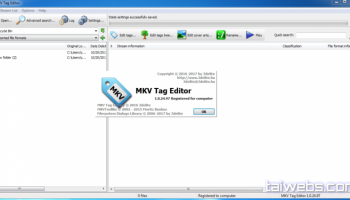
MKV Tag Editor by 3delite is a robust and intuitive software designed to streamline the process of editing metadata for MKV (Matroska) video files. This specialized tool caters to both casual users and professionals who require precise control over their video library's metadata.
One of the standout features of MKV Tag Editor is its user-friendly interface, which balances simplicity with functionality. The clean layout ensures that even those new to metadata editing can navigate the software with ease, while advanced users will appreciate the depth of options available. The software supports a wide range of metadata fields, including title, artist, director, genre, and more, allowing for comprehensive customization of your MKV files.
MKV Tag Editor excels in its ability to handle batch processing, making it an invaluable tool for users with large collections of MKV files. The batch processing feature allows for the simultaneous editing of multiple files, significantly reducing the time and effort required to update metadata across an entire library. This feature is particularly useful for media archivists and enthusiasts who need to maintain a well-organized and accurately labeled video collection.
Another notable aspect of MKV Tag Editor is its support for cover art embedding. Users can easily add or update cover images for their MKV files, enhancing the visual appeal of their media library. The software supports various image formats, ensuring compatibility with a wide range of cover art sources.
In addition to its core tagging capabilities, MKV Tag Editor offers advanced features such as chapter editing and subtitle management. Users can create, modify, and organize chapters within their MKV files, providing a more structured viewing experience. The subtitle management feature allows for the addition, removal, and synchronization of subtitle tracks, ensuring that your videos are accessible to a broader audience.
Performance-wise, MKV Tag Editor is optimized for speed and efficiency. The software handles large files and extensive metadata edits with ease, ensuring that users can complete their tasks without unnecessary delays. The stability of the software is also commendable, with minimal crashes or bugs reported by users.
Security and privacy are also prioritized in MKV Tag Editor. The software does not collect any personal data, and all metadata edits are performed locally on your device, ensuring that your information remains secure.
In summary, MKV Tag Editor by 3delite is a powerful and versatile tool for anyone looking to manage and edit the metadata of their MKV video files. Its combination of a user-friendly interface, extensive feature set, and robust performance makes it an excellent choice for both casual users and professionals. Whether you're organizing a personal video collection or managing a large media library, MKV Tag Editor provides the tools you need to keep your files accurately labeled and well-organized.
One of the standout features of MKV Tag Editor is its user-friendly interface, which balances simplicity with functionality. The clean layout ensures that even those new to metadata editing can navigate the software with ease, while advanced users will appreciate the depth of options available. The software supports a wide range of metadata fields, including title, artist, director, genre, and more, allowing for comprehensive customization of your MKV files.
MKV Tag Editor excels in its ability to handle batch processing, making it an invaluable tool for users with large collections of MKV files. The batch processing feature allows for the simultaneous editing of multiple files, significantly reducing the time and effort required to update metadata across an entire library. This feature is particularly useful for media archivists and enthusiasts who need to maintain a well-organized and accurately labeled video collection.
Another notable aspect of MKV Tag Editor is its support for cover art embedding. Users can easily add or update cover images for their MKV files, enhancing the visual appeal of their media library. The software supports various image formats, ensuring compatibility with a wide range of cover art sources.
In addition to its core tagging capabilities, MKV Tag Editor offers advanced features such as chapter editing and subtitle management. Users can create, modify, and organize chapters within their MKV files, providing a more structured viewing experience. The subtitle management feature allows for the addition, removal, and synchronization of subtitle tracks, ensuring that your videos are accessible to a broader audience.
Performance-wise, MKV Tag Editor is optimized for speed and efficiency. The software handles large files and extensive metadata edits with ease, ensuring that users can complete their tasks without unnecessary delays. The stability of the software is also commendable, with minimal crashes or bugs reported by users.
Security and privacy are also prioritized in MKV Tag Editor. The software does not collect any personal data, and all metadata edits are performed locally on your device, ensuring that your information remains secure.
In summary, MKV Tag Editor by 3delite is a powerful and versatile tool for anyone looking to manage and edit the metadata of their MKV video files. Its combination of a user-friendly interface, extensive feature set, and robust performance makes it an excellent choice for both casual users and professionals. Whether you're organizing a personal video collection or managing a large media library, MKV Tag Editor provides the tools you need to keep your files accurately labeled and well-organized.
OS: Windows 11, Windows 10 32/64 bit
Add Your Review or 64-bit Compatibility Report
Top Video Tools 64-bit downloads


VLC Media Player x64 3.0.20
VLC x64 is a free and open source multimedia 64bit player for Windows x64
Open Source

Screenbits 9.13.1.0
Screenbits: High-quality screen recording with intuitive controls and features.
Trialware

Video Jaguar 1.0
Video Jaguar is the world's easiest video ad maker for businesses and agencies.
Shareware | $8.99


CamStudio 2.7.4 r354
You can use it to create demonstration videos for any software program
Open Source

4Videosoft MTS Converter 6.2.22
Convert video to audio or convert audio to AAC, AC3 , AIFF, AMR, AU, and more
Shareware | $16.16

MonitorTest 4.0 Build 1002
Comprehensive tool for testing and calibrating monitor performance.
Trialware


PotPlayer 64bit 1.7.21397
A comprehensive video and audio player, that also supports TV channels
Freeware

VideoPad Free Movie and Video Editor 18.16
Free Video Editor and Movie Making Software for Windows anyone can use.
Freeware
tags: video editor, free video editor, movie maker, free movie maker, video editing, video editing software, free video editing software, free movie making software, free film editing, video editing software free pc, best video editing apps free, video cutting software mac, video production software, windows video editor, open source video editor, video and audio editing software, free video editing apps for pc, video capture and editing software, video and audio editor
Members area
Top 64-bit Downloads
-
Media Player Classic -
HomeCinema - 64 bit 2.3.0
x64 open source download -
VLC Media Player x64 3.0.20
x64 open source download -
MCEBuddy 2.6.3
x64 trialware download -
PotPlayer 64bit 1.7.21397
x64 freeware download -
GUITAR RIG 5 PRO 7.0.2
x64 demo download -
Voxengo Stereo Touch x64 2.17
x64 freeware download -
Voxengo Crunchessor x64 2.19
x64 demo download -
Devastor x64 2.3.2
x64 demo download -
Adobe PhotoShop CC x64 2024 25.9.1
x64 trialware download -
Blue Cat's Triple EQ x64 4.45
x64 freeware download
Top Downloads
-
FreeTube 0.23.15 Beta
open source download -
Little AlterBoy 5.4.1
trialware download -
Syrah 23.07.0.50310
trialware download -
Auremo 0.24.9
open source download -
Nero 7 Ultra Edition 7.10.1
shareware download -
ft2-clone 2.12
open source download -
Screenbox 0.18.1
open source download -
VLC Media Player x64 3.0.20
open source download -
Screenbits 9.13.1.0
trialware download -
Cyclop 1.3.7
demo download -
Melodics 5.0.139.0
demo download -
Media Player Classic -
HomeCinema - 64 bit 2.3.0
open source download -
Soundbase 2012.10.10
freeware download -
PlayIt Live 2.17.2.5046
shareware download -
FineCut 1.0.2
demo download