
MKVCleaver - X 64-bit Download
Popular x64 Tags
- video x64 download
- video converter x64 download
- avi x64 download
- internet tv x64 download
- divx x64 download
- dvd x64 download
- online tv x64 download
- mov x64 download
- mpeg x64 download
- converter x64 download
- xvid x64 download
- 3gp converter x64 download
- psp x64 download
- download x64 download
- ipod x64 download
- mp4 x64 download
- wmv x64 download
- ipod video x64 download
- dvd ripper x64 download
- dvd to 3gp x64 download
- dvd to ipod x64 download
- swf x64 download
- dvd to psp x64 download
- 3gp x64 download
- asf x64 download
- iphone x64 download
- dat x64 download
- mpg x64 download
- video to ipod x64 download
- flv x64 download
MKVCleaver 0.8.0.2
Sponsored links:
license: Open Source
downloads: 63
size: 7.80 MB
updated: 2025-11-22
tags: MKVCleaver, download MKVCleaver, MKVCleaver free download, MKV track, VFR detection, extract track, MKV, extract, attachment, timecode
Add to Basket

Ilia Bakhmoutski

MKVCleaver, developed by Ilia Bakhmoutski, is a powerful and user-friendly tool designed for extracting data from MKV (Matroska) video files. This software stands out for its simplicity and efficiency, making it an essential utility for both casual users and professionals who need to manage and manipulate multimedia content.
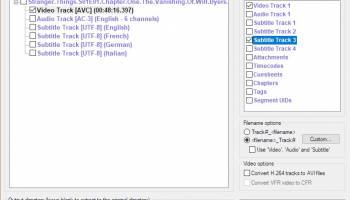
One of the most compelling features of MKVCleaver is its intuitive interface. The software is designed to be accessible, even for those who may not be tech-savvy. The straightforward layout allows users to quickly load MKV files, select the specific tracks or elements they wish to extract, and execute the process with minimal effort. This ease of use does not come at the expense of functionality; MKVCleaver is robust enough to handle complex tasks with precision.
MKVCleaver excels in its core functionality of extracting audio, video, and subtitle tracks from MKV files. It supports a wide range of codecs and formats, ensuring compatibility with various media players and editing software. This versatility is particularly beneficial for users who work with diverse multimedia content and need a reliable tool to streamline their workflow.
Performance is another area where MKVCleaver shines. The software is optimized for speed and efficiency, allowing users to process large files and multiple tasks without significant lag or resource drain. This makes it an ideal choice for professionals who require a dependable tool that can keep up with demanding workloads.
In addition to its primary extraction capabilities, MKVCleaver offers several advanced features that enhance its utility. For instance, users can customize extraction settings to suit their specific needs, such as selecting output formats and configuring file naming conventions. The software also supports batch processing, enabling users to handle multiple files simultaneously, which significantly boosts productivity.
Security and reliability are paramount in any software, and MKVCleaver does not disappoint. The software is regularly updated to address any potential vulnerabilities and to incorporate user feedback, ensuring a stable and secure experience. The developer, Ilia Bakhmoutski, is known for his commitment to quality and user satisfaction, which is evident in the meticulous attention to detail and continuous improvement of the software.
In summary, MKVCleaver is a versatile and efficient tool that simplifies the process of extracting data from MKV files. Its user-friendly interface, robust performance, and advanced features make it a valuable asset for anyone dealing with multimedia content. Whether you're a casual user looking to extract subtitles from a movie or a professional needing to manage large volumes of video data, MKVCleaver is a reliable and effective solution.
One of the most compelling features of MKVCleaver is its intuitive interface. The software is designed to be accessible, even for those who may not be tech-savvy. The straightforward layout allows users to quickly load MKV files, select the specific tracks or elements they wish to extract, and execute the process with minimal effort. This ease of use does not come at the expense of functionality; MKVCleaver is robust enough to handle complex tasks with precision.
MKVCleaver excels in its core functionality of extracting audio, video, and subtitle tracks from MKV files. It supports a wide range of codecs and formats, ensuring compatibility with various media players and editing software. This versatility is particularly beneficial for users who work with diverse multimedia content and need a reliable tool to streamline their workflow.
Performance is another area where MKVCleaver shines. The software is optimized for speed and efficiency, allowing users to process large files and multiple tasks without significant lag or resource drain. This makes it an ideal choice for professionals who require a dependable tool that can keep up with demanding workloads.
In addition to its primary extraction capabilities, MKVCleaver offers several advanced features that enhance its utility. For instance, users can customize extraction settings to suit their specific needs, such as selecting output formats and configuring file naming conventions. The software also supports batch processing, enabling users to handle multiple files simultaneously, which significantly boosts productivity.
Security and reliability are paramount in any software, and MKVCleaver does not disappoint. The software is regularly updated to address any potential vulnerabilities and to incorporate user feedback, ensuring a stable and secure experience. The developer, Ilia Bakhmoutski, is known for his commitment to quality and user satisfaction, which is evident in the meticulous attention to detail and continuous improvement of the software.
In summary, MKVCleaver is a versatile and efficient tool that simplifies the process of extracting data from MKV files. Its user-friendly interface, robust performance, and advanced features make it a valuable asset for anyone dealing with multimedia content. Whether you're a casual user looking to extract subtitles from a movie or a professional needing to manage large volumes of video data, MKVCleaver is a reliable and effective solution.
OS: Windows 10 32/64 bit, Windows 8 32/64 bit, Windows 7 32/64 bit
Add Your Review or 64-bit Compatibility Report
Top Video Tools 64-bit downloads


VLC Media Player x64 3.0.20
VLC x64 is a free and open source multimedia 64bit player for Windows x64
Open Source

Screenbits 9.13.1.0
Screenbits: High-quality screen recording with intuitive controls and features.
Trialware


Video Jaguar 1.0
Video Jaguar is the world's easiest video ad maker for businesses and agencies.
Shareware | $8.99

CamStudio 2.7.4 r354
You can use it to create demonstration videos for any software program
Open Source

4Videosoft MTS Converter 6.2.22
Convert video to audio or convert audio to AAC, AC3 , AIFF, AMR, AU, and more
Shareware | $16.16

MonitorTest 4.0 Build 1002
Comprehensive tool for testing and calibrating monitor performance.
Trialware

PotPlayer 64bit 1.7.21397
A comprehensive video and audio player, that also supports TV channels
Freeware


Jubler x64 7.0.3
Can be used as an authoring software for new subtitles or as a tool to convert
Open Source
Members area
Top 64-bit Downloads
-
Media Player Classic -
HomeCinema - 64 bit 2.3.0
x64 open source download -
VLC Media Player x64 3.0.20
x64 open source download -
MCEBuddy 2.6.3
x64 trialware download -
PotPlayer 64bit 1.7.21397
x64 freeware download -
Jubler x64 7.0.3
x64 open source download -
GUITAR RIG 5 PRO 7.0.2
x64 demo download -
Voxengo Stereo Touch x64 2.17
x64 freeware download -
Plex 1.93.0.144
x64 freeware download -
Voxengo Crunchessor x64 2.19
x64 demo download -
Devastor x64 2.3.2
x64 demo download
Top Downloads
-
FreeTube 0.23.15 Beta
open source download -
Little AlterBoy 5.4.1
trialware download -
Syrah 23.07.0.50310
trialware download -
Auremo 0.24.9
open source download -
Nero 7 Ultra Edition 7.10.1
shareware download -
ft2-clone 2.12
open source download -
Screenbox 0.18.1
open source download -
VLC Media Player x64 3.0.20
open source download -
Screenbits 9.13.1.0
trialware download -
Cyclop 1.3.7
demo download -
Melodics 5.0.139.0
demo download -
Media Player Classic -
HomeCinema - 64 bit 2.3.0
open source download -
Soundbase 2012.10.10
freeware download -
PlayIt Live 2.17.2.5046
shareware download -
FineCut 1.0.2
demo download