
MP3Gain - X 64-bit Download
Popular x64 Tags
- sound recorder x64 download
- record x64 download
- audio recorder x64 download
- audio editor x64 download
- ipod x64 download
- microphone x64 download
- voice recorder x64 download
- and burner software for mp3 x64 download
- audio recording x64 download
- free x64 download
- recorder x64 download
- mp3 x64 download
- voice x64 download
- radio x64 download
- wav x64 download
- wma recorder x64 download
- sound recorder software x64 download
- sound x64 download
- wma x64 download
- record streaming audio x64 download
- sound recording software x64 download
- recording x64 download
- edit x64 download
- audio x64 download
- wav recorder x64 download
- ogg x64 download
- mp3 recorder x64 download
- converter x64 download
- podcast x64 download
- record music x64 download
MP3Gain 1.3.4 Beta
Sponsored links:
license: Freeware
downloads: 250
size: 891 kB
updated: 2018-09-24
tags: MP3 ADJUST, MP3 repair, mp3, repair, layer, music volume, audio volume, human ear, mp3 player, mp3 tracks, MP3 Gain
Add to Basket

Glen Sawyer

Tired of reaching for your volume knob every time your mp3 player changes to a new song?
MP3Gain analyzes and adjusts mp3 files so that they have the same volume.
MP3Gain does not just do peak normalization, as many normalizers do. Instead, it does some statistical analysis to determine how loud the file actually sounds to the human ear.
Also, the changes MP3Gain makes are completely lossless. There is no quality lost in the change because the program adjusts the mp3 file directly, without decoding and re-encoding.
It can then adjust the mp3 files so that they all have the same loudness without any quality loss. This way, you don't have to keep reaching for the volume dial on your mp3 player every time it switches to a new song.
MP3Gain operates in two modes, Track and Album:
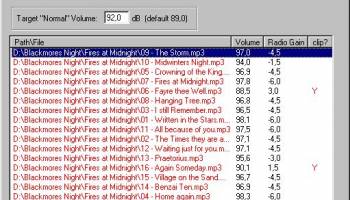
Track mode volume-corrects a mix of unrelated songs to a selected level. MP3Gain calculates the volume level for each song individually. It then corrects each song to make its volume level match the Target Volume.
For example, if you have 3 songs that have volume levels of 86, 91 and 89 dB and you use Track Gain to convert them to a Target Volume of 92 dB, they will all be at approximately 92 dB.
Album mode volume-corrects a collection of related songs (as they would appear on a CD, or "album") relative to other collections of songs. Applying Album gain is like adjusting the volume knob once for each CD you put in your CD player. The overall volume of the album is adjusted to the Target Volume, but the volume differences between the mp3s in the album are preserved.
For example, if you have 3 songs that have volume levels of 86, 91 and 89 dB, then the overall volume of this "album" will probably be around 89 dB. If the Target Volume is set to 92 dB, then when you apply Album Gain MP3Gain will increase the volume of each of these songs by +3 dB.
With Album mode, you want some songs to be noticeably quieter than other songs, just like they are on an album. If you're playing a classical CD, you expect the track with the flute solo to be quieter than the track with the big full-orchestra finale. Album mode allows you to correct an entire album while keeping each song's volume level relative to the other songs.
MP3Gain can also make changes based on the peak amplitude of the mp3, ignoring how loud the mp3 actually sounds to the human ear.
MP3Gain analyzes and adjusts mp3 files so that they have the same volume.
MP3Gain does not just do peak normalization, as many normalizers do. Instead, it does some statistical analysis to determine how loud the file actually sounds to the human ear.
Also, the changes MP3Gain makes are completely lossless. There is no quality lost in the change because the program adjusts the mp3 file directly, without decoding and re-encoding.
It can then adjust the mp3 files so that they all have the same loudness without any quality loss. This way, you don't have to keep reaching for the volume dial on your mp3 player every time it switches to a new song.
MP3Gain operates in two modes, Track and Album:
Track mode volume-corrects a mix of unrelated songs to a selected level. MP3Gain calculates the volume level for each song individually. It then corrects each song to make its volume level match the Target Volume.
For example, if you have 3 songs that have volume levels of 86, 91 and 89 dB and you use Track Gain to convert them to a Target Volume of 92 dB, they will all be at approximately 92 dB.
Album mode volume-corrects a collection of related songs (as they would appear on a CD, or "album") relative to other collections of songs. Applying Album gain is like adjusting the volume knob once for each CD you put in your CD player. The overall volume of the album is adjusted to the Target Volume, but the volume differences between the mp3s in the album are preserved.
For example, if you have 3 songs that have volume levels of 86, 91 and 89 dB, then the overall volume of this "album" will probably be around 89 dB. If the Target Volume is set to 92 dB, then when you apply Album Gain MP3Gain will increase the volume of each of these songs by +3 dB.
With Album mode, you want some songs to be noticeably quieter than other songs, just like they are on an album. If you're playing a classical CD, you expect the track with the flute solo to be quieter than the track with the big full-orchestra finale. Album mode allows you to correct an entire album while keeping each song's volume level relative to the other songs.
MP3Gain can also make changes based on the peak amplitude of the mp3, ignoring how loud the mp3 actually sounds to the human ear.
OS: Windows 2000, Windows 2003, Windows XP, Windows Vista, Windows Vista x64, Windows 7, Windows 7 x64, Windows 8, Windows 8 x64, Windows 10, Windows 10 x64
Add Your Review or 64-bit Compatibility Report
Top Audio File Recorders 64-bit downloads


Ardour 9.2.0

Ardour: Powerful open-source digital audio workstation for recording and editing.
Open Source | $45.00
tags: Ardour, download Ardour, Ardour free download, Music Editor, Master Track, Mix Song, Music, MIDI, Master, Mix


TablEdit 3.06
Powerful tablature editor for guitar, bass, and other string instruments.
Demo | $59.97


LMMS (Linux MultiMedia Studio) x64 25.1.6 Build 4997
FL Studio: Powerful digital audio workstation for music production and mixing.
Demo | $99.00

SoundTap Streaming Audio Recorder Free 11.06
SoundTap Streaming Audio Recorder, capture and convert audio playing on your PC
Freeware
Members area
Top 64-bit Downloads
-
HandBrake 64-bit 1.8.0
x64 freeware download -
MCEBuddy 2.6.3
x64 trialware download -
VLC Media Player x64 3.0.20
x64 open source download -
Media Player Classic -
HomeCinema - 64 bit 2.3.0
x64 open source download -
Ashampoo Cinemagraph 1.0.2
x64 shareware download -
Voxengo Tube Amp x64 2.13
x64 freeware download -
Mp4Gain 1.03
x64 shareware download -
Microsoft Zune Windows
x64 4.8.2345.0
x64 freeware download -
Renoise 64-bit 3.4.4
x64 demo download -
PotPlayer 64bit 1.7.21397
x64 freeware download
Top Downloads
-
FreeTube 0.23.13 Beta
open source download -
Nero 7 Ultra Edition 7.10.1
shareware download -
Little AlterBoy 5.4.1
trialware download -
SAM Broadcaster PRO 2023.3
shareware download -
Syncaila 2.7.9.3
demo download -
DSpeech 1.72
freeware download -
THX TruStudio Pro 3.5.0
freeware download -
DVDFab Free Blu-ray
Ripper 11.0.5.1
freeware download -
Blu-Ray Reauthor
Professional 2.2
commercial download -
Windows Media Player 12 11.2408.4.0
freeware download -
Free HD Video Converter
Factory 28.6
freeware download -
Tidabie Tidal Music
Converter 3.3.1
shareware download -
NoteBurner Amazon Video
Downloader for Windows 2.3.9
shareware download -
Nero Vision Xtra 10.6.10800
trialware download -
TunePat Netflix Video
Downloader 3.5.2
shareware download