
MPad - X 64-bit Download
Popular x64 Tags
- docx to pdf x64 download
- to pdf x64 download
- pdf converter x64 download
- xlsx to pdf x64 download
- pdf to word x64 download
- doc to pdf x64 download
- excel to pdf x64 download
- pdf to text x64 download
- word to jpg x64 download
- convert office x64 download
- powerpoint converter x64 download
- excel converter x64 download
- image converter x64 download
- pdf conversion x64 download
- word to pdf x64 download
- editor x64 download
- rtf to pdf x64 download
- pdf to doc x64 download
- text x64 download
- txt converter x64 download
- word converter x64 download
- convert word to pdf x64 download
- jpg converter x64 download
- office converter x64 download
- txt to pdf x64 download
- htm html converter x64 download
- powerpoint to pdf x64 download
- rtf converter x64 download
- docm to pdf x64 download
- xlsm to pdf x64 download
MPad 1.45
Sponsored links:
license: Freeware
downloads: 33
size: 22.30 MB
updated: 2026-01-25
tags: MPad, download MPad, MPad free download, code editor, text editor, programming editor, editor, code, programming, synatx
Add to Basket

Rickards Software

MPad by Rickards Software is a sophisticated, yet user-friendly text editor designed to cater to the needs of writers, coders, and anyone who works extensively with text. This versatile tool stands out in the crowded market of text editors with its unique blend of simplicity and powerful features.
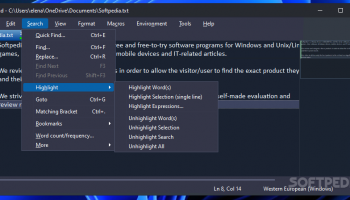
At first glance, MPad impresses with its clean, minimalist interface that prioritizes user experience. The design is intuitive, allowing users to dive right into their work without the distraction of unnecessary clutter. This makes it an excellent choice for those who value a streamlined workspace.
One of MPad's standout features is its robust support for various programming languages. It offers syntax highlighting, auto-completion, and error detection for a wide range of languages, making it an indispensable tool for developers. Whether you're writing HTML, CSS, JavaScript, Python, or any other language, MPad provides a seamless coding experience.
For writers, MPad offers a distraction-free mode that helps maintain focus on the task at hand. This mode strips away all non-essential elements, leaving you with a blank canvas to pour your thoughts onto. Additionally, the software includes a word count feature, which is particularly useful for those working on articles, essays, or manuscripts.
MPad also excels in customization. Users can tailor the editor to their preferences with a variety of themes and font options. This level of personalization ensures that MPad can adapt to different working styles and environments, enhancing overall productivity.
Collaboration is another area where MPad shines. The software includes features that facilitate real-time collaboration, allowing multiple users to work on the same document simultaneously. This is particularly beneficial for teams working on joint projects, as it streamlines the workflow and enhances communication.
Moreover, MPad is equipped with advanced search and replace functionalities, making it easy to navigate through large documents and make quick edits. The software also supports multiple tabs, enabling users to work on several documents at once without losing track of their progress.
Security is a top priority for Rickards Software, and MPad reflects this with its robust encryption features. Users can rest assured that their documents are protected from unauthorized access, providing peace of mind in an era where data security is paramount.
In terms of performance, MPad is lightweight and fast, ensuring that it runs smoothly even on older hardware. This efficiency does not come at the expense of functionality, as the software remains rich in features despite its low resource consumption.
In summary, MPad by Rickards Software is a versatile and powerful text editor that caters to a wide range of users. Its clean interface, extensive language support, customization options, and collaborative features make it a standout choice for both writers and developers. Whether you're crafting a novel, coding a website, or collaborating on a project, MPad provides the tools you need to succeed.
At first glance, MPad impresses with its clean, minimalist interface that prioritizes user experience. The design is intuitive, allowing users to dive right into their work without the distraction of unnecessary clutter. This makes it an excellent choice for those who value a streamlined workspace.
One of MPad's standout features is its robust support for various programming languages. It offers syntax highlighting, auto-completion, and error detection for a wide range of languages, making it an indispensable tool for developers. Whether you're writing HTML, CSS, JavaScript, Python, or any other language, MPad provides a seamless coding experience.
For writers, MPad offers a distraction-free mode that helps maintain focus on the task at hand. This mode strips away all non-essential elements, leaving you with a blank canvas to pour your thoughts onto. Additionally, the software includes a word count feature, which is particularly useful for those working on articles, essays, or manuscripts.
MPad also excels in customization. Users can tailor the editor to their preferences with a variety of themes and font options. This level of personalization ensures that MPad can adapt to different working styles and environments, enhancing overall productivity.
Collaboration is another area where MPad shines. The software includes features that facilitate real-time collaboration, allowing multiple users to work on the same document simultaneously. This is particularly beneficial for teams working on joint projects, as it streamlines the workflow and enhances communication.
Moreover, MPad is equipped with advanced search and replace functionalities, making it easy to navigate through large documents and make quick edits. The software also supports multiple tabs, enabling users to work on several documents at once without losing track of their progress.
Security is a top priority for Rickards Software, and MPad reflects this with its robust encryption features. Users can rest assured that their documents are protected from unauthorized access, providing peace of mind in an era where data security is paramount.
In terms of performance, MPad is lightweight and fast, ensuring that it runs smoothly even on older hardware. This efficiency does not come at the expense of functionality, as the software remains rich in features despite its low resource consumption.
In summary, MPad by Rickards Software is a versatile and powerful text editor that caters to a wide range of users. Its clean interface, extensive language support, customization options, and collaborative features make it a standout choice for both writers and developers. Whether you're crafting a novel, coding a website, or collaborating on a project, MPad provides the tools you need to succeed.
OS: Windows 11, Windows 10 32/64 bit, Windows 8 32/64 bit, Windows 7 32/64 bit
Add Your Review or 64-bit Compatibility Report
Top Text / Document Editors 64-bit downloads


Vim 9.2.0260

A highly configurable text editor built to enable efficient text editing
Open Source
tags: Vim, download Vim, Vim free download, text editor, Unix console, Windows Terminal, console, Unix, script, Terminal


novelWriter 2.8.2
Powerful tool for writers to organize, draft, and publish their novels.
Open Source

CodeNimble 2.5.0
CodeNimble: Streamline your coding workflow with intuitive tools and features.
Open Source


BabelPad 15.1.0.4
Text editor for Win that supports the proper rendering of most complex scripts
Freeware

Members area
Top 64-bit Downloads
-
HWiNFO64 6.28 B4200
x64 freeware download -
GRBackPro Server Backup
x64 11.2.0
x64 shareware download -
Windows 7 x64
x64 trialware download -
EasyTune6 B24.0119.1
x64 freeware download -
XtraTools Professional
x64 26.2.1
x64 shareware download -
DAR 2.7.14
x64 open source download -
BusDog x64 0.2
x64 freeware download -
PhotoRenamer 4.1
x64 freeware download -
Laplink DiskImage
Professional x64 10.0.71
x64 trialware download -
CIB pdf brewer 4.20.0
x64 freeware download
Top Downloads
-
FreeCommander XE
Portable 2026 Build 941
freeware download -
FURY CTRL 2.0.65.0
freeware download -
FMDiff 4.0.5
demo download -
Open Files from XLSX to
XLS 5.2
shareware download -
Shell Tools 2.0.1
freeware download -
Vim 9.2.0260
open source download -
AnyMP4 Data Recovery 1.5.12
shareware download -
PCtransfer 1.0.0.1033
freeware download -
Software to Data
Recovery 5.8.4.1
shareware download -
EaseUS Key Finder 4.1.6 Build 20240910
demo download -
HWiNFO64 6.28 B4200
freeware download -
Music Collection 3.9.7.2
freeware download -
WinFindr 1.9
shareware download -
File Compression 1.0
commercial download -
NirLauncher 1.30.22
freeware download