
NETEagle Xtreme - X 64-bit Download
Popular x64 Tags
- software x64 download
- network x64 download
- download x64 download
- seo x64 download
- rss reader x64 download
- online tv x64 download
- internet x64 download
- freeware x64 download
- free x64 download
- identity management x64 download
- hardware inventory x64 download
- slow pc performance x64 download
- proxy x64 download
- utility x64 download
- password manager x64 download
- satellite tv for pc x64 download
- email x64 download
- password reset x64 download
- security x64 download
- address x64 download
- server x64 download
- web x64 download
- remote control software x64 download
- pages x64 download
- rss x64 download
- password management x64 download
- active directory x64 download
- why is my computer so slow x64 download
- software distribution x64 download
- software inventory x64 download
NETEagle Xtreme 1.00
Sponsored links:
license: Shareware ($15.00)
downloads: 271
size: 1.68 MB
updated: 2007-09-25
tags: optimize modem connection, tweak modem connection, increase download speed, optimize, optimizer, modem
Add to Basket

ThemeSoft Development

NETEagle is an award winning tool that optimizes your modem connection. Your internet connection can be optimized up to 200% or higher by using NETEagle. NETEagle supports all current Windows versions, and works with any internet connection. NETEagle optimizes internet related settings, allowing for faster throughput. NETEagle has been tried and tested on numerous machines and has been found to work over 99% of the time to increase your download speeds.
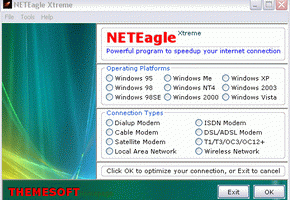
NETEagle is a tool that optimizes your modem connection. Your internet connection can be optimized up to 200% or higher by using NETEagle. NETEagle also makes your dial-up connection more stable and more resistant to hang-up's and disconnects. This means you can download and surf the internet faster than ever before. NETEagle supports all current Windows versions (i.e. Windows 95/98/98SE/ME/2000/XP/2003/Vista), and works with any internet connection like 14.4/28.8/33.6/56 Kb, ISDN, cable, DSL, ADSL, LAN, wireless and satellite modems. No installation or modification needs to be made to your hardware.
NETEagle optimizes Internet/Network related settings on your end of the connection (your PC) as well as several configuration files. However, those are not the only changes made to your computer. NETEagle also allocates a small portion of your computer's memory to the processor to process data coming from and to your modem allowing for faster throughput. NETEagle has been tried and tested on numerous machines and has been found to work over 99% of the time. Increase your download speeds and stop dealing with slow internet connections when playing online games, streaming music, audio and video with NETEagle.
NETEagle is quite easy to use and understand. With a few mouse button clicks and setting changes the application is ready to work. After the settings have been made, you will need to reboot your computer and your computer's modem will be ready to use at optimal performance. Note that it is a program that optimizes your end of the connection, and you will still be dependent on the feed that your ISP provides.
Tweaks done to your system
NETEagle attempts to modify some Windows settings to improve Internet speed, including transfer rates within ICS and the maximum memory allocation to modem. Plus, it performs a comprehensive DNS lookup optimization and tries to increase HTTP request limit, while tweaking TTL, MTU and MSS properties at the same time.
Of course, beginners who experience a hard time trying to figure out these optimizations can always have a look in the help file. Developers have included lots of details on most of the features.
NETEagle is a tool that optimizes your modem connection. Your internet connection can be optimized up to 200% or higher by using NETEagle. NETEagle also makes your dial-up connection more stable and more resistant to hang-up's and disconnects. This means you can download and surf the internet faster than ever before. NETEagle supports all current Windows versions (i.e. Windows 95/98/98SE/ME/2000/XP/2003/Vista), and works with any internet connection like 14.4/28.8/33.6/56 Kb, ISDN, cable, DSL, ADSL, LAN, wireless and satellite modems. No installation or modification needs to be made to your hardware.
NETEagle optimizes Internet/Network related settings on your end of the connection (your PC) as well as several configuration files. However, those are not the only changes made to your computer. NETEagle also allocates a small portion of your computer's memory to the processor to process data coming from and to your modem allowing for faster throughput. NETEagle has been tried and tested on numerous machines and has been found to work over 99% of the time. Increase your download speeds and stop dealing with slow internet connections when playing online games, streaming music, audio and video with NETEagle.
NETEagle is quite easy to use and understand. With a few mouse button clicks and setting changes the application is ready to work. After the settings have been made, you will need to reboot your computer and your computer's modem will be ready to use at optimal performance. Note that it is a program that optimizes your end of the connection, and you will still be dependent on the feed that your ISP provides.
Tweaks done to your system
NETEagle attempts to modify some Windows settings to improve Internet speed, including transfer rates within ICS and the maximum memory allocation to modem. Plus, it performs a comprehensive DNS lookup optimization and tries to increase HTTP request limit, while tweaking TTL, MTU and MSS properties at the same time.
Of course, beginners who experience a hard time trying to figure out these optimizations can always have a look in the help file. Developers have included lots of details on most of the features.
OS: Windows 2000, Windows 2003, Windows XP, Windows Vista, Windows Vista x64
Requirements: Microsoft Internet Explorer 5 or higher
Add Your Review or 64-bit Compatibility Report
Top Other 64-bit downloads


Adobe Flash Player 10 for 64-bit Windows Preview 2
Enables native 64-bit support on Linux operating systems
Freeware


Advanced TCP IP Data Logger 5.1.3 Build 310

Log data from one or more Terminal Servers to disk
Demo | $100.00


Virtual World 4.7.4
An interactive 3D Virtual World chat with live webcam and avatars support.
Commercial | $1 500.00

Skyfiles 4.0
A client for Google Docs which enables folder drag and drop uploading.
Shareware | $29.00


eToolz 4.5.2
A collection of networking tools such as NS-Lookup, Ping, TraceRoute and Whois
Freeware

TeamViewer Portable 15.75.5
Effortlessly connect and control devices remotely with TeamViewer Portable.
Freeware | $32.90

SoftPerfect Connection Emulator 1.9
Imitates network connections with low bandwidth limits, latency and losses.
Shareware | $199.00
tags: packet, delay, loss, latency, WAN, emulator, emulation, software, speed limit, speed, limit, bandwidth, throttling, congestion
Members area
Top 64-bit Downloads
-
Adobe Flash Player 10
for 64-bit Windows Preview 2
x64 freeware download -
SoftPerfect Bandwidth
Manager 3.3.0
x64 shareware download -
Internet Explorer 8 for
Windows Vista 64-bit and
Windows Server 2008
64-bit
x64 freeware download -
SoftPerfect Connection
Emulator 1.9
x64 shareware download -
Angry IP Scanner 64bit 3.9.1
x64 open source download -
WatchFTP x64 4.2.1.0
x64 trialware download -
FileZilla Server 1.8.1
x64 open source download -
Hitman Pro x64 3.8.34.330
x64 trialware download -
Xlight FTP Server
Standart x64 3.9.4.2
x64 trialware download -
AlternaTIFF x64 2.0.8
x64 freeware download
Top Downloads
-
TheWorld Browser 7.0.0.108
freeware download -
MusicFab 1.0.6.6
demo download -
Adobe Flash Player 10
for 64-bit Windows Preview 2
freeware download -
Open With Photoshop 63.0
open source download -
MetaMask for Chrome 13.22.0
open source download -
Web Archives for Opera 7.3.0
open source download -
Dooble 2024.12.31
open source download -
BiglyBT 4.0.0.0
open source download -
VNC for Mac and Linux 7.16.0 (r14)
demo download -
Advanced TCP IP Data
Logger 5.1.3 Build 310
demo download -
Profile Migrator 1.1
trialware download -
Net-SNMP 5.9.1
freeware download -
internet search engines 2.00
freeware download -
Stylebot 1.2.1
freeware download -
BzReader 1.0.13.0
freeware download