
NetPad - X 64-bit Download
Popular x64 Tags
- docx to pdf x64 download
- to pdf x64 download
- pdf converter x64 download
- xlsx to pdf x64 download
- pdf to word x64 download
- doc to pdf x64 download
- excel to pdf x64 download
- pdf to text x64 download
- word to jpg x64 download
- powerpoint converter x64 download
- convert office x64 download
- excel converter x64 download
- image converter x64 download
- pdf conversion x64 download
- word to pdf x64 download
- editor x64 download
- rtf to pdf x64 download
- pdf to doc x64 download
- text x64 download
- txt converter x64 download
- word converter x64 download
- convert word to pdf x64 download
- jpg converter x64 download
- office converter x64 download
- txt to pdf x64 download
- htm html converter x64 download
- powerpoint to pdf x64 download
- rtf converter x64 download
- docm to pdf x64 download
- xlsm to pdf x64 download
NetPad 0.9.1
Sponsored links:
license: Open Source
downloads: 38
size: 280.00 MB
updated: 2025-05-28
tags: NetPad, download NetPad, NetPad free download, C# editor, write script, run script, script, editor, Monaco
Add to Basket

Tareq Imbasher

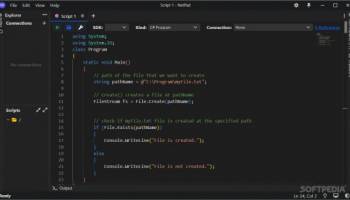
NetPad, developed by Tareq Imbasher, is an innovative and versatile text editor designed to cater to both casual users and developers. This lightweight yet powerful tool is crafted with a user-friendly interface that ensures a seamless experience for anyone looking to manage text files efficiently.
One of the standout features of NetPad is its cross-platform compatibility. Whether you're working on Windows, macOS, or Linux, NetPad ensures a consistent and reliable performance, making it an ideal choice for users who frequently switch between different operating systems. The software's open-source nature also means that it's continually evolving, with contributions from a vibrant community of developers who are committed to enhancing its functionality and usability.
NetPad boasts a rich set of features that make text editing a breeze. The syntax highlighting feature supports a wide range of programming languages, making it an excellent tool for developers who need to write and debug code. This feature not only improves readability but also helps in identifying errors quickly. Additionally, the auto-completion functionality speeds up the coding process by predicting and suggesting code snippets as you type.
For those who work with large text files, NetPad's efficient search and replace functionality is a game-changer. It allows users to quickly locate and modify text, saving valuable time and effort. The software also supports regular expressions, providing advanced search capabilities for more complex text manipulation tasks.
NetPad's minimalist design is another aspect worth mentioning. The clean and clutter-free interface ensures that users can focus on their work without unnecessary distractions. Despite its simplicity, the software does not compromise on customization options. Users can tailor the appearance and behavior of the editor to suit their preferences, from changing themes to configuring keyboard shortcuts.
Collaboration is made easy with NetPad's built-in support for version control systems like Git. This feature is particularly useful for development teams who need to track changes, manage revisions, and collaborate on projects seamlessly. The integration with Git ensures that all changes are documented and can be reverted if necessary, providing an additional layer of security and accountability.
Moreover, NetPad is designed with performance in mind. It is optimized to handle large files and complex operations without slowing down, ensuring a smooth and responsive user experience. This makes it a reliable choice for users who need a robust text editor that can keep up with demanding tasks.
In summary, NetPad by Tareq Imbasher is a highly capable text editor that combines simplicity with powerful features. Its cross-platform compatibility, extensive customization options, and robust performance make it a valuable tool for both everyday text editing and professional development work. Whether you're a writer, a coder, or someone who frequently works with text files, NetPad is a software solution that promises to enhance your productivity and streamline your workflow.
One of the standout features of NetPad is its cross-platform compatibility. Whether you're working on Windows, macOS, or Linux, NetPad ensures a consistent and reliable performance, making it an ideal choice for users who frequently switch between different operating systems. The software's open-source nature also means that it's continually evolving, with contributions from a vibrant community of developers who are committed to enhancing its functionality and usability.
NetPad boasts a rich set of features that make text editing a breeze. The syntax highlighting feature supports a wide range of programming languages, making it an excellent tool for developers who need to write and debug code. This feature not only improves readability but also helps in identifying errors quickly. Additionally, the auto-completion functionality speeds up the coding process by predicting and suggesting code snippets as you type.
For those who work with large text files, NetPad's efficient search and replace functionality is a game-changer. It allows users to quickly locate and modify text, saving valuable time and effort. The software also supports regular expressions, providing advanced search capabilities for more complex text manipulation tasks.
NetPad's minimalist design is another aspect worth mentioning. The clean and clutter-free interface ensures that users can focus on their work without unnecessary distractions. Despite its simplicity, the software does not compromise on customization options. Users can tailor the appearance and behavior of the editor to suit their preferences, from changing themes to configuring keyboard shortcuts.
Collaboration is made easy with NetPad's built-in support for version control systems like Git. This feature is particularly useful for development teams who need to track changes, manage revisions, and collaborate on projects seamlessly. The integration with Git ensures that all changes are documented and can be reverted if necessary, providing an additional layer of security and accountability.
Moreover, NetPad is designed with performance in mind. It is optimized to handle large files and complex operations without slowing down, ensuring a smooth and responsive user experience. This makes it a reliable choice for users who need a robust text editor that can keep up with demanding tasks.
In summary, NetPad by Tareq Imbasher is a highly capable text editor that combines simplicity with powerful features. Its cross-platform compatibility, extensive customization options, and robust performance make it a valuable tool for both everyday text editing and professional development work. Whether you're a writer, a coder, or someone who frequently works with text files, NetPad is a software solution that promises to enhance your productivity and streamline your workflow.
OS: Windows 11, Windows 10 64 bit
Add Your Review or 64-bit Compatibility Report
Top Text / Document Editors 64-bit downloads


WinHex 21.6
Powerful hex editor and data recovery tool for digital forensics and analysis.
Demo | $156.90

TeXstudio 4.9.2
Powerful LaTeX editor with intuitive features for seamless document creation.
Open Source

Vim 9.2.0033

A highly configurable text editor built to enable efficient text editing
Open Source
tags: Vim, download Vim, Vim free download, text editor, Unix console, Windows Terminal, console, Unix, script, Terminal


EmEditor Professional 26.0.2
Powerful text editor with advanced features for programmers and writers.
Trialware | $60.00

CodeNimble 2.5.0
CodeNimble: Streamline your coding workflow with intuitive tools and features.
Open Source


EditPlus 6.1 Build 0836
EditPlus: A versatile text editor for coding, markup, and text editing.
Trialware | $35.00


Geany 2.1
Lightweight IDE with powerful features for efficient coding and project management.
Open Source
Members area
Top 64-bit Downloads
-
Windows 10 x64 22H2
x64 trialware download -
SoftPerfect RAM Disk 26.2
x64 shareware download -
XtraTools Professional
x64 26.2.1
x64 shareware download -
HWMonitor (64-bit) 1.53
x64 freeware download -
Windows 7 x64
x64 trialware download -
Lenovo Vantage 10.2001.10.0
x64 freeware download -
Windows 8 x64 RTM Build 9200
x64 trialware download -
Ashampoo WinOptimizer
FREE 26.00.12
x64 freeware download -
7-Zip (x64 bit) 24.07
x64 open source download -
BestSync Portable x64 2024 (19.0.1.5)
x64 trialware download
Top Downloads
-
FreeCommander XE 2026 Build 941
shareware download -
Windows 10 x64 22H2
trialware download -
Windows 7 Service Pack 1 7601.17514.1011
freeware download -
FreeCommander XE
Portable 2026 Build 941
freeware download -
Dr. Hardware 2026 26.0.0
shareware download -
Thaiphoon Burner 17.4.1.2
freeware download -
RecoveryRobot Memory
Card Recovery 1.3.3
shareware download -
Revo Uninstaller 2.00
freeware download -
BIOS Agent Plus 2.2019.1.31
demo download -
Caffeine 1.98
freeware download -
Qemu Simple Boot 1.3
freeware download -
DirPrintOK 7.52
freeware download -
TweakNow WinSecret 7.9.8 Plus
trialware download -
SoftPerfect RAM Disk 26.2
shareware download -
Don't Sleep 9.99
freeware download