
OpenShot Video Editor - X 64-bit Download
Popular x64 Tags
- video x64 download
- video converter x64 download
- avi x64 download
- internet tv x64 download
- divx x64 download
- dvd x64 download
- online tv x64 download
- mov x64 download
- mpeg x64 download
- converter x64 download
- xvid x64 download
- 3gp converter x64 download
- psp x64 download
- download x64 download
- ipod x64 download
- mp4 x64 download
- wmv x64 download
- ipod video x64 download
- dvd ripper x64 download
- dvd to 3gp x64 download
- dvd to ipod x64 download
- swf x64 download
- dvd to psp x64 download
- 3gp x64 download
- asf x64 download
- iphone x64 download
- dat x64 download
- mpg x64 download
- video to ipod x64 download
- flv x64 download
OpenShot Video Editor 3.5.0
Sponsored links:
license: Open Source
downloads: 193
size: 208.00 MB
updated: 2026-03-21
tags: OpenShot Video Editor, download OpenShot Video Editor, OpenShot Video Editor free download, video production, create slideshow, 3D title, editor, transition, effect, frame
Add to Basket

OpenShot Studios LLC

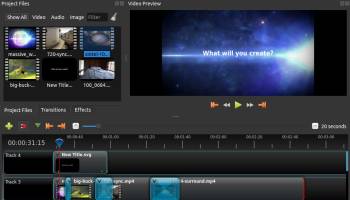
OpenShot Video Editor is designed to be an easy to use, quick to learn, and surprisingly powerful video editor. Take a quick look at some of our most popular features and capabilities.
OpenShot supports the following operating systems: Linux (most distributions are supported), Windows (version 7, 8, and 10+), and OS X (version 10.9+). Project files are also cross-platform, meaning you can save a video project in one OS, and open it on another. All video editing software features are available on all platforms. Based on the powerful FFmpeg library, OpenShot can read and write most video and image formats. For a full list of supported formats, see the FFmpeg project. OpenShot's export dialog defaults to some of the more common formats, but with the advanced tab, you can use any FFmpeg format.
OpenShot comes with a powerful key frame animation framework, capable of an unlimited number of key frames and animation possibilities. Key frames interpolation mode can be quadratic bezier curves, linear, or constant, which determines how the animated values are calculated.
Integration with the user's desktop is a key feature of OpenShot. Native file browsers, window borders, and full drag and drop support with the native file system. Getting started is as easy as dragging files into OpenShot from your favorite file manager.
Tracks are used to layer images, videos, and audio in a project. You can create as many layers as needed, such as watermarks, background audio tracks, background videos, etc... Any transparency will show through the layer below it. Tracks can also be moved up, down, or locked.
Clips on the timeline can be adjusted in many ways, including scaling, trimming, rotation, alpha, snapping, and adjusting X,Y location. These properties can also be animated over time with just a few clicks! You can also use our transform tool to interactively resize clips.
Over 400 transitions are included in OpenShot, which lets you gradually fade from one clip to another. The quickness and sharpness of the transitions can also be adjusted using keyframes (if needed). Overlapping two clips will create a new transition automatically.
When arranging clips in a video project, images on the higher tracks/layers will be displayed on top, and the lower tracks will be displayed behind them. Much like a stack of paper, items on top cover up items below them. And if you cut any holes out (i.e. transparency) the lower images will show though.
Over 40 vector title templates are included with OpenShot, which makes adding titles to your project fun and easy. You can also create your own SVG vector titles, and use those as templates instead. Quickly adjust the font, color, and text of your titles in our built-in title editor.
Render amazing 3D animations inside OpenShot, powered by the wonderful, open-source Blender application. OpenShot comes with more than 20 animations, and lets you adjust colors, sizes, length, text, and many render properties (such as reflectivity, bevel, extrude, and more).
OpenShot has many great audio editing features built-in, such as displaying waveforms on the timeline, or even rendering the waveform as part of your video. You can also split the audio from your video clip, and adjust each audio channel individually.
OpenShot includes many video effects (with more on the way). Drag a video effect onto your clip, and adjust it's properties (many which can be animated). Adjust brightness, gamma, hue, greyscale, chroma key, and much more! Combined with transitions, animation, and time control, OpenShot is an extremely powerful video editor.
OpenShot supports the following operating systems: Linux (most distributions are supported), Windows (version 7, 8, and 10+), and OS X (version 10.9+). Project files are also cross-platform, meaning you can save a video project in one OS, and open it on another. All video editing software features are available on all platforms. Based on the powerful FFmpeg library, OpenShot can read and write most video and image formats. For a full list of supported formats, see the FFmpeg project. OpenShot's export dialog defaults to some of the more common formats, but with the advanced tab, you can use any FFmpeg format.
OpenShot comes with a powerful key frame animation framework, capable of an unlimited number of key frames and animation possibilities. Key frames interpolation mode can be quadratic bezier curves, linear, or constant, which determines how the animated values are calculated.
Integration with the user's desktop is a key feature of OpenShot. Native file browsers, window borders, and full drag and drop support with the native file system. Getting started is as easy as dragging files into OpenShot from your favorite file manager.
Tracks are used to layer images, videos, and audio in a project. You can create as many layers as needed, such as watermarks, background audio tracks, background videos, etc... Any transparency will show through the layer below it. Tracks can also be moved up, down, or locked.
Clips on the timeline can be adjusted in many ways, including scaling, trimming, rotation, alpha, snapping, and adjusting X,Y location. These properties can also be animated over time with just a few clicks! You can also use our transform tool to interactively resize clips.
Over 400 transitions are included in OpenShot, which lets you gradually fade from one clip to another. The quickness and sharpness of the transitions can also be adjusted using keyframes (if needed). Overlapping two clips will create a new transition automatically.
When arranging clips in a video project, images on the higher tracks/layers will be displayed on top, and the lower tracks will be displayed behind them. Much like a stack of paper, items on top cover up items below them. And if you cut any holes out (i.e. transparency) the lower images will show though.
Over 40 vector title templates are included with OpenShot, which makes adding titles to your project fun and easy. You can also create your own SVG vector titles, and use those as templates instead. Quickly adjust the font, color, and text of your titles in our built-in title editor.
Render amazing 3D animations inside OpenShot, powered by the wonderful, open-source Blender application. OpenShot comes with more than 20 animations, and lets you adjust colors, sizes, length, text, and many render properties (such as reflectivity, bevel, extrude, and more).
OpenShot has many great audio editing features built-in, such as displaying waveforms on the timeline, or even rendering the waveform as part of your video. You can also split the audio from your video clip, and adjust each audio channel individually.
OpenShot includes many video effects (with more on the way). Drag a video effect onto your clip, and adjust it's properties (many which can be animated). Adjust brightness, gamma, hue, greyscale, chroma key, and much more! Combined with transitions, animation, and time control, OpenShot is an extremely powerful video editor.
OS: Windows 11, Windows 10 32/64 bit, Windows 8 32/64 bit, Windows 7 32/64 bit
Add Your Review or 64-bit Compatibility Report
Top Video Tools 64-bit downloads


VLC Media Player x64 3.0.20
VLC x64 is a free and open source multimedia 64bit player for Windows x64
Open Source

Screenbits 9.13.1.0
Screenbits: High-quality screen recording with intuitive controls and features.
Trialware

4Videosoft MTS Converter 6.2.22
Convert video to audio or convert audio to AAC, AC3 , AIFF, AMR, AU, and more
Shareware | $16.16

MonitorTest 4.0 Build 1002
Comprehensive tool for testing and calibrating monitor performance.
Trialware

Video Jaguar 1.0
Video Jaguar is the world's easiest video ad maker for businesses and agencies.
Shareware | $8.99

CamStudio 2.7.4 r354
You can use it to create demonstration videos for any software program
Open Source


PotPlayer 64bit 1.7.21397
A comprehensive video and audio player, that also supports TV channels
Freeware


VideoPad Free Movie and Video Editor 18.16
Free Video Editor and Movie Making Software for Windows anyone can use.
Freeware
tags: video editor, free video editor, movie maker, free movie maker, video editing, video editing software, free video editing software, free movie making software, free film editing, video editing software free pc, best video editing apps free, video cutting software mac, video production software, windows video editor, open source video editor, video and audio editing software, free video editing apps for pc, video capture and editing software, video and audio editor
Members area
Top 64-bit Downloads
-
Media Player Classic -
HomeCinema - 64 bit 2.3.0
x64 open source download -
VLC Media Player x64 3.0.20
x64 open source download -
MCEBuddy 2.6.3
x64 trialware download -
PotPlayer 64bit 1.7.21397
x64 freeware download -
GUITAR RIG 5 PRO 7.0.2
x64 demo download -
Voxengo Stereo Touch x64 2.17
x64 freeware download -
Voxengo Crunchessor x64 2.19
x64 demo download -
Devastor x64 2.3.2
x64 demo download -
Adobe PhotoShop CC x64 2024 25.9.1
x64 trialware download -
Blue Cat's Triple EQ x64 4.45
x64 freeware download
Top Downloads
-
FreeTube 0.23.15 Beta
open source download -
Little AlterBoy 5.4.1
trialware download -
Auremo 0.24.9
open source download -
Syrah 23.07.0.50310
trialware download -
ft2-clone 2.12
open source download -
Screenbox 0.18.1
open source download -
Nero 7 Ultra Edition 7.10.1
shareware download -
VLC Media Player x64 3.0.20
open source download -
Screenbits 9.13.1.0
trialware download -
Cyclop 1.3.7
demo download -
Melodics 5.0.139.0
demo download -
Media Player Classic -
HomeCinema - 64 bit 2.3.0
open source download -
PlayIt Live 2.17.2.5046
shareware download -
FineCut 1.0.2
demo download -
MCEBuddy 2.6.3
trialware download