
PhotoPad Photo and Image Editor - X 64-bit Download
Popular x64 Tags
- photo editor x64 download
- software x64 download
- image editor x64 download
- image editing x64 download
- photos x64 download
- photoshop x64 download
- color x64 download
- design x64 download
- jpeg x64 download
- editor x64 download
- plugin x64 download
- image enhancement x64 download
- exif x64 download
- watermark x64 download
- rotate x64 download
- batch x64 download
- pictures x64 download
- graphics x64 download
- image x64 download
- digital camera x64 download
- photo x64 download
- graphic x64 download
- images x64 download
- resize x64 download
- paint x64 download
- camera x64 download
- digital x64 download
- digital imaging x64 download
- picture x64 download
- jpg x64 download
PhotoPad Photo and Image Editor 15.00 Beta
Sponsored links:
license: Shareware ($34.99)
downloads: 46
size: 3.10 MB
updated: 2026-01-21
tags: PhotoPad Photo and Image Editor, download PhotoPad Photo and Image Editor, PhotoPad Photo and Image Editor free download, image editor, edit photo, photo editor, crop, flip, rotate, collage
Add to Basket

NCH Software

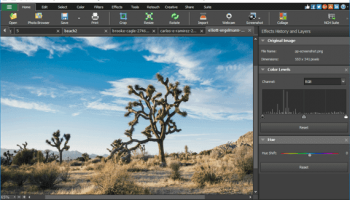
PhotoPad Photo and Image Editor, developed by NCH Software, is a versatile and user-friendly photo editing tool designed to cater to both novice and experienced users. This software offers a comprehensive suite of features that enable users to enhance, edit, and transform their photos with ease.
One of the standout aspects of PhotoPad is its intuitive interface, which makes navigating through its myriad of tools and options a breeze. Whether you're looking to perform basic edits like cropping, resizing, and rotating, or more advanced adjustments such as color correction, exposure tweaking, and applying filters, PhotoPad has you covered. The software supports a wide range of image formats, ensuring compatibility with virtually any photo you wish to edit.
PhotoPad excels in its array of creative tools. Users can explore artistic effects, add text and captions, and incorporate clipart and stickers to personalize their images. The software also includes powerful retouching tools, allowing for blemish removal, red-eye correction, and even the ability to seamlessly merge multiple photos into panoramas or collages.
For those who enjoy experimenting with their photos, PhotoPad offers a variety of filters and effects, ranging from vintage and sepia tones to modern, high-contrast looks. The software's layer-based editing system provides flexibility and precision, enabling users to work on specific parts of an image without affecting the whole picture.
One of the key strengths of PhotoPad is its accessibility. The software is lightweight and runs smoothly on both Windows and Mac operating systems, making it an excellent choice for users with varying hardware capabilities. Additionally, NCH Software offers a free version of PhotoPad, which includes a robust set of features, with the option to upgrade to a premium version for access to more advanced tools and functionalities.
PhotoPad also integrates well with other NCH Software products, allowing users to expand their creative toolkit. For instance, users can easily import images from NCH's video editing software or export edited photos to their slideshow creator.
In summary, PhotoPad Photo and Image Editor by NCH Software is a powerful yet accessible photo editing solution that caters to a wide range of user needs. Its blend of basic and advanced features, coupled with an intuitive interface and cross-platform compatibility, makes it a valuable tool for anyone looking to enhance their digital photos. Whether you're a hobbyist looking to touch up family photos or a professional in need of a reliable editing tool, PhotoPad offers the functionality and ease-of-use to help you achieve stunning results.
One of the standout aspects of PhotoPad is its intuitive interface, which makes navigating through its myriad of tools and options a breeze. Whether you're looking to perform basic edits like cropping, resizing, and rotating, or more advanced adjustments such as color correction, exposure tweaking, and applying filters, PhotoPad has you covered. The software supports a wide range of image formats, ensuring compatibility with virtually any photo you wish to edit.
PhotoPad excels in its array of creative tools. Users can explore artistic effects, add text and captions, and incorporate clipart and stickers to personalize their images. The software also includes powerful retouching tools, allowing for blemish removal, red-eye correction, and even the ability to seamlessly merge multiple photos into panoramas or collages.
For those who enjoy experimenting with their photos, PhotoPad offers a variety of filters and effects, ranging from vintage and sepia tones to modern, high-contrast looks. The software's layer-based editing system provides flexibility and precision, enabling users to work on specific parts of an image without affecting the whole picture.
One of the key strengths of PhotoPad is its accessibility. The software is lightweight and runs smoothly on both Windows and Mac operating systems, making it an excellent choice for users with varying hardware capabilities. Additionally, NCH Software offers a free version of PhotoPad, which includes a robust set of features, with the option to upgrade to a premium version for access to more advanced tools and functionalities.
PhotoPad also integrates well with other NCH Software products, allowing users to expand their creative toolkit. For instance, users can easily import images from NCH's video editing software or export edited photos to their slideshow creator.
In summary, PhotoPad Photo and Image Editor by NCH Software is a powerful yet accessible photo editing solution that caters to a wide range of user needs. Its blend of basic and advanced features, coupled with an intuitive interface and cross-platform compatibility, makes it a valuable tool for anyone looking to enhance their digital photos. Whether you're a hobbyist looking to touch up family photos or a professional in need of a reliable editing tool, PhotoPad offers the functionality and ease-of-use to help you achieve stunning results.
OS: Windows 11, Windows 10 32/64 bit, Windows 8 32/64 bit, Windows 7 32/64 bit
Add Your Review or 64-bit Compatibility Report
Top Editors 64-bit downloads


CorelDRAW X5 2025 26.2.0.29
Versatile graphic design suite for vector illustration and layout creation.
Trialware | $30.75


Infix PDF Editor 7.7.0
Edit PDFs like a word processor - use tabs, spellcheck, find & replace...
Demo | $99.00


Gimp for x64 Windows 2.10.38
App for image manipulation which comes bundled with many options and tools
Open Source

FreeFotoWorks 2026 26.0.8

Photo editing software for beginners and pro. All well-known photo effects.
Freeware


Logo Design Studio Pro 1.7.3
Everything you need to become your own logo designer!
Shareware | $39.99

Members area
Top 64-bit Downloads
-
cPicture (x64 bit) 4.1
x64 freeware download -
PhotoFiltre 11.6.1
x64 freeware download -
VanceAI 1.0.0.7
x64 shareware download -
Gimp for x64 Windows 2.10.38
x64 open source download -
AcroPDF 6.2
x64 shareware download -
Rocket Propulsion
Analysis Lite x64 1.2.0
x64 freeware download -
Portable PhotoFiltre 11.6.1
x64 freeware download -
DirectMath x64 3.2.3
x64 freeware download -
Spectral Studio 1.0
x64 shareware download -
SiBELia x64 3.0.6
x64 open source download
Top Downloads
-
CorelDRAW X5 2025 26.2.0.29
trialware download -
Fotosizer 3.21.0.594
freeware download -
cPicture (x64 bit) 4.1
freeware download -
MSU Subtitle Remover
VirtualDub plugin 3.0beta2
freeware download -
PhotoFiltre 11.6.1
freeware download -
TinyPDF 3.00
freeware download -
JPEG to PDF Converter 1.1
freeware download -
VanceAI 1.0.0.7
shareware download -
Zeus 1.5
freeware download -
Morpheus Photo Warper 3.17
shareware download -
Tourweaver Professional 7.98.181016
trialware download -
Glise 1.7.1
shareware download -
PDFBat PDF to Word
Converter 9.8
shareware download -
AcroPDF 6.2
shareware download -
PDF Converter for
Windows 8 1.01
shareware download