
Rename Expert - X 64-bit Download
Popular x64 Tags
- files x64 download
- file manager x64 download
- zip x64 download
- tool x64 download
- software x64 download
- ntfs x64 download
- remove x64 download
- disk x64 download
- free x64 download
- duplicate x64 download
- copy x64 download
- folder x64 download
- utility x64 download
- data recovery software x64 download
- undelete x64 download
- erase x64 download
- directory x64 download
- backup x64 download
- file x64 download
- hard x64 download
- data recovery x64 download
- delete x64 download
- recovery x64 download
- find x64 download
- file recovery x64 download
- unerase x64 download
- recover x64 download
- mp3 x64 download
- space x64 download
- search x64 download
Rename Expert 5.31.7
Sponsored links:
license: Demo
downloads: 319
size: 11.40 MB
updated: 2024-08-27
tags: Rename Expert, download Rename Expert, Rename Expert free download, rename file, file renamer, rename folder, rename, renamer, replace, changer
Buy Now
Add to Basket

Gillmeister Software

**Rename Expert by Gillmeister Software: A Comprehensive Solution for Efficient File and Folder Renaming**
Rename Expert, developed by Gillmeister Software, stands out as a robust and versatile tool designed to streamline the often tedious task of renaming files and folders. This software is engineered to cater to both individual users and businesses, offering a plethora of features that enhance productivity and ensure consistency across file management tasks.
**User-Friendly Interface and Intuitive Design**
One of the most striking aspects of Rename Expert is its user-friendly interface. The software boasts a clean, intuitive design that makes it accessible to users of all skill levels. Whether you're a novice or a seasoned IT professional, navigating through its features is straightforward and hassle-free. The well-organized layout ensures that all functions are easily accessible, reducing the learning curve and allowing users to get started quickly.
**Powerful Renaming Capabilities**
Rename Expert excels in its core functionality – renaming files and folders. It supports a wide range of renaming operations, from simple tasks like changing file extensions to more complex actions such as adding sequential numbers, inserting dates, or even using metadata for renaming. The software's ability to handle large batches of files simultaneously is a significant time-saver, making it ideal for projects that involve extensive file management.
**Advanced Features for Precision and Flexibility**
The software is equipped with advanced features that provide users with precision and flexibility. For instance, the use of regular expressions allows for highly customized renaming rules, catering to specific needs and scenarios. Additionally, Rename Expert supports the renaming of files based on their content, such as ID3 tags for music files or EXIF data for images, ensuring that your files are named accurately and meaningfully.
**Automation and Scripting**
For users who require automation, Rename Expert offers scripting capabilities that can automate repetitive tasks. This feature is particularly beneficial for businesses that need to maintain a consistent naming convention across large volumes of files. By creating and saving renaming profiles, users can apply the same set of rules to different batches of files with ease, ensuring uniformity and reducing the risk of errors.
**Compatibility and Integration**
Rename Expert is designed to integrate seamlessly with various file systems and supports a wide range of file formats. It is compatible with Windows operating systems and can handle files stored on local drives, network drives, and even cloud storage services. This broad compatibility ensures that users can manage their files regardless of where they are stored.
**Safety and Reliability**
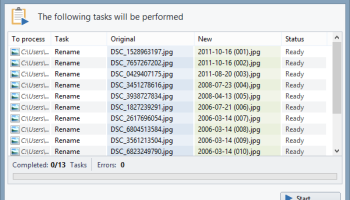
Safety is a paramount concern when renaming files, and Rename Expert addresses this with features like preview and undo options. Before committing to changes, users can preview the new file names, ensuring that the renaming rules have been applied correctly. In case of any mistakes, the undo function allows users to revert to the original file names, providing peace of mind and safeguarding against data loss.
**Conclusion**
Rename Expert by Gillmeister Software is a powerful, efficient, and reliable tool for anyone looking to streamline their file and folder renaming processes. Its combination of user-friendly design, advanced features, and robust performance makes it a standout choice in the realm of file management software. Whether you're managing a personal photo collection or overseeing a large-scale business project, Rename Expert provides the tools you need to keep your files organized and consistently named.
Rename Expert, developed by Gillmeister Software, stands out as a robust and versatile tool designed to streamline the often tedious task of renaming files and folders. This software is engineered to cater to both individual users and businesses, offering a plethora of features that enhance productivity and ensure consistency across file management tasks.
**User-Friendly Interface and Intuitive Design**
One of the most striking aspects of Rename Expert is its user-friendly interface. The software boasts a clean, intuitive design that makes it accessible to users of all skill levels. Whether you're a novice or a seasoned IT professional, navigating through its features is straightforward and hassle-free. The well-organized layout ensures that all functions are easily accessible, reducing the learning curve and allowing users to get started quickly.
**Powerful Renaming Capabilities**
Rename Expert excels in its core functionality – renaming files and folders. It supports a wide range of renaming operations, from simple tasks like changing file extensions to more complex actions such as adding sequential numbers, inserting dates, or even using metadata for renaming. The software's ability to handle large batches of files simultaneously is a significant time-saver, making it ideal for projects that involve extensive file management.
**Advanced Features for Precision and Flexibility**
The software is equipped with advanced features that provide users with precision and flexibility. For instance, the use of regular expressions allows for highly customized renaming rules, catering to specific needs and scenarios. Additionally, Rename Expert supports the renaming of files based on their content, such as ID3 tags for music files or EXIF data for images, ensuring that your files are named accurately and meaningfully.
**Automation and Scripting**
For users who require automation, Rename Expert offers scripting capabilities that can automate repetitive tasks. This feature is particularly beneficial for businesses that need to maintain a consistent naming convention across large volumes of files. By creating and saving renaming profiles, users can apply the same set of rules to different batches of files with ease, ensuring uniformity and reducing the risk of errors.
**Compatibility and Integration**
Rename Expert is designed to integrate seamlessly with various file systems and supports a wide range of file formats. It is compatible with Windows operating systems and can handle files stored on local drives, network drives, and even cloud storage services. This broad compatibility ensures that users can manage their files regardless of where they are stored.
**Safety and Reliability**
Safety is a paramount concern when renaming files, and Rename Expert addresses this with features like preview and undo options. Before committing to changes, users can preview the new file names, ensuring that the renaming rules have been applied correctly. In case of any mistakes, the undo function allows users to revert to the original file names, providing peace of mind and safeguarding against data loss.
**Conclusion**
Rename Expert by Gillmeister Software is a powerful, efficient, and reliable tool for anyone looking to streamline their file and folder renaming processes. Its combination of user-friendly design, advanced features, and robust performance makes it a standout choice in the realm of file management software. Whether you're managing a personal photo collection or overseeing a large-scale business project, Rename Expert provides the tools you need to keep your files organized and consistently named.
Homepage: Rename Expert
OS: Windows 11, Windows Server 2022, Windows Server 2019, Windows Server 2016, Windows 10 32/64 bit, Windows Server 2012, Windows 8 32/64 bit, Windows 7 32/64 bit, Windows Vista
Add Your Review or 64-bit Compatibility Report
Top File & Disk Management 64-bit downloads


FreeCommander XE Portable 2026 Build 941
FreeCommander XE Portable: A versatile file manager with dual-pane interface.
Freeware

Open Files from XLSX to XLS 5.2
Convert XLSX to XLS with Open files from XLSX to XLS program
Shareware | $29.00

WinFindr 1.8
Effortlessly locate files and folders with WinFindr's intuitive search.
Shareware | $23.00


FileMyster 1.2.5
Admin tool for seamless automatic sychronization between folders and computers
Freeware


Pitara 5.0.9574.42157

Pitara: Your all-in-one solution for seamless project management and collaboration.
Open Source

tail for Windows 2.1
tail for Windows is a UNIX/Linux like tail DOS Command for Windows.
Shareware | $29.99

Members area
Top 64-bit Downloads
-
HWiNFO64 6.28 B4200
x64 freeware download -
GRBackPro Server Backup
x64 11.2.0
x64 shareware download -
Windows 7 x64
x64 trialware download -
EasyTune6 B24.0119.1
x64 freeware download -
XtraTools Professional
x64 26.2.1
x64 shareware download -
SoftPerfect RAM Disk 26.2
x64 shareware download -
7z SFX Builder x64 2.1
x64 freeware download -
BusDog x64 0.2
x64 freeware download -
PhotoRenamer 4.1
x64 freeware download -
DBX Converter 2.0
x64 shareware download
Top Downloads
-
FreeCommander XE
Portable 2026 Build 941
freeware download -
Open Files from XLSX to
XLS 5.2
shareware download -
FMDiff 4.0.5
demo download -
Vim 9.2.0198
open source download -
Shell Tools 2.0.1
freeware download -
WinFindr 1.8
shareware download -
Caffeine 1.98
freeware download -
AnyMP4 Data Recovery 1.5.12
shareware download -
Software to Data
Recovery 5.8.4.1
shareware download -
Clipstory 1.0
shareware download -
Tags4Docs 1.1
shareware download -
Nomad.NET 3.2.0.2890
freeware download -
FileMyster 1.2.5
freeware download -
Music Collection 3.9.7.1
freeware download -
File Compression 1.0
commercial download