
SubCreator - X 64-bit Download
Popular x64 Tags
- video x64 download
- video converter x64 download
- avi x64 download
- internet tv x64 download
- divx x64 download
- dvd x64 download
- online tv x64 download
- mov x64 download
- mpeg x64 download
- converter x64 download
- xvid x64 download
- 3gp converter x64 download
- psp x64 download
- download x64 download
- ipod x64 download
- mp4 x64 download
- wmv x64 download
- ipod video x64 download
- dvd ripper x64 download
- dvd to 3gp x64 download
- dvd to ipod x64 download
- swf x64 download
- dvd to psp x64 download
- 3gp x64 download
- asf x64 download
- iphone x64 download
- dat x64 download
- mpg x64 download
- video to ipod x64 download
- flv x64 download
SubCreator 1.4.0.150
Sponsored links:

Radek Strugalski

This application supports editing and creation of subtitles from scratch or basing on existing text script. The application handles most common subtitle formats like time format, frame format, SRT, SSA, SAMI or MPL2. It offers many additional features supporting timing processing, converting and synchronization. An interface focuses on excessive use of keyboard to maximize the speed of timing work. Default subtitle resolution is 0.1s what should be sufficient in most cases.
MAIN FEATURES:
Keyboard handling
To speed up the process of creating a subtitle almost all functions for video playback, timing and processing have been assigned a keyboard shortcut. Of course all mentioned functions have corresponding menu entries but it is strongly recommended to use the keyboard. SubCreator is designed in a way that allows you simultaneous video playback control and script typing by use of your keyboard.
Drag and drop capabilities
You can open a script or movie file in two ways:
Drag and drop the file or files you want to open onto a SubCreator icon. Yes! You can drag both video and script files at once! The program should properly distinguish file types. This also applies to any Open-dialog in SubCreator. SubCreator can open and recognize supported file formats at the same time. The files should be placed in one directory, however.
Drag and drop any supported file or files onto the main application window. Rules are the same as mentioned above.
Playing movies
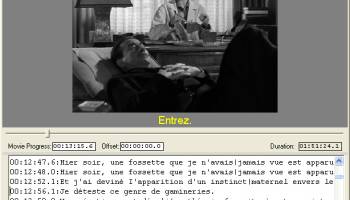
All formats supported by DirectShow or Windows Media Player are also supported by SubCreator. A movie can be played forward and (fast) backward*, skipped forward and backward by a predefined amount of time or to a specified time directly. The movie is viewed in the upper part of the application window. The lower part is occupied by a text editor.
Script editing
SubCreator works using its own internal format, which is very similar to the common time format. But in case of SubCreator, the timestamp format is adjustable.
You can use one of four accessible formats:
H:MM:SS
HH:MM:SS
H:MM:SS.T
HH:MM:SS.T
As you can see the maximum time resolution you can reach is 0.1 sec. which is quite sufficient in most cases.
Each line of text can have its starting time defined. There is no possibility to directly set the stop time of line. Duration of a take is determined by the default subtitle duration or by the next take start time. With this solution it is quite easy to make a first rough timing of any given movie because you are not disturbed by the need of setting the exact stop time. Therefore, the first pass of timing can be done really fast ? on the fly in most cases. Later you can adjust each subtitle duration by putting special lines after them. Read more details in the Practical Use chapter.
All lines without timestamps are treated as comments, which belong to the first line with timestamp placed above. Of course lines without timestamps at the beginning of the file are also treated like comments.
The text editor offers standard functions as seen in other popular text editors like:
copying/pasting,
finding text,
replacing text,
multilevel undo.
Importing various types of subtitle scripts:
Time Format,
Frame Format,
MPL2 Format,
SRT Format,
SSA Format,
SAMI Format.
After opening and loading file you will be asked to convert the file to a native SubCreator format. This is the only method of importing files.
MAIN FEATURES:
Keyboard handling
To speed up the process of creating a subtitle almost all functions for video playback, timing and processing have been assigned a keyboard shortcut. Of course all mentioned functions have corresponding menu entries but it is strongly recommended to use the keyboard. SubCreator is designed in a way that allows you simultaneous video playback control and script typing by use of your keyboard.
Drag and drop capabilities
You can open a script or movie file in two ways:
Drag and drop the file or files you want to open onto a SubCreator icon. Yes! You can drag both video and script files at once! The program should properly distinguish file types. This also applies to any Open-dialog in SubCreator. SubCreator can open and recognize supported file formats at the same time. The files should be placed in one directory, however.
Drag and drop any supported file or files onto the main application window. Rules are the same as mentioned above.
Playing movies
All formats supported by DirectShow or Windows Media Player are also supported by SubCreator. A movie can be played forward and (fast) backward*, skipped forward and backward by a predefined amount of time or to a specified time directly. The movie is viewed in the upper part of the application window. The lower part is occupied by a text editor.
Script editing
SubCreator works using its own internal format, which is very similar to the common time format. But in case of SubCreator, the timestamp format is adjustable.
You can use one of four accessible formats:
H:MM:SS
HH:MM:SS
H:MM:SS.T
HH:MM:SS.T
As you can see the maximum time resolution you can reach is 0.1 sec. which is quite sufficient in most cases.
Each line of text can have its starting time defined. There is no possibility to directly set the stop time of line. Duration of a take is determined by the default subtitle duration or by the next take start time. With this solution it is quite easy to make a first rough timing of any given movie because you are not disturbed by the need of setting the exact stop time. Therefore, the first pass of timing can be done really fast ? on the fly in most cases. Later you can adjust each subtitle duration by putting special lines after them. Read more details in the Practical Use chapter.
All lines without timestamps are treated as comments, which belong to the first line with timestamp placed above. Of course lines without timestamps at the beginning of the file are also treated like comments.
The text editor offers standard functions as seen in other popular text editors like:
copying/pasting,
finding text,
replacing text,
multilevel undo.
Importing various types of subtitle scripts:
Time Format,
Frame Format,
MPL2 Format,
SRT Format,
SSA Format,
SAMI Format.
After opening and loading file you will be asked to convert the file to a native SubCreator format. This is the only method of importing files.
OS: Windows XP, Windows Vista, Windows Vista x64, Windows 7, Windows 7 x64
Add Your Review or 64-bit Compatibility Report
Top Video Tools 64-bit downloads


VLC Media Player x64 3.0.20
VLC x64 is a free and open source multimedia 64bit player for Windows x64
Open Source

Screenbits 9.13.1.0
Screenbits: High-quality screen recording with intuitive controls and features.
Trialware

MonitorTest 4.0 Build 1002
Comprehensive tool for testing and calibrating monitor performance.
Trialware

Video Jaguar 1.0
Video Jaguar is the world's easiest video ad maker for businesses and agencies.
Shareware | $8.99

CamStudio 2.7.4 r354
You can use it to create demonstration videos for any software program
Open Source

4Videosoft MTS Converter 6.2.22
Convert video to audio or convert audio to AAC, AC3 , AIFF, AMR, AU, and more
Shareware | $16.16


VideoPad Free Movie and Video Editor 18.16

Free Video Editor and Movie Making Software for Windows anyone can use.
Freeware
tags: video editor, free video editor, movie maker, free movie maker, video editing, video editing software, free video editing software, free movie making software, free film editing, video editing software free pc, best video editing apps free, video cutting software mac, video production software, windows video editor, open source video editor, video and audio editing software, free video editing apps for pc, video capture and editing software, video and audio editor

MP4 Converter 6.3.0
Effortlessly convert videos to MP4 with high quality and fast processing.
Trialware | $29.99
Members area
Top 64-bit Downloads
-
Media Player Classic -
HomeCinema - 64 bit 2.3.0
x64 open source download -
VLC Media Player x64 3.0.20
x64 open source download -
MCEBuddy 2.6.3
x64 trialware download -
GUITAR RIG 5 PRO 7.0.2
x64 demo download -
PotPlayer 64bit 1.7.21397
x64 freeware download -
Voxengo Crunchessor x64 2.19
x64 demo download -
Adobe PhotoShop CC x64 2024 25.9.1
x64 trialware download -
Voxengo Stereo Touch x64 2.17
x64 freeware download -
Blue Cat's Triple EQ x64 4.45
x64 freeware download -
FabFilter Pro-L x64 2.22
x64 trialware download
Top Downloads
-
FreeTube 0.23.15 Beta
open source download -
Little AlterBoy 5.4.1
trialware download -
Auremo 0.24.9
open source download -
ft2-clone 2.12
open source download -
Nero 7 Ultra Edition 7.10.1
shareware download -
VLC Media Player x64 3.0.20
open source download -
Screenbits 9.13.1.0
trialware download -
Syrah 23.07.0.50310
trialware download -
Cyclop 1.3.7
demo download -
Melodics 5.0.139.0
demo download -
Media Player Classic -
HomeCinema - 64 bit 2.3.0
open source download -
Screenbox 0.18.0
open source download -
FineCut 1.0.2
demo download -
MCEBuddy 2.6.3
trialware download -
Audio Reader XL 2026 26.1.4
shareware download