
Subtitle Edit - X 64-bit Download
Popular x64 Tags
- video x64 download
- video converter x64 download
- avi x64 download
- internet tv x64 download
- divx x64 download
- dvd x64 download
- online tv x64 download
- mov x64 download
- mpeg x64 download
- converter x64 download
- xvid x64 download
- 3gp converter x64 download
- psp x64 download
- download x64 download
- ipod x64 download
- mp4 x64 download
- wmv x64 download
- ipod video x64 download
- dvd ripper x64 download
- dvd to 3gp x64 download
- dvd to ipod x64 download
- swf x64 download
- dvd to psp x64 download
- 3gp x64 download
- asf x64 download
- iphone x64 download
- dat x64 download
- mpg x64 download
- video to ipod x64 download
- flv x64 download
Subtitle Edit 4.0.15
Sponsored links:
license: Open Source
downloads: 195
size: 10.40 MB
updated: 2026-03-26
tags: Subtitle Edit, download Subtitle Edit, Subtitle Edit free download, Subtitle Editor, Edit Subtitle, Synchronize Subtitle, Subtitle, Editor, Synchronize, Synchronization
Add to Basket

Nikolaj Lynge Olsson

**Subtitle Edit: A Comprehensive Tool for Subtitle Editing**
Subtitle Edit, developed by Nikolaj Lynge Olsson, stands out as a robust and versatile software designed to cater to both amateur and professional subtitle editors. This free, open-source application offers a rich array of features that make subtitle creation, synchronization, and translation a seamless experience.
**User-Friendly Interface**
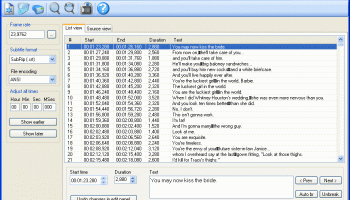
One of the most striking aspects of Subtitle Edit is its intuitive and user-friendly interface. The layout is clean and organized, allowing users to easily navigate through its extensive functionalities. Whether you are a novice or an experienced editor, the software's design ensures a smooth learning curve.
**Comprehensive Subtitle Editing**
Subtitle Edit supports a wide range of subtitle formats, including SRT, ASS, and SUB, among others. The software allows users to perform basic tasks such as creating, editing, and deleting subtitle lines, as well as more advanced operations like adjusting timing, merging, and splitting subtitles. The visual synchronization feature is particularly noteworthy, enabling users to align subtitles with video frames accurately.
**Advanced Synchronization Tools**
Timing is crucial in subtitle editing, and Subtitle Edit excels in this area. The software offers several synchronization tools, including waveform and spectrogram views, which provide a visual representation of audio tracks. These tools help users fine-tune subtitle timing with precision, ensuring that subtitles are perfectly synced with the dialogue.
**Translation and Spell Check**
For multilingual projects, Subtitle Edit includes powerful translation features. Users can translate subtitles using integrated Google Translate support or manually through the software's intuitive translation interface. Additionally, the built-in spell checker supports multiple languages, helping to maintain the accuracy and professionalism of the subtitles.
**Audio and Video Integration**
Subtitle Edit supports direct video playback, allowing users to preview their subtitles in real-time. This feature is complemented by the software's ability to import and export a variety of video formats. The integration of audio waveforms further enhances the editing process, providing a comprehensive view of the audio-visual timeline.
**Batch Processing and Automation**
Efficiency is key in subtitle editing, and Subtitle Edit addresses this with its batch processing capabilities. Users can perform bulk operations, such as converting subtitle formats or adjusting timings, saving valuable time. The software also supports scripting, allowing for the automation of repetitive tasks.
**Community and Support**
As an open-source project, Subtitle Edit benefits from a vibrant community of users and contributors. This collaborative environment ensures continuous improvements and updates. The software's website offers extensive documentation, tutorials, and a forum where users can seek assistance and share insights.
**Conclusion**
Subtitle Edit by Nikolaj Lynge Olsson is a powerful, feature-rich tool that meets the diverse needs of subtitle editors. Its user-friendly interface, advanced synchronization tools, and comprehensive editing capabilities make it an indispensable asset for anyone involved in subtitle creation and translation. Whether you are working on a small project or a large-scale production, Subtitle Edit provides the tools and flexibility needed to produce high-quality subtitles efficiently.
Subtitle Edit, developed by Nikolaj Lynge Olsson, stands out as a robust and versatile software designed to cater to both amateur and professional subtitle editors. This free, open-source application offers a rich array of features that make subtitle creation, synchronization, and translation a seamless experience.
**User-Friendly Interface**
One of the most striking aspects of Subtitle Edit is its intuitive and user-friendly interface. The layout is clean and organized, allowing users to easily navigate through its extensive functionalities. Whether you are a novice or an experienced editor, the software's design ensures a smooth learning curve.
**Comprehensive Subtitle Editing**
Subtitle Edit supports a wide range of subtitle formats, including SRT, ASS, and SUB, among others. The software allows users to perform basic tasks such as creating, editing, and deleting subtitle lines, as well as more advanced operations like adjusting timing, merging, and splitting subtitles. The visual synchronization feature is particularly noteworthy, enabling users to align subtitles with video frames accurately.
**Advanced Synchronization Tools**
Timing is crucial in subtitle editing, and Subtitle Edit excels in this area. The software offers several synchronization tools, including waveform and spectrogram views, which provide a visual representation of audio tracks. These tools help users fine-tune subtitle timing with precision, ensuring that subtitles are perfectly synced with the dialogue.
**Translation and Spell Check**
For multilingual projects, Subtitle Edit includes powerful translation features. Users can translate subtitles using integrated Google Translate support or manually through the software's intuitive translation interface. Additionally, the built-in spell checker supports multiple languages, helping to maintain the accuracy and professionalism of the subtitles.
**Audio and Video Integration**
Subtitle Edit supports direct video playback, allowing users to preview their subtitles in real-time. This feature is complemented by the software's ability to import and export a variety of video formats. The integration of audio waveforms further enhances the editing process, providing a comprehensive view of the audio-visual timeline.
**Batch Processing and Automation**
Efficiency is key in subtitle editing, and Subtitle Edit addresses this with its batch processing capabilities. Users can perform bulk operations, such as converting subtitle formats or adjusting timings, saving valuable time. The software also supports scripting, allowing for the automation of repetitive tasks.
**Community and Support**
As an open-source project, Subtitle Edit benefits from a vibrant community of users and contributors. This collaborative environment ensures continuous improvements and updates. The software's website offers extensive documentation, tutorials, and a forum where users can seek assistance and share insights.
**Conclusion**
Subtitle Edit by Nikolaj Lynge Olsson is a powerful, feature-rich tool that meets the diverse needs of subtitle editors. Its user-friendly interface, advanced synchronization tools, and comprehensive editing capabilities make it an indispensable asset for anyone involved in subtitle creation and translation. Whether you are working on a small project or a large-scale production, Subtitle Edit provides the tools and flexibility needed to produce high-quality subtitles efficiently.
OS: Windows 11, Windows 10 32/64 bit, Windows 8 32/64 bit, Windows 7 32/64 bit
Requirements: .NET Framework Version 4.0
Add Your Review or 64-bit Compatibility Report
Top Video Tools 64-bit downloads


VLC Media Player x64 3.0.20
VLC x64 is a free and open source multimedia 64bit player for Windows x64
Open Source

Screenbits 9.13.1.0
Screenbits: High-quality screen recording with intuitive controls and features.
Trialware

4Videosoft MTS Converter 6.2.22
Convert video to audio or convert audio to AAC, AC3 , AIFF, AMR, AU, and more
Shareware | $16.16

MonitorTest 4.0 Build 1002
Comprehensive tool for testing and calibrating monitor performance.
Trialware

Video Jaguar 1.0
Video Jaguar is the world's easiest video ad maker for businesses and agencies.
Shareware | $8.99

CamStudio 2.7.4 r354
You can use it to create demonstration videos for any software program
Open Source


PotPlayer 64bit 1.7.21397
A comprehensive video and audio player, that also supports TV channels
Freeware


VideoPad Free Movie and Video Editor 18.16
Free Video Editor and Movie Making Software for Windows anyone can use.
Freeware
tags: video editor, free video editor, movie maker, free movie maker, video editing, video editing software, free video editing software, free movie making software, free film editing, video editing software free pc, best video editing apps free, video cutting software mac, video production software, windows video editor, open source video editor, video and audio editing software, free video editing apps for pc, video capture and editing software, video and audio editor
Members area
Top 64-bit Downloads
-
Media Player Classic -
HomeCinema - 64 bit 2.3.0
x64 open source download -
VLC Media Player x64 3.0.20
x64 open source download -
MCEBuddy 2.6.3
x64 trialware download -
PotPlayer 64bit 1.7.21397
x64 freeware download -
GUITAR RIG 5 PRO 7.0.2
x64 demo download -
Voxengo Stereo Touch x64 2.17
x64 freeware download -
Voxengo Crunchessor x64 2.19
x64 demo download -
Devastor x64 2.3.2
x64 demo download -
Adobe PhotoShop CC x64 2024 25.9.1
x64 trialware download -
Blue Cat's Triple EQ x64 4.45
x64 freeware download
Top Downloads
-
FreeTube 0.23.15 Beta
open source download -
Little AlterBoy 5.4.1
trialware download -
Auremo 0.24.9
open source download -
Syrah 23.07.0.50310
trialware download -
ft2-clone 2.12
open source download -
Screenbox 0.18.1
open source download -
Nero 7 Ultra Edition 7.10.1
shareware download -
VLC Media Player x64 3.0.20
open source download -
Screenbits 9.13.1.0
trialware download -
Cyclop 1.3.7
demo download -
Melodics 5.0.139.0
demo download -
Media Player Classic -
HomeCinema - 64 bit 2.3.0
open source download -
PlayIt Live 2.17.2.5046
shareware download -
FineCut 1.0.2
demo download -
MCEBuddy 2.6.3
trialware download