
Subtitle Edit portable - X 64-bit Download
Popular x64 Tags
- video x64 download
- video converter x64 download
- avi x64 download
- internet tv x64 download
- divx x64 download
- dvd x64 download
- online tv x64 download
- mov x64 download
- mpeg x64 download
- converter x64 download
- xvid x64 download
- 3gp converter x64 download
- psp x64 download
- download x64 download
- ipod x64 download
- mp4 x64 download
- wmv x64 download
- ipod video x64 download
- dvd ripper x64 download
- dvd to 3gp x64 download
- dvd to ipod x64 download
- swf x64 download
- dvd to psp x64 download
- 3gp x64 download
- asf x64 download
- iphone x64 download
- dat x64 download
- mpg x64 download
- video to ipod x64 download
- flv x64 download
Subtitle Edit portable 4.0.15
Sponsored links:
license: Open Source
downloads: 180
size: 11.40 MB
updated: 2026-03-26
tags: Subtitle Edit Portable, download Subtitle Edit Portable, Subtitle Edit Portable free download, Subtitle Editor, Edit Subtitle, Synchronize Subtitle, Subtitle, Editor, Synchronize, Synchronization
Add to Basket

Nikolaj Lynge Olsson

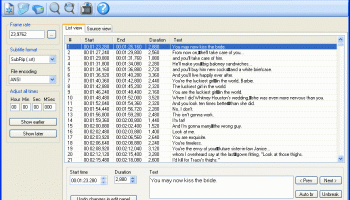
**Subtitle Edit Portable: A Comprehensive Tool for Subtitle Editing**
Subtitle Edit Portable, developed by Nikolaj Lynge Olsson, is a robust and versatile software designed to cater to the needs of both amateur and professional video editors. This portable version of the popular Subtitle Edit software brings all the powerful features of its desktop counterpart, with the added convenience of being able to run directly from a USB drive or other portable storage devices.
**Key Features:**
1. **User-Friendly Interface:**
Subtitle Edit Portable boasts an intuitive and clean interface that makes it easy for users to navigate through its extensive feature set. Whether you're a beginner or an experienced editor, you'll find the layout logical and straightforward.
2. **Comprehensive Subtitle Editing:**
The software supports a wide range of subtitle formats, including SRT, ASS, SSA, and more. It allows users to create, edit, synchronize, and translate subtitles with precision. The visual synchronization tool is particularly useful for aligning subtitles with video frames accurately.
3. **Advanced Synchronization Tools:**
Subtitle Edit Portable offers multiple synchronization methods, such as point synchronization, waveforms, and spectrograms. These tools help in fine-tuning the timing of subtitles to match the audio perfectly, ensuring a seamless viewing experience.
4. **Translation and Spell Check:**
The software includes built-in translation support, making it easier to translate subtitles into different languages. Additionally, the spell check feature helps maintain the quality and accuracy of the text, reducing the chances of errors.
5. **Audio and Video Preview:**
One of the standout features is the integrated audio and video preview, which allows users to see how the subtitles will appear in real-time. This feature is invaluable for making on-the-fly adjustments and ensuring that the final output meets expectations.
6. **Batch Processing:**
For users dealing with multiple subtitle files, the batch processing feature can save a significant amount of time. It allows for the simultaneous editing and conversion of multiple files, streamlining the workflow.
7. **Portability:**
As a portable application, Subtitle Edit Portable does not require installation. This makes it an excellent choice for users who need to work on different computers or prefer not to clutter their system with additional software. Simply run the executable from any portable storage device and start editing.
8. **Open Source and Community Support:**
Subtitle Edit Portable is open-source software, which means it is free to use and benefits from continuous improvements and updates from the developer community. Users can also contribute to its development or customize it to suit their specific needs.
**Conclusion:**
Subtitle Edit Portable by Nikolaj Lynge Olsson is a powerful, flexible, and user-friendly tool that stands out in the realm of subtitle editing software. Its comprehensive feature set, combined with the convenience of portability, makes it an indispensable tool for anyone involved in video production or translation. Whether you're synchronizing subtitles for a personal project or preparing professional content, Subtitle Edit Portable provides all the tools you need to achieve high-quality results efficiently.
Subtitle Edit Portable, developed by Nikolaj Lynge Olsson, is a robust and versatile software designed to cater to the needs of both amateur and professional video editors. This portable version of the popular Subtitle Edit software brings all the powerful features of its desktop counterpart, with the added convenience of being able to run directly from a USB drive or other portable storage devices.
**Key Features:**
1. **User-Friendly Interface:**
Subtitle Edit Portable boasts an intuitive and clean interface that makes it easy for users to navigate through its extensive feature set. Whether you're a beginner or an experienced editor, you'll find the layout logical and straightforward.
2. **Comprehensive Subtitle Editing:**
The software supports a wide range of subtitle formats, including SRT, ASS, SSA, and more. It allows users to create, edit, synchronize, and translate subtitles with precision. The visual synchronization tool is particularly useful for aligning subtitles with video frames accurately.
3. **Advanced Synchronization Tools:**
Subtitle Edit Portable offers multiple synchronization methods, such as point synchronization, waveforms, and spectrograms. These tools help in fine-tuning the timing of subtitles to match the audio perfectly, ensuring a seamless viewing experience.
4. **Translation and Spell Check:**
The software includes built-in translation support, making it easier to translate subtitles into different languages. Additionally, the spell check feature helps maintain the quality and accuracy of the text, reducing the chances of errors.
5. **Audio and Video Preview:**
One of the standout features is the integrated audio and video preview, which allows users to see how the subtitles will appear in real-time. This feature is invaluable for making on-the-fly adjustments and ensuring that the final output meets expectations.
6. **Batch Processing:**
For users dealing with multiple subtitle files, the batch processing feature can save a significant amount of time. It allows for the simultaneous editing and conversion of multiple files, streamlining the workflow.
7. **Portability:**
As a portable application, Subtitle Edit Portable does not require installation. This makes it an excellent choice for users who need to work on different computers or prefer not to clutter their system with additional software. Simply run the executable from any portable storage device and start editing.
8. **Open Source and Community Support:**
Subtitle Edit Portable is open-source software, which means it is free to use and benefits from continuous improvements and updates from the developer community. Users can also contribute to its development or customize it to suit their specific needs.
**Conclusion:**
Subtitle Edit Portable by Nikolaj Lynge Olsson is a powerful, flexible, and user-friendly tool that stands out in the realm of subtitle editing software. Its comprehensive feature set, combined with the convenience of portability, makes it an indispensable tool for anyone involved in video production or translation. Whether you're synchronizing subtitles for a personal project or preparing professional content, Subtitle Edit Portable provides all the tools you need to achieve high-quality results efficiently.
OS: Windows 11, Windows 10 32/64 bit, Windows 8 32/64 bit, Windows 7 32/64 bit
Requirements: .NET Framework Version 4.0
Add Your Review or 64-bit Compatibility Report
Top Video Tools 64-bit downloads


VLC Media Player x64 3.0.20
VLC x64 is a free and open source multimedia 64bit player for Windows x64
Open Source

Screenbits 9.13.1.0
Screenbits: High-quality screen recording with intuitive controls and features.
Trialware

Video Jaguar 1.0
Video Jaguar is the world's easiest video ad maker for businesses and agencies.
Shareware | $8.99


CamStudio 2.7.4 r354
You can use it to create demonstration videos for any software program
Open Source

4Videosoft MTS Converter 6.2.22
Convert video to audio or convert audio to AAC, AC3 , AIFF, AMR, AU, and more
Shareware | $16.16

MonitorTest 4.0 Build 1002
Comprehensive tool for testing and calibrating monitor performance.
Trialware


Jubler x64 7.0.3
Can be used as an authoring software for new subtitles or as a tool to convert
Open Source

Members area
Top 64-bit Downloads
-
Media Player Classic -
HomeCinema - 64 bit 2.3.0
x64 open source download -
VLC Media Player x64 3.0.20
x64 open source download -
MCEBuddy 2.6.3
x64 trialware download -
Jubler x64 7.0.3
x64 open source download -
Voxengo Stereo Touch x64 2.17
x64 freeware download -
PotPlayer 64bit 1.7.21397
x64 freeware download -
Plex 1.93.0.144
x64 freeware download -
Voxengo Crunchessor x64 2.19
x64 demo download -
Devastor x64 2.3.2
x64 demo download -
GUITAR RIG 5 PRO 7.0.2
x64 demo download
Top Downloads
-
FreeTube 0.23.15 Beta
open source download -
Little AlterBoy 5.4.1
trialware download -
Syrah 23.07.0.50310
trialware download -
Auremo 0.24.9
open source download -
Nero 7 Ultra Edition 7.10.1
shareware download -
Cyclop 1.3.7
demo download -
ft2-clone 2.12
open source download -
Screenbox 0.18.1
open source download -
VLC Media Player x64 3.0.20
open source download -
Screenbits 9.13.1.0
trialware download -
DSP Filters 1.18.9
demo download -
Melodics 5.0.139.0
demo download -
OnionMedia 1.2.24.0
open source download -
Media Player Classic -
HomeCinema - 64 bit 2.3.0
open source download -
Soundbase 2012.10.10
freeware download