
SunsetScreen Portable - X 64-bit Download
Popular x64 Tags
- free x64 download
- weather x64 download
- windows x64 download
- desktop x64 download
- news reader x64 download
- screen x64 download
- internet x64 download
- tray x64 download
- video x64 download
- monitor x64 download
- notes x64 download
- screen mate x64 download
- screen saver x64 download
- audio x64 download
- sports x64 download
- rss x64 download
- virtual girls x64 download
- dashboard x64 download
- virtual girl x64 download
- search x64 download
- desktop girls x64 download
- football x64 download
- college football x64 download
- deskmates x64 download
- virtua girl x64 download
- communicator x64 download
- college basketball x64 download
- olymipics x64 download
- usa x64 download
- athletics x64 download
SunsetScreen Portable 1.50
Sponsored links:

Daniel White

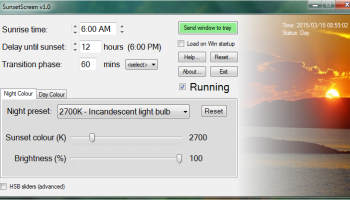
SunsetScreen is a free app for Windows which helps take the glare off your your screen in the evening. Scientific research has shown that melatonin - the chemical the brain makes late in the day - is reduced when exposed to blue light. By tempering this blue light, it becomes easier to wind down properly at night, and thus have a more restful sleep. SunsetScreen makes it possible for anyone to match the screen color and brightness to the indoor light, so as to protect the eyes while using the computer.
Don't imagine that it detects the amount of light in your room on its own, but it does come with a collection of presets for night and day monitor settings configuration that aim to reduce the blue light and dim the screen to increase the production of melatonin, the hormone that regulates sleep cycles.
Whether you're a morning lark or night owl, SunsetScreen allows you to set the time of the sunset and sunrise, so you can have full control over your sleep cycle.
Programs such as F.lux partially solve the problem, but in the winter, I found the sunsets came too early. This caused F.lux to darken the screen early too. Just because it's dark outside early, that does not mean the human body clock revolves around the winter's schedule. Many, perhaps most people find considerable benefit to extra light during the day during the darker seasons, and if this extends to your laptop, tablet or computer screen, then we should allow that!
Morning larks, night owls and even those who work night shifts will benefit from using SunsetScreen because their sleep cycles are hours apart from each other. SunsetScreen can be tailored so you can set the sunset and sunrise times appropriately to match your sleep rhythm.
We should also be able to define the colour of the filter by hue, saturation or brightness if need be. This way, we can match the colour more precisely to the illumination by the light bulbs we have in our houses. Although dimming the amount of blue light is most important, the overall brightness may also be dimmed too if you so wish.
Features include:
Set the sunset time precisely.
Set the sunrise time too.
Choose by colour temperature or by HSB for a precise colour.
Transition from one phase to the other gradually.
Automatically resides in the tray so it keeps out of your way.
Loads automatically at Windows startup if you wish.
Instantly turn off SunsetScreen if you need to do colour sensitive work.
Choose from a range of presets, and reset to default if things go wonky.
Small, fast, elegant and easy to use interface in less than a megabyte.
Isn't patent pending unlike something beginning with 'F' ;)
Don't imagine that it detects the amount of light in your room on its own, but it does come with a collection of presets for night and day monitor settings configuration that aim to reduce the blue light and dim the screen to increase the production of melatonin, the hormone that regulates sleep cycles.
Whether you're a morning lark or night owl, SunsetScreen allows you to set the time of the sunset and sunrise, so you can have full control over your sleep cycle.
Programs such as F.lux partially solve the problem, but in the winter, I found the sunsets came too early. This caused F.lux to darken the screen early too. Just because it's dark outside early, that does not mean the human body clock revolves around the winter's schedule. Many, perhaps most people find considerable benefit to extra light during the day during the darker seasons, and if this extends to your laptop, tablet or computer screen, then we should allow that!
Morning larks, night owls and even those who work night shifts will benefit from using SunsetScreen because their sleep cycles are hours apart from each other. SunsetScreen can be tailored so you can set the sunset and sunrise times appropriately to match your sleep rhythm.
We should also be able to define the colour of the filter by hue, saturation or brightness if need be. This way, we can match the colour more precisely to the illumination by the light bulbs we have in our houses. Although dimming the amount of blue light is most important, the overall brightness may also be dimmed too if you so wish.
Features include:
Set the sunset time precisely.
Set the sunrise time too.
Choose by colour temperature or by HSB for a precise colour.
Transition from one phase to the other gradually.
Automatically resides in the tray so it keeps out of your way.
Loads automatically at Windows startup if you wish.
Instantly turn off SunsetScreen if you need to do colour sensitive work.
Choose from a range of presets, and reset to default if things go wonky.
Small, fast, elegant and easy to use interface in less than a megabyte.
Isn't patent pending unlike something beginning with 'F' ;)
OS: Windows XP, Windows Vista, Windows Vista x64, Windows 7, Windows 7 x64, Windows 8, Windows 8 x64, Windows 10, Windows 10 x64, Windows 11
Add Your Review or 64-bit Compatibility Report
Top Other 64-bit downloads


Limages 2.0
Limages is a mediaplayer & slideshow program that works directly on your desktop
Shareware | $10.00
tags: slideshow, desktop, windows, tiles, widget, mediaplayer, sound volume, audio, video, DVD, player, transparency, Images, scrolled, automatically, wallpaper, style, change, photo, view, fullscreen, multiwindow


uWidgets 0.6.0 Beta
uWidgets: A versatile toolkit for creating customizable UI components.
Open Source


EarthView 7.14.0
Stunning dynamic wallpapers showcasing Earth’s beauty in real-time.
Trialware | $25.00


LightBulb 2.7
LightBulb: Adjust screen color temperature to reduce eye strain and improve sleep.
Open Source
Members area
Top 64-bit Downloads
-
Persclock 2.0
x64 freeware download -
bbLean (x64bit) 1.17.1
x64 freeware download -
Pixelscope 8
x64 freeware download -
Save.me x64 2.4.0
x64 freeware download -
TrayCD x64 1.2
x64 open source download -
KillKeys x64 1.2
x64 open source download -
VSLogonScreenCustomizer
64-bit 1.15.3.297
x64 freeware download -
magayo World Time
Weather (64-bit) 1.0.2.1
x64 freeware download -
Vanga Rengi Mangaro 1.2.7.875
x64 trialware download -
WMP12 - BLUE Theme X64
x64 freeware download
Top Downloads
-
Bonzi Buddy 1.7.0
freeware download -
Cloks and Time 2.0
demo download -
MouseScribe 1.4
trialware download -
Limages 2.0
shareware download -
uWidgets 0.6.0 Beta
open source download -
CoordiPoint 1.0
freeware download -
IconPackager 10.03
trialware download -
Persclock 2.0
freeware download -
f.lux 4.104
freeware download -
Sim Aquarium FREE! 3.7.55
freeware download -
EarthTime 6.32.1
trialware download -
PictureRiver 1.7.4.2
shareware download -
iPadian 10.1
freeware download -
LightBulb 2.7
open source download -
DesktopOK 12.41
freeware download