
Template Phrases for Microsoft Outlook - X 64-bit Download
Popular x64 Tags
- save x64 download
- addin x64 download
- email x64 download
- outlook x64 download
- outlook software x64 download
- email extractor x64 download
- convert x64 download
- e mail x64 download
- mailbox x64 download
- add in x64 download
- outlook express x64 download
- backup x64 download
- email software x64 download
- bulk x64 download
- pdf x64 download
- mail x64 download
- attachments x64 download
- export x64 download
- email recovery x64 download
- html x64 download
- plugin x64 download
- address x64 download
- extract x64 download
- pop3 x64 download
- spam x64 download
- email grabber x64 download
- addon x64 download
- eml x64 download
- msoutlook x64 download
- add-in x64 download
You are here: X-64-bit Download
\ Communications
\ Other E-Mail Tools \ Template Phrases for Microsoft Outlook
Template Phrases for Microsoft Outlook 2019-1-590-1655
Sponsored links:

Add-in Express Ltd.

With this plug-in for Microsoft Outlook you can quickly insert commonly-typed phrases or blocks of text into e-mail messages, without having to type the same text over and over again.
Template Phrases for Microsoft Outlook is an extremely useful tool for technical support personnel, sales managers and anyone who extensively uses e-mail in daily work.
If you are replying to a lot of e-mail messages on a daily basis, you know that some part or parts of their text is constantly repeated. Greetings, signatures, the same answers to the same questions, the same words or phrases typed hundreds of times, the same things explained again and again to your clients or partners. Having written just another paragraph, you sorrowfully realize that it is not the first and even not the tenth time that you type the same phrase. Is this situation familiar to you?
Then you certainly wouldn't mind having all those phrases and frequently used Microsoft Outlook templates at hand, so that you can just pick up the right one and have it pasted into an email message. This is exactly what our Template Phrases plug-in does!
What makes Template Phrases unique.
What makes Template Phrases unique
* Simplicity of use and comfort of work. You will not have to waste your time on reading through the manual or Help file. Once you install the plug-in and click "New message" or "Reply" in Outlook, you see the Template Phrases pane in the message window, and you can start using it right away.
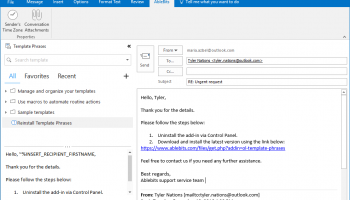
* The Template Phrases pane gives you the absolute and complete visualization. You see all your template phrases at a glance organized in a multi-level tree structure, and you also see the complete text of the currently selected template.
* You need just one mouse click to insert a template phrase or text fragment in your e-mail, or to add a new e-mail template to the existing list.
* You have a pretty good set of macros to add attachments to your messages, to fill in To, CC, BCC or Subject fields, to request Read or Delivery receipts, and to do a whole lot of other things which you do manually dozens of times a day.
* Shared templates. You create your templates once and store them on a network share. Now multiple users can add this shared folder to their template tree and use them along with their own templates. This feature is great for sales or support teams.
* Quick search. Have a huge template tree with multiple folders and subfolders? Or, are your templates scattered all around? No matter how you organize them, finding the right one takes no more than a second. You switch to the Search tab and type the keyword or keywords. As you type, all templates containing this word, or its part, appear in the Template Phrases pane.
* Favorites and Recently used. These 2 tabs make the process of finding the right template even simpler. The Recently used tab is populated automatically, as for Favorites, here you can organize the most often used templates any way you like.
Template Phrases for Microsoft Outlook is an extremely useful tool for technical support personnel, sales managers and anyone who extensively uses e-mail in daily work.
If you are replying to a lot of e-mail messages on a daily basis, you know that some part or parts of their text is constantly repeated. Greetings, signatures, the same answers to the same questions, the same words or phrases typed hundreds of times, the same things explained again and again to your clients or partners. Having written just another paragraph, you sorrowfully realize that it is not the first and even not the tenth time that you type the same phrase. Is this situation familiar to you?
Then you certainly wouldn't mind having all those phrases and frequently used Microsoft Outlook templates at hand, so that you can just pick up the right one and have it pasted into an email message. This is exactly what our Template Phrases plug-in does!
What makes Template Phrases unique.
What makes Template Phrases unique
* Simplicity of use and comfort of work. You will not have to waste your time on reading through the manual or Help file. Once you install the plug-in and click "New message" or "Reply" in Outlook, you see the Template Phrases pane in the message window, and you can start using it right away.
* The Template Phrases pane gives you the absolute and complete visualization. You see all your template phrases at a glance organized in a multi-level tree structure, and you also see the complete text of the currently selected template.
* You need just one mouse click to insert a template phrase or text fragment in your e-mail, or to add a new e-mail template to the existing list.
* You have a pretty good set of macros to add attachments to your messages, to fill in To, CC, BCC or Subject fields, to request Read or Delivery receipts, and to do a whole lot of other things which you do manually dozens of times a day.
* Shared templates. You create your templates once and store them on a network share. Now multiple users can add this shared folder to their template tree and use them along with their own templates. This feature is great for sales or support teams.
* Quick search. Have a huge template tree with multiple folders and subfolders? Or, are your templates scattered all around? No matter how you organize them, finding the right one takes no more than a second. You switch to the Search tab and type the keyword or keywords. As you type, all templates containing this word, or its part, appear in the Template Phrases pane.
* Favorites and Recently used. These 2 tabs make the process of finding the right template even simpler. The Recently used tab is populated automatically, as for Favorites, here you can organize the most often used templates any way you like.
Homepage: Template Phrases for Microsoft Outlook
OS: Windows XP, Windows Vista, Windows Vista x64, Windows 7, Windows 7 x64, Windows 8, Windows 8 x64, Windows 10, Windows 10 x64
Add Your Review or 64-bit Compatibility Report
Top Other E-Mail Tools 64-bit downloads


Address Magic Personal 9.0.434
Easily convert address books between Outlook, Gmail, iCloud, Yahoo and more
Shareware | $29.95

delight email 4.0
With delight email you can send mass emails and SMS like newsletters.
Demo | $199.00


MailDex 2.0.4.2
MailDex indexes all your email content. Convert to email to PDF.
Shareware | $139.99

DataNumen Outlook Express Undelete 2.2
A powerful tool to recover deleted email from Outlook Express mail folders.
Freeware

Email Generator 1.3
email generator software help you search mass email ids from multi mail server.
Shareware | $19.00


Ant Text 1.0.0.75
@nt Text is a new way of writing e-mails, for repeatedly using the same text
Shareware | $14.95
Members area
Top 64-bit Downloads
-
Linphone 5.0.8
x64 freeware download -
WeChat 3.9.6
x64 freeware download -
MAPIViewer 64-bit 3.4
x64 freeware download -
MOBILedit Forensic
Express 7.4.1.21502
x64 demo download -
NK2Edit x64 3.46
x64 freeware download -
AdiIRC 64bit 4.4
x64 freeware download -
SIP Communicator for
Windows (x64 bit) 2.10.5550
x64 open source download -
OutlookAddressBookView
x64 2.44
x64 freeware download -
KeyLemon 4.0.3
x64 trialware download -
WhatsApp UWP Beta
x64 freeware download
Top Downloads
-
Skype 8.150.0.125
freeware download -
Find Unused Contacts 4.11
freeware download -
VSee 4.28 (52330)
shareware download -
Paltalk 2.4.0 Build 112318
shareware download -
Beeper 4.2.653
open source download -
Clyton 37.0
shareware download -
PC SMS Software 8.0.1.3
shareware download -
Windows Communicator 3.1
shareware download -
cwtch 1.16.2
open source download -
Wavebox 10.146.26.2
demo download -
Total Webmail Converter 1.4
shareware download -
Linphone 5.0.8
freeware download -
LINE 9.9.0 Build 3633
freeware download -
Mail.dll 3.0
shareware download -
SMS4Mail 5.1
demo download