
True Launch Bar - X 64-bit Download
Popular x64 Tags
- free x64 download
- weather x64 download
- windows x64 download
- desktop x64 download
- news reader x64 download
- screen x64 download
- internet x64 download
- tray x64 download
- video x64 download
- monitor x64 download
- notes x64 download
- screen mate x64 download
- screen saver x64 download
- audio x64 download
- sports x64 download
- rss x64 download
- virtual girls x64 download
- dashboard x64 download
- virtual girl x64 download
- search x64 download
- desktop girls x64 download
- football x64 download
- college football x64 download
- deskmates x64 download
- virtua girl x64 download
- communicator x64 download
- college basketball x64 download
- olymipics x64 download
- usa x64 download
- athletics x64 download
True Launch Bar 6.5
Sponsored links:
license: Trialware ($19.90)
downloads: 1123
size: 10.10 MB
updated: 2013-04-08
Buy Now
Add to Basket

Tordex

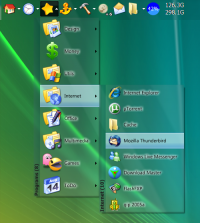
True Launch Bar is a Superior replacement for the standard Quick Launch bar. All functions presented in Quick Launch are also in True Launch Bar. However, the True Launch Bar is fully compatible with Quick Launch because it uses the same folder for shortcuts. But there is one huge difference. True Launch Bar allows you to combine your shortcuts into groups. This feature looks like popup menus. This vastly improves the management of your shortcuts and save working space on your desktop. By using True Launch Bar, you speed up the launching of your applications like never before.
Compatibility with standard Quick Launch
True Launch Bar is fully compatible with the standard Windows (TM) Quick Launch toolbar. It uses the same folder for shortcuts. If some program installs an icon into Quick Launch, then the program also installs the icon for True Launch Bar as well. True Launch Bar can be docked into the taskbar like just like Quick Launch.
Grouping links into popup menus
The huge advantage of True Launch Bar is popup menus. You can create menus on in the True Launch bar panel and place your shortcuts there. This will save space on your taskbar and give you another dimension in using the taskbar. True Launch Bar is Quick Launch on steroids!!!
Full support of Windows XP Visual Styles
True Launch Bar completely supports Windows XP Visual Styles. You turn on the Flat Menus option and TLB will begin to look like All Programs menu from the Start Button.
Virtual Folders
You can also create virtual folders on the True Launch Bar. When you create a virtual folder, you select the folder's content you want to see in the toolbar menu. It can be any folder on your disk or on a local network (Favorites, Programs, Recent, etc.); or you can add file system folders such as Printers, Control Panel, My Computer, Dialup Network or other similar folders. If you right-click on an item in the virtual folder, you can see a full context menu like in the Explorer window, and you can perform any action from this menu (Properties, Open, Delete...). In fact you can use True Launch Bar as small file manager. In addition you can add separators with titles into Virtual folders. This can greatly improve the grouping of items inside Virtual Folders.
Drag & Drop
True Launch Bar fully supports Windows Drag&Drop technology. You can simply drag your shortcuts onto the toolbar or menu. You can use the left and right mouse button to drag shortcuts to the True Launch Bar. Using the right button dragging you will see a context menu with common actions.
Skinable
True Launch Bar is skinable. This means that you can change the appearance of buttons, menu items... Visit our Skins Library to download new skins. If you want to make your own skins please read Skins specification.
Plugins
The main feature of True Launch Bar is its active content. Now you can use buttons not only for launching your applications but have button work like small applet. In most cases you will have a button to run your email client (like Outlook Express). If you add Mail Monitor onto the True Launch Bar this button can actually tell you when you have new mail and can run your email client. Visit our Plugins Library to find more plugins such as System Monitor, Media Control, Volume Control etc.
Compatibility with standard Quick Launch
True Launch Bar is fully compatible with the standard Windows (TM) Quick Launch toolbar. It uses the same folder for shortcuts. If some program installs an icon into Quick Launch, then the program also installs the icon for True Launch Bar as well. True Launch Bar can be docked into the taskbar like just like Quick Launch.
Grouping links into popup menus
The huge advantage of True Launch Bar is popup menus. You can create menus on in the True Launch bar panel and place your shortcuts there. This will save space on your taskbar and give you another dimension in using the taskbar. True Launch Bar is Quick Launch on steroids!!!
Full support of Windows XP Visual Styles
True Launch Bar completely supports Windows XP Visual Styles. You turn on the Flat Menus option and TLB will begin to look like All Programs menu from the Start Button.
Virtual Folders
You can also create virtual folders on the True Launch Bar. When you create a virtual folder, you select the folder's content you want to see in the toolbar menu. It can be any folder on your disk or on a local network (Favorites, Programs, Recent, etc.); or you can add file system folders such as Printers, Control Panel, My Computer, Dialup Network or other similar folders. If you right-click on an item in the virtual folder, you can see a full context menu like in the Explorer window, and you can perform any action from this menu (Properties, Open, Delete...). In fact you can use True Launch Bar as small file manager. In addition you can add separators with titles into Virtual folders. This can greatly improve the grouping of items inside Virtual Folders.
Drag & Drop
True Launch Bar fully supports Windows Drag&Drop technology. You can simply drag your shortcuts onto the toolbar or menu. You can use the left and right mouse button to drag shortcuts to the True Launch Bar. Using the right button dragging you will see a context menu with common actions.
Skinable
True Launch Bar is skinable. This means that you can change the appearance of buttons, menu items... Visit our Skins Library to download new skins. If you want to make your own skins please read Skins specification.
Plugins
The main feature of True Launch Bar is its active content. Now you can use buttons not only for launching your applications but have button work like small applet. In most cases you will have a button to run your email client (like Outlook Express). If you add Mail Monitor onto the True Launch Bar this button can actually tell you when you have new mail and can run your email client. Visit our Plugins Library to find more plugins such as System Monitor, Media Control, Volume Control etc.
Homepage: True Launch Bar
OS: Windows XP, Windows Vista, Windows Vista x64, Windows 7, Windows 7 x64, Windows 8, Windows 8 x64
Add Your Review or 64-bit Compatibility Report
Top Other 64-bit downloads


uWidgets 0.6.0 Beta
uWidgets: A versatile toolkit for creating customizable UI components.
Open Source


Limages 2.0
Limages is a mediaplayer & slideshow program that works directly on your desktop
Shareware | $10.00
tags: slideshow, desktop, windows, tiles, widget, mediaplayer, sound volume, audio, video, DVD, player, transparency, Images, scrolled, automatically, wallpaper, style, change, photo, view, fullscreen, multiwindow


LightBulb 2.7
LightBulb: Adjust screen color temperature to reduce eye strain and improve sleep.
Open Source

GumNotes 1.1.7.692
GumNotes is an annotation tool for documents, websites, emails, and contacts.
Freeware
Members area
Top 64-bit Downloads
-
Persclock 2.0
x64 freeware download -
bbLean (x64bit) 1.17.1
x64 freeware download -
Pixelscope 8
x64 freeware download -
Save.me x64 2.4.0
x64 freeware download -
Synergy 64bit 1.8.8
x64 open source download -
TrayCD x64 1.2
x64 open source download -
KillKeys x64 1.2
x64 open source download -
VSLogonScreenCustomizer
64-bit 1.15.3.297
x64 freeware download -
QuickMonth Calendar x64 2.2
x64 freeware download -
magayo World Time
Weather (64-bit) 1.0.2.1
x64 freeware download
Top Downloads
-
Bonzi Buddy 1.7.0
freeware download -
Cloks and Time 2.0
demo download -
CoordiPoint 1.0
freeware download -
MouseScribe 1.4
trialware download -
uWidgets 0.6.0 Beta
open source download -
IconPackager 10.03
trialware download -
f.lux 4.104
freeware download -
Persclock 2.0
freeware download -
Limages 2.0
shareware download -
iPadian 10.1
freeware download -
XWidget 1.9.22
freeware download -
DesktopSlides 3.1
freeware download -
Desktops 2.01
freeware download -
EarthTime 6.32.1
trialware download -
PictureRiver 1.7.4.2
shareware download