
TurboLaunch - X 64-bit Download
Popular x64 Tags
- menu x64 download
- control x64 download
- run x64 download
- start x64 download
- hotkey x64 download
- security x64 download
- taskbar x64 download
- windows x64 download
- launch x64 download
- task manager x64 download
- desktop x64 download
- launcher x64 download
- shortcut x64 download
- application x64 download
- fast x64 download
- program x64 download
- tray x64 download
- startup x64 download
- manager x64 download
- utility x64 download
- process x64 download
- performance x64 download
- antivirus x64 download
- macro x64 download
- 2000 x64 download
- spyware x64 download
- anti spyware x64 download
- virus x64 download
- trojan remover x64 download
- trojan x64 download
TurboLaunch 5.1.4
Sponsored links:

Savard Software

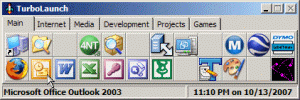
TurboLaunch is a fully configurable tool-bar style application that can be set up to run many programs and perform certain pre-programmed actions. Like a toolbar, pictures are used to distinguish what a button is configured to do. TurboLaunch automatically uses the default icon, but you have complete control and can change the icon to whatever you want!
The buttons on TurboLaunch are easy to configure! By dragging and dropping programs, files, shortcuts, or folders, you can instantly configure that button to run the dropped object. You can also configure buttons manually by specifying their command, parameters, working folder, and window style. You even have the ability to assign a shortcut key to any button, allowing you to quickly run that button with a simple keyboard command.
Not only can you configure a button to run a program, but you can also configure buttons to perform certain pre-programmed actions. By configuring a button to Activate the Screen Saver, Shutdown Windows, Install a Program, Reboot the System, or more, you have single-click access to things that normally take several steps to perform!
You can also configure any button on TurboLaunch to establish a network connection (such as the Internet or a VPN connection). This makes connecting to your Internet service provider a snap, with cool features such as Auto Redial and Disconnect if Already Connected. Assign a shortcut key to your network connection so you can connect and disconnect with just a simple keystroke!
TurboLaunch is fully configurable. You can adjust the number of rows and columns of buttons that appear on the TurboLaunch window, or even organize them into groups. Remove the title bar, make TurboLaunch always stay on top of other windows, and resize the buttons bigger or smaller for easier viewing or to save screen space!
After using TurboLaunch for just a short time, we are sure you will find TurboLaunch to be an invaluable tool for your Windows environment!
The buttons on TurboLaunch are easy to configure! By dragging and dropping programs, files, shortcuts, or folders, you can instantly configure that button to run the dropped object. You can also configure buttons manually by specifying their command, parameters, working folder, and window style. You even have the ability to assign a shortcut key to any button, allowing you to quickly run that button with a simple keyboard command.
Not only can you configure a button to run a program, but you can also configure buttons to perform certain pre-programmed actions. By configuring a button to Activate the Screen Saver, Shutdown Windows, Install a Program, Reboot the System, or more, you have single-click access to things that normally take several steps to perform!
You can also configure any button on TurboLaunch to establish a network connection (such as the Internet or a VPN connection). This makes connecting to your Internet service provider a snap, with cool features such as Auto Redial and Disconnect if Already Connected. Assign a shortcut key to your network connection so you can connect and disconnect with just a simple keystroke!
TurboLaunch is fully configurable. You can adjust the number of rows and columns of buttons that appear on the TurboLaunch window, or even organize them into groups. Remove the title bar, make TurboLaunch always stay on top of other windows, and resize the buttons bigger or smaller for easier viewing or to save screen space!
After using TurboLaunch for just a short time, we are sure you will find TurboLaunch to be an invaluable tool for your Windows environment!
OS: Windows XP, Windows Vista, Windows Vista x64, Windows 7, Windows 7 x64, Windows 8, Windows 8 x64, Windows 10, Windows 10 x64
Add Your Review or 64-bit Compatibility Report
Top Launchers & Task Managers 64-bit downloads


EF Process Manager 24.03
Shows you comprehensive information about which modules/processes have opened.
Shareware | $14.50


NirLauncher 1.30.22
NirLauncher: A versatile toolkit for managing and running NirSoft utilities.
Freeware


QuickWayToFolders 1.4.2
Streamline your file navigation with QuickWayToFolders for effortless access.
Open Source

FireDaemon Pro 4.0.66
A utility to install and run any application or script as a Windows service
Shareware | $50.00
Members area
Top 64-bit Downloads
-
Windows 10 x64 22H2
x64 trialware download -
SoftPerfect RAM Disk 26.2
x64 shareware download -
Windows 7 x64
x64 trialware download -
XtraTools Professional
x64 26.2.1
x64 shareware download -
HWMonitor (64-bit) 1.53
x64 freeware download -
Windows 8 x64 RTM Build 9200
x64 trialware download -
7-Zip (x64 bit) 24.07
x64 open source download -
Lenovo Vantage 10.2001.10.0
x64 freeware download -
BestSync Portable x64 2024 (19.0.1.5)
x64 trialware download -
AkelPad (x64 bit) 4.9.8
x64 open source download
Top Downloads
-
FreeCommander XE 2026 Build 941
shareware download -
Windows 10 x64 22H2
trialware download -
Windows 7 Service Pack 1 7601.17514.1011
freeware download -
Dr. Hardware 2026 26.0.0
shareware download -
FreeCommander XE
Portable 2026 Build 941
freeware download -
Thaiphoon Burner 17.4.1.2
freeware download -
Caffeine 1.98
freeware download -
RecoveryRobot Memory
Card Recovery 1.3.3
shareware download -
Qemu Simple Boot 1.3
freeware download -
BlueStacks 5 5.21.210.1023
freeware download -
Revo Uninstaller 2.00
freeware download -
Fortect 7.3.4.6
trialware download -
BIOS Agent Plus 2.2019.1.31
demo download -
SoftPerfect RAM Disk 26.2
shareware download -
tinyMediaManager 5.2.6
shareware download