
TweakNow FileRenamer - X 64-bit Download
Popular x64 Tags
- files x64 download
- file manager x64 download
- zip x64 download
- tool x64 download
- software x64 download
- ntfs x64 download
- remove x64 download
- disk x64 download
- free x64 download
- duplicate x64 download
- copy x64 download
- folder x64 download
- utility x64 download
- data recovery software x64 download
- undelete x64 download
- erase x64 download
- directory x64 download
- backup x64 download
- file x64 download
- hard x64 download
- data recovery x64 download
- delete x64 download
- recovery x64 download
- find x64 download
- file recovery x64 download
- unerase x64 download
- recover x64 download
- mp3 x64 download
- space x64 download
- search x64 download
TweakNow FileRenamer 24.8.29
Sponsored links:
license: Freeware
downloads: 46
size: 2.20 MB
updated: 2024-08-29
tags: FileRenamer, download FileRenamer, FileRenamer free download, rename files, files renamer, file management, rename, renamer, adjust, customize
Add to Basket

Stefan Trost

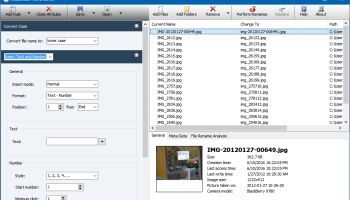
FileRenamer by Stefan Trost is a versatile and robust software tool designed to streamline the often tedious task of renaming multiple files. Whether you're a photographer needing to organize thousands of images, a developer managing code files, or just someone looking to tidy up your digital library, FileRenamer offers a comprehensive solution that caters to a wide array of renaming needs.
At its core, FileRenamer stands out for its simplicity and efficiency. The user interface is clean and intuitive, making it accessible for both novice users and seasoned professionals. The software supports a variety of renaming options, including the ability to add prefixes or suffixes, replace text within filenames, and even apply complex renaming rules using regular expressions. This flexibility ensures that users can tailor the renaming process to their specific requirements with minimal effort.
One of the standout features of FileRenamer is its preview functionality. Before committing to any changes, users can see a real-time preview of how the new filenames will look. This reduces the risk of errors and provides peace of mind, especially when dealing with large batches of files. Additionally, the software supports undo operations, allowing users to revert changes if needed, further enhancing its reliability.
FileRenamer also excels in performance. It can handle large volumes of files with ease, making it suitable for both small-scale and enterprise-level tasks. The software is optimized for speed, ensuring that even extensive renaming operations are completed swiftly without compromising system performance.
Another notable aspect is the software's compatibility. FileRenamer supports a wide range of file types and works seamlessly across different operating systems. This cross-platform functionality ensures that users can rely on the software regardless of their preferred OS environment.
Customization is another key strength of FileRenamer. Users can save their renaming settings as profiles, allowing for quick and easy application of frequently used renaming rules. This feature is particularly useful for repetitive tasks, saving time and effort in the long run.
Moreover, FileRenamer includes advanced options for power users. These include the ability to use metadata from files (such as EXIF data from photos or ID3 tags from music files) in the renaming process, providing an additional layer of precision and control.
In summary, FileRenamer by Stefan Trost is a powerful, user-friendly, and highly customizable tool that simplifies the process of renaming files. Its combination of intuitive design, robust functionality, and performance efficiency makes it an indispensable tool for anyone looking to manage and organize their digital files effectively. Whether you're dealing with a handful of documents or an extensive media library, FileRenamer is equipped to handle the task with ease and precision.
At its core, FileRenamer stands out for its simplicity and efficiency. The user interface is clean and intuitive, making it accessible for both novice users and seasoned professionals. The software supports a variety of renaming options, including the ability to add prefixes or suffixes, replace text within filenames, and even apply complex renaming rules using regular expressions. This flexibility ensures that users can tailor the renaming process to their specific requirements with minimal effort.
One of the standout features of FileRenamer is its preview functionality. Before committing to any changes, users can see a real-time preview of how the new filenames will look. This reduces the risk of errors and provides peace of mind, especially when dealing with large batches of files. Additionally, the software supports undo operations, allowing users to revert changes if needed, further enhancing its reliability.
FileRenamer also excels in performance. It can handle large volumes of files with ease, making it suitable for both small-scale and enterprise-level tasks. The software is optimized for speed, ensuring that even extensive renaming operations are completed swiftly without compromising system performance.
Another notable aspect is the software's compatibility. FileRenamer supports a wide range of file types and works seamlessly across different operating systems. This cross-platform functionality ensures that users can rely on the software regardless of their preferred OS environment.
Customization is another key strength of FileRenamer. Users can save their renaming settings as profiles, allowing for quick and easy application of frequently used renaming rules. This feature is particularly useful for repetitive tasks, saving time and effort in the long run.
Moreover, FileRenamer includes advanced options for power users. These include the ability to use metadata from files (such as EXIF data from photos or ID3 tags from music files) in the renaming process, providing an additional layer of precision and control.
In summary, FileRenamer by Stefan Trost is a powerful, user-friendly, and highly customizable tool that simplifies the process of renaming files. Its combination of intuitive design, robust functionality, and performance efficiency makes it an indispensable tool for anyone looking to manage and organize their digital files effectively. Whether you're dealing with a handful of documents or an extensive media library, FileRenamer is equipped to handle the task with ease and precision.
OS: Windows 11, Windows 10 32/64 bit, Windows 8 32/64 bit, Windows 7 32/64 bit
Add Your Review or 64-bit Compatibility Report
Top File & Disk Management 64-bit downloads


FreeCommander XE Portable 2026 Build 941
FreeCommander XE Portable: A versatile file manager with dual-pane interface.
Freeware

Open Files from XLSX to XLS 5.2
Convert XLSX to XLS with Open files from XLSX to XLS program
Shareware | $29.00

Pitara 5.0.9582.21949

Pitara: Your all-in-one solution for seamless project management and collaboration.
Open Source


WinFindr 1.9
Effortlessly locate files and folders with WinFindr's intuitive search.
Shareware | $23.00


tail for Windows 2.1
tail for Windows is a UNIX/Linux like tail DOS Command for Windows.
Shareware | $29.99


FileMyster 1.2.5
Admin tool for seamless automatic sychronization between folders and computers
Freeware

Members area
Top 64-bit Downloads
-
HWiNFO64 6.28 B4200
x64 freeware download -
Windows 7 x64
x64 trialware download -
GRBackPro Server Backup
x64 11.2.0
x64 shareware download -
Windows 10 x64 22H2
x64 trialware download -
EasyTune6 B24.0119.1
x64 freeware download -
XtraTools Professional
x64 26.2.1
x64 shareware download -
O&O MediaRecovery
64-bit 14.0.17
x64 demo download -
DAR 2.7.14
x64 open source download -
BusDog x64 0.2
x64 freeware download -
PhotoRenamer 4.1
x64 freeware download
Top Downloads
-
FreeCommander XE
Portable 2026 Build 941
freeware download -
FURY CTRL 2.0.65.0
freeware download -
FMDiff 4.0.5
demo download -
Open Files from XLSX to
XLS 5.2
shareware download -
Vim 9.2.0261
open source download -
Shell Tools 2.0.1
freeware download -
HWiNFO64 6.28 B4200
freeware download -
Pitara 5.0.9582.21949
open source download -
iSunshare iBypass Genius 3.1.2.1
shareware download -
AnyMP4 Data Recovery 1.5.12
shareware download -
PCtransfer 1.0.0.1033
freeware download -
Software to Data
Recovery 5.8.4.1
shareware download -
EaseUS Key Finder 4.1.6 Build 20240910
demo download -
Music Collection 3.9.7.2
freeware download -
WinFindr 1.9
shareware download