
VideoCacheView Portable - X 64-bit Download
Popular x64 Tags
- download manager x64 download
- free x64 download
- speed x64 download
- downloader x64 download
- internet x64 download
- flash x64 download
- manager x64 download
- mp3 x64 download
- movies x64 download
- images x64 download
- pictures x64 download
- accelerator x64 download
- grabber x64 download
- download x64 download
- picture downloader x64 download
- jpg x64 download
- picture x64 download
- video x64 download
- resume x64 download
- grab x64 download
- google video x64 download
- internet video x64 download
- video downloader x64 download
- video grabber x64 download
- flash video x64 download
- flv to avi x64 download
- download video x64 download
- youtube downloader x64 download
- youtube converter x64 download
- youtube download x64 download
VideoCacheView Portable 3.09
Sponsored links:

NirSoft

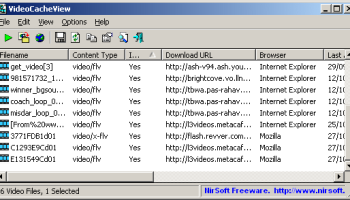
After watching a video in a Web site, you may want to save the video file into your local disk for playing it offline in the future. If the video file is stored in your browser's cache, this utility can help you to extract the video file from the cache and save it for watching it in the future.
It automatically scans the entire cache of Internet Explorer and Mozilla-based Web browsers (Including Firefox) and finds all video files that are currently stored in it. It allows you to easily copy the cached video files into another folder for playing/watching them in the future. If you have a movie player that is configured to play flv files, it also allows you to play the video directly from your browser's cache.
Using VideoCacheView
VideoCacheView doesn't require any installation process or additional DLL files. In order to start using it, simply run the executable file (VideoCacheView.exe)
After running VideoCacheView, it scan the cache folders of your Internet Explorer and Mozilla browsers, as well as the temporary folder of Windows. Wait 5 - 30 seconds until the scanning process is finished, and the main window of VideoCacheView should display all the video files that are currently in cache.
After the video list is displayed, you can use one of the following options, assuming that the video files are stored in the cache ('In Cache' = Yes):
Play Selected File: Allows you to play the video file directly from the cache, assuming that you have a video player that is configured to play .flv files.
Copy Selected Files To: Allows to copy the video files from the cache into another folder, so you will be able to play them in the future.
If you have a video file that is not stored in the cache ('In Cache' = No), you can use the 'Open Download URL In Browser' option (F8) in order to download the video file. You can also use the 'Copy Download URLs' option (Ctrl+U) to copy the download URLs to the clipboard, and then use then in your browser or in other download software.
Be aware that some Web sites may not allow you to download a video file in this way.
It automatically scans the entire cache of Internet Explorer and Mozilla-based Web browsers (Including Firefox) and finds all video files that are currently stored in it. It allows you to easily copy the cached video files into another folder for playing/watching them in the future. If you have a movie player that is configured to play flv files, it also allows you to play the video directly from your browser's cache.
Using VideoCacheView
VideoCacheView doesn't require any installation process or additional DLL files. In order to start using it, simply run the executable file (VideoCacheView.exe)
After running VideoCacheView, it scan the cache folders of your Internet Explorer and Mozilla browsers, as well as the temporary folder of Windows. Wait 5 - 30 seconds until the scanning process is finished, and the main window of VideoCacheView should display all the video files that are currently in cache.
After the video list is displayed, you can use one of the following options, assuming that the video files are stored in the cache ('In Cache' = Yes):
Play Selected File: Allows you to play the video file directly from the cache, assuming that you have a video player that is configured to play .flv files.
Copy Selected Files To: Allows to copy the video files from the cache into another folder, so you will be able to play them in the future.
If you have a video file that is not stored in the cache ('In Cache' = No), you can use the 'Open Download URL In Browser' option (F8) in order to download the video file. You can also use the 'Copy Download URLs' option (Ctrl+U) to copy the download URLs to the clipboard, and then use then in your browser or in other download software.
Be aware that some Web sites may not allow you to download a video file in this way.
OS: Windows XP, Windows Vista, Windows Vista x64, Windows 7, Windows 7 x64, Windows 8, Windows 8 x64, Windows 10, Windows 10 x64
Add Your Review or 64-bit Compatibility Report
Top Download Managers 64-bit downloads


Persepolis Download Manager 5.2.0.0
Efficient download manager with a user-friendly interface and powerful features.
Open Source


Social Media Downloader 8.2.0
Effortlessly download and manage media from various online sources.
Trialware | $29.99

MP4 Downloader 6.2.0
Effortlessly download and convert MP4 videos from various websites.
Trialware | $29.99

FlashGet v3 3.7.0.1195
Is a leading download manager & has the highest amount of users on the internet
Freeware


Universal Maps Downloader 10.235
Effortlessly download and manage maps from various online sources.
Demo | $69.00

Neat Download Manager Windows 1.2
Free Download Manager for Windows with browser integration
Freeware

Flickr Downloader 1.0.0.668
Easily download entire sets, single or multiple pictures from Flickr
Freeware

TuneCable iMusic Converter 3.3.1

Convert Apple Music to MP3, AAC, WAV, FLAC with TuneCable iMusic Converter.
Demo | $29.95
Members area
Top 64-bit Downloads
-
Internet Explorer 8 for
Windows Vista 64-bit and
Windows Server 2008
64-bit
x64 freeware download -
Adobe Flash Player 10
for 64-bit Windows Preview 2
x64 freeware download -
SSuite NetSurfer Extreme
x64 1.8.14.14
x64 freeware download -
Google Chrome x64 bit 126.0.6478.127
x64 freeware download -
Firefox 64bit x64 127.0.2
x64 open source download -
Radio Downloader 64-bit 0.32
x64 open source download -
HTTPNetworkSniffer
64-bit 1.63
x64 freeware download -
SoftPerfect Bandwidth
Manager 3.3.0
x64 shareware download -
DameWare Mini Remote
Control 64bit 12.3.0.12
x64 trialware download -
Capivara x64 0.8.11
x64 freeware download
Top Downloads
-
Internet Explorer 8 for
Windows Vista 64-bit and
Windows Server 2008
64-bit
freeware download -
Adobe Flash Player 10
for 64-bit Windows Preview 2
freeware download -
Google Chrome 145.0.7632.68
freeware download -
X-Browser 1.4
freeware download -
TeamViewer Host 15.74.6
freeware download -
LanguageTool for Chrome 10.0.12
shareware download -
Teleparty (formerly
Netflix Party) 5.5.6
trialware download -
Toggl Track for Firefox 4.11.8
shareware download -
SSuite NetSurfer Extreme
x64 1.8.14.14
freeware download -
BrowseEmAll 9.7.0
trialware download -
uTorrent (µTorrent) 3.6.0 B47124
open source download -
NTP Server Tool 1.0
freeware download -
Portable iReasoning MIB
Browser Enterprise 14.0 B4717
trialware download -
Web Translator 8.31
shareware download -
Gtraffic bot 2.0.8
shareware download