
Visual Comparer - X 64-bit Download
Popular x64 Tags
- files x64 download
- file manager x64 download
- zip x64 download
- tool x64 download
- software x64 download
- ntfs x64 download
- remove x64 download
- disk x64 download
- free x64 download
- duplicate x64 download
- copy x64 download
- folder x64 download
- utility x64 download
- data recovery software x64 download
- undelete x64 download
- erase x64 download
- directory x64 download
- backup x64 download
- file x64 download
- hard x64 download
- data recovery x64 download
- delete x64 download
- recovery x64 download
- find x64 download
- file recovery x64 download
- unerase x64 download
- recover x64 download
- mp3 x64 download
- space x64 download
- search x64 download
Visual Comparer 1.80 Build 0630
Sponsored links:
license: Freeware
downloads: 220
size: 16.30 MB
updated: 2025-11-23
tags: software development, highlight difference, text merger, version control, download Visual Comparer, Visual Comparer, Nikeware, file comparison, Visual Comparer free download, compare files, visual comparison, compare, data synchronization, merger, highlig
Add to Basket

Nikeware

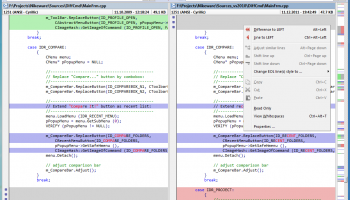
Visual Comparer, developed by Nikeware, is a robust software tool designed to facilitate the comparison and synchronization of files and directories. Tailored primarily for developers and IT professionals, this application excels in its ability to streamline the process of identifying differences between code files, configurations, or any text-based documents.
At the core of Visual Comparer is its intuitive interface, which presents users with a side-by-side view of the files or directories being compared. This layout enhances the user's ability to quickly spot discrepancies, making it particularly useful for tasks such as code reviews, debugging, or version control. The software supports a wide array of file formats, ensuring versatility across various development environments.
One of the standout features of Visual Comparer is its advanced comparison algorithms. These algorithms are engineered to detect even the most subtle differences between files, including changes in whitespace, line endings, and character encoding. This precision is crucial for professionals who need to ensure the integrity and consistency of their codebases.
In addition to its comparison capabilities, Visual Comparer offers synchronization functionality. This feature allows users to merge changes from one file to another seamlessly, facilitating efficient collaboration among team members or between different versions of a project. The software also supports batch processing, enabling users to compare and synchronize multiple files or directories simultaneously, thus saving valuable time.
Visual Comparer is equipped with customization options that cater to the specific needs of its users. These include adjustable comparison settings, such as ignoring certain types of differences or focusing on specific sections of the files. Users can also tailor the display settings to suit their preferences, enhancing readability and ease of use.
Another notable aspect of Visual Comparer is its integration capabilities. It can be incorporated into various development workflows, supporting popular version control systems and allowing for smooth transitions between different stages of the development process. This makes it a versatile tool for both individual developers and larger teams.
Overall, Visual Comparer by Nikeware is a comprehensive solution for anyone needing precise and efficient file comparison and synchronization. Its combination of powerful features, user-friendly interface, and customization options make it a valuable asset in the toolkit of any developer or IT professional. Whether you're managing a complex codebase or simply need to ensure consistency across files, Visual Comparer provides the tools necessary to achieve your objectives with accuracy and ease.
At the core of Visual Comparer is its intuitive interface, which presents users with a side-by-side view of the files or directories being compared. This layout enhances the user's ability to quickly spot discrepancies, making it particularly useful for tasks such as code reviews, debugging, or version control. The software supports a wide array of file formats, ensuring versatility across various development environments.
One of the standout features of Visual Comparer is its advanced comparison algorithms. These algorithms are engineered to detect even the most subtle differences between files, including changes in whitespace, line endings, and character encoding. This precision is crucial for professionals who need to ensure the integrity and consistency of their codebases.
In addition to its comparison capabilities, Visual Comparer offers synchronization functionality. This feature allows users to merge changes from one file to another seamlessly, facilitating efficient collaboration among team members or between different versions of a project. The software also supports batch processing, enabling users to compare and synchronize multiple files or directories simultaneously, thus saving valuable time.
Visual Comparer is equipped with customization options that cater to the specific needs of its users. These include adjustable comparison settings, such as ignoring certain types of differences or focusing on specific sections of the files. Users can also tailor the display settings to suit their preferences, enhancing readability and ease of use.
Another notable aspect of Visual Comparer is its integration capabilities. It can be incorporated into various development workflows, supporting popular version control systems and allowing for smooth transitions between different stages of the development process. This makes it a versatile tool for both individual developers and larger teams.
Overall, Visual Comparer by Nikeware is a comprehensive solution for anyone needing precise and efficient file comparison and synchronization. Its combination of powerful features, user-friendly interface, and customization options make it a valuable asset in the toolkit of any developer or IT professional. Whether you're managing a complex codebase or simply need to ensure consistency across files, Visual Comparer provides the tools necessary to achieve your objectives with accuracy and ease.
OS: Windows 11, Windows 10 32/64 bit, Windows 8 32/64 bit, Windows 7 32/64 bit, Windows Vista
Add Your Review or 64-bit Compatibility Report
Top File & Disk Management 64-bit downloads


FreeCommander XE Portable 2026 Build 941
FreeCommander XE Portable: A versatile file manager with dual-pane interface.
Freeware

Open Files from XLSX to XLS 5.2
Convert XLSX to XLS with Open files from XLSX to XLS program
Shareware | $29.00


WinFindr 1.9

Effortlessly locate files and folders with WinFindr's intuitive search.
Shareware | $23.00

Pitara 5.0.9579.1159
Pitara: Your all-in-one solution for seamless project management and collaboration.
Open Source


tail for Windows 2.1
tail for Windows is a UNIX/Linux like tail DOS Command for Windows.
Shareware | $29.99


FileMyster 1.2.5
Admin tool for seamless automatic sychronization between folders and computers
Freeware

Members area
Top 64-bit Downloads
-
HWiNFO64 6.28 B4200
x64 freeware download -
GRBackPro Server Backup
x64 11.2.0
x64 shareware download -
Windows 7 x64
x64 trialware download -
EasyTune6 B24.0119.1
x64 freeware download -
XtraTools Professional
x64 26.2.1
x64 shareware download -
DAR 2.7.14
x64 open source download -
BusDog x64 0.2
x64 freeware download -
PhotoRenamer 4.1
x64 freeware download -
Laplink DiskImage
Professional x64 10.0.71
x64 trialware download -
CIB pdf brewer 4.20.0
x64 freeware download
Top Downloads
-
FreeCommander XE
Portable 2026 Build 941
freeware download -
FURY CTRL 2.0.65.0
freeware download -
FMDiff 4.0.5
demo download -
Open Files from XLSX to
XLS 5.2
shareware download -
Shell Tools 2.0.1
freeware download -
Vim 9.2.0260
open source download -
AnyMP4 Data Recovery 1.5.12
shareware download -
PCtransfer 1.0.0.1033
freeware download -
Software to Data
Recovery 5.8.4.1
shareware download -
EaseUS Key Finder 4.1.6 Build 20240910
demo download -
HWiNFO64 6.28 B4200
freeware download -
Music Collection 3.9.7.2
freeware download -
WinFindr 1.9
shareware download -
File Compression 1.0
commercial download -
NirLauncher 1.30.22
freeware download