
Visual Subst - X 64-bit Download
Popular x64 Tags
- files x64 download
- file manager x64 download
- zip x64 download
- tool x64 download
- software x64 download
- ntfs x64 download
- remove x64 download
- disk x64 download
- free x64 download
- duplicate x64 download
- copy x64 download
- folder x64 download
- utility x64 download
- data recovery software x64 download
- undelete x64 download
- erase x64 download
- directory x64 download
- backup x64 download
- file x64 download
- hard x64 download
- data recovery x64 download
- delete x64 download
- recovery x64 download
- find x64 download
- file recovery x64 download
- unerase x64 download
- recover x64 download
- mp3 x64 download
- space x64 download
- search x64 download
Visual Subst 5.9
Sponsored links:
license: Demo
downloads: 67
size: 2.70 MB
updated: 2025-03-03
tags: Visual Subst, create virtual drive, productivity tools, NTWind Software, drive mapping, virtual drive, drive, file management, associate directory, associate, virtual drives, virtual, download Visual Subst, substitute, Visual Subst free download
Add to Basket

NTWind Software

Visual Subst, developed by NTWind Software, is a practical utility designed to simplify the process of managing virtual drives on Windows operating systems. This tool offers users the ability to map long and complex folder paths to virtual drives, effectively transforming cumbersome directory navigation into a seamless and efficient experience.
At its core, Visual Subst is engineered to enhance productivity by allowing users to create virtual drives that act as shortcuts to frequently accessed folders. This is particularly beneficial for developers, IT professionals, and power users who regularly work with deep directory structures or network paths. By assigning a drive letter to a specific folder, users can access it as if it were a physical drive, significantly reducing the time spent navigating through nested folders.
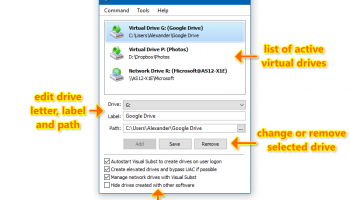
The software boasts a user-friendly interface that makes the process of creating and managing virtual drives straightforward. With just a few clicks, users can assign a drive letter to any folder, and the changes take effect immediately without the need for system reboots. Visual Subst also supports the automatic creation of virtual drives at system startup, ensuring that your shortcuts are always ready for use.
One of the standout features of Visual Subst is its ability to handle command-line operations, providing advanced users with the flexibility to automate tasks and integrate the tool into scripts or batch files. This feature is particularly useful for those who require a high level of customization and control over their virtual drive configurations.
Furthermore, Visual Subst is designed to be lightweight and efficient, ensuring that it does not consume unnecessary system resources. It seamlessly integrates into the Windows environment, maintaining system performance while providing enhanced functionality.
In addition to its core features, Visual Subst offers a range of customization options, allowing users to tailor the software to their specific needs. Whether you need to manage multiple virtual drives or require a simple solution for a single folder, Visual Subst provides the flexibility and ease of use to accommodate a wide range of scenarios.
Overall, Visual Subst by NTWind Software is a robust and versatile tool that simplifies the management of virtual drives on Windows. Its intuitive interface, combined with powerful features and customization options, makes it an invaluable asset for anyone looking to streamline their workflow and improve productivity. Whether you're a developer, IT professional, or simply someone who values efficiency, Visual Subst offers a practical solution to the challenges of navigating complex directory structures.
At its core, Visual Subst is engineered to enhance productivity by allowing users to create virtual drives that act as shortcuts to frequently accessed folders. This is particularly beneficial for developers, IT professionals, and power users who regularly work with deep directory structures or network paths. By assigning a drive letter to a specific folder, users can access it as if it were a physical drive, significantly reducing the time spent navigating through nested folders.
The software boasts a user-friendly interface that makes the process of creating and managing virtual drives straightforward. With just a few clicks, users can assign a drive letter to any folder, and the changes take effect immediately without the need for system reboots. Visual Subst also supports the automatic creation of virtual drives at system startup, ensuring that your shortcuts are always ready for use.
One of the standout features of Visual Subst is its ability to handle command-line operations, providing advanced users with the flexibility to automate tasks and integrate the tool into scripts or batch files. This feature is particularly useful for those who require a high level of customization and control over their virtual drive configurations.
Furthermore, Visual Subst is designed to be lightweight and efficient, ensuring that it does not consume unnecessary system resources. It seamlessly integrates into the Windows environment, maintaining system performance while providing enhanced functionality.
In addition to its core features, Visual Subst offers a range of customization options, allowing users to tailor the software to their specific needs. Whether you need to manage multiple virtual drives or require a simple solution for a single folder, Visual Subst provides the flexibility and ease of use to accommodate a wide range of scenarios.
Overall, Visual Subst by NTWind Software is a robust and versatile tool that simplifies the management of virtual drives on Windows. Its intuitive interface, combined with powerful features and customization options, makes it an invaluable asset for anyone looking to streamline their workflow and improve productivity. Whether you're a developer, IT professional, or simply someone who values efficiency, Visual Subst offers a practical solution to the challenges of navigating complex directory structures.
OS: Windows 11, Windows 10 32/64 bit, Windows 8 32/64 bit, Windows 7 32/64 bit
Add Your Review or 64-bit Compatibility Report
Top File & Disk Management 64-bit downloads


FreeCommander XE Portable 2026 Build 941
FreeCommander XE Portable: A versatile file manager with dual-pane interface.
Freeware

Open Files from XLSX to XLS 5.2
Convert XLSX to XLS with Open files from XLSX to XLS program
Shareware | $29.00


WinFindr 1.8
Effortlessly locate files and folders with WinFindr's intuitive search.
Shareware | $23.00


tail for Windows 2.1
tail for Windows is a UNIX/Linux like tail DOS Command for Windows.
Shareware | $29.99


FileMyster 1.2.5
Admin tool for seamless automatic sychronization between folders and computers
Freeware


Pitara 5.0.9576.24479

Pitara: Your all-in-one solution for seamless project management and collaboration.
Open Source
Members area
Top 64-bit Downloads
-
HWiNFO64 6.28 B4200
x64 freeware download -
Windows 7 x64
x64 trialware download -
GRBackPro Server Backup
x64 11.2.0
x64 shareware download -
EasyTune6 B24.0119.1
x64 freeware download -
XtraTools Professional
x64 26.2.1
x64 shareware download -
SoftPerfect RAM Disk 26.2
x64 shareware download -
7z SFX Builder x64 2.1
x64 freeware download -
BusDog x64 0.2
x64 freeware download -
PhotoRenamer 4.1
x64 freeware download -
CIB pdf brewer 4.20.0
x64 freeware download
Top Downloads
-
FreeCommander XE
Portable 2026 Build 941
freeware download -
FMDiff 4.0.5
demo download -
Open Files from XLSX to
XLS 5.2
shareware download -
FURY CTRL 2.0.65.0
freeware download -
Shell Tools 2.0.1
freeware download -
Vim 9.2.0219
open source download -
AnyMP4 Data Recovery 1.5.12
shareware download -
Software to Data
Recovery 5.8.4.1
shareware download -
Music Collection 3.9.7.1
freeware download -
WinFindr 1.8
shareware download -
File Compression 1.0
commercial download -
Caffeine 1.98
freeware download -
PCtransfer 1.0.0.1033
freeware download -
EaseUS Key Finder 4.1.6 Build 20240910
demo download -
DiskCopy 1.4.2.0
freeware download