
VisualRoute 2010 - X 64-bit Download
Popular x64 Tags
- whois x64 download
- monitor x64 download
- trace x64 download
- visual ping x64 download
- address x64 download
- internet x64 download
- network x64 download
- traceroute x64 download
- connection x64 download
- server x64 download
- port x64 download
- lookup x64 download
- bandwidth x64 download
- icmp x64 download
- ping x64 download
- script x64 download
- pinger x64 download
- fast x64 download
- visual x64 download
- network management x64 download
- time server x64 download
- time x64 download
- client x64 download
- web x64 download
VisualRoute 2010 14.0l
Sponsored links:

Visualware Inc

VisualRoute helps determine if a connectivity problem is due to an ISP, the Internet, or the destination web site, and pinpoints the network where a problem occurs.
VisualRoute 2010 is available in several specialized editions, including simple options like performing a traceroute to more omplicated options like on-demand and continuous connectivity analysis, and 2-way connection testing to/from remote customer desktops or multiple points on a global network. Try the online connection test and see for yourself.
Below are just a handful of the features available in VisualRoute.....
# Graphical View of Traceroute, Ping, Reverse DNS Connectivity Analysis
Results from several essential network diagnostic tools are integrated into an overall connectivity report. More Info
# IP Location Reporting
The physical geographical locations of network servers and routers is key information for understanding routing problems. More Info
# Reverse Traces from Remote Desktops Help Resolve Customer Connectivity Problems
The SupportPro Edition enables support staff to test connectivity in both directions: to/from the VisualRoute desktop and to/from remote systems.
VisualRoutes Features and Benefits:
Graphical View of Traceroute, Ping, Reverse DNS Connectivity Analysis
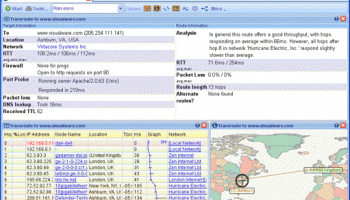
Results from several essential network diagnostic tools are integrated into an overall connectivity report, providing a graphical view of connection performance report including packet loss and latency for each network hop. Drill-down detail is easily visible with a mouse over any network hop.
IP Location Reporting
The physical geographical locations of network servers and routers is key information for understanding routing problems, viewing the actual route path on global map provides an instant of picture of routing efficiency and distances. Try an IP trace online.
Whois Lookups, Network Provider Reporting
Get instant lookups of domain information from worldwide databases, so you can see the registered 'owner' of an IP address or domain. See the contact information for the company providing Internet access for each hop of a network route, so you can easily report network problems.
OmniPath Multiple Path Discovery
Get real-time views of all possible routes to a destination and easily compare the performance of different routes. The common use of load-balancers creates multiple paths that data packets may travel between the source and destination. OmniPath discovers the various paths, enables you to easily see which routes are the fastest/slowest, have the highest/lowest packet loss, or have the highest probability.
NetVu Multiple Route Topology Graph
See a high-level view of all network routes for open trace reports, enabling easily identification of network nodes that are common to multiple routes, and network routes that have multiple path options due to load balancers or router configurations.
NetVu enables you to consistently monitor all possible paths between the source and destination for mutiple routes in a single diagram, view the common nodes, and locate single points of failure. The diagram updates wheneven a new trace is performed, when used with the continuous trace option you can easily check the health of your network by viewing changes in the diagram.
Application Port Testing, Port Probing, DNS Peformance Testing
Trace specific application ports to test if your critical applications are up and responding as expected. VisualRoute measures and reports on DNS (domain name service) response time, which can have a significant effect on connectivity performance.
VisualRoute 2010 is available in several specialized editions, including simple options like performing a traceroute to more omplicated options like on-demand and continuous connectivity analysis, and 2-way connection testing to/from remote customer desktops or multiple points on a global network. Try the online connection test and see for yourself.
Below are just a handful of the features available in VisualRoute.....
# Graphical View of Traceroute, Ping, Reverse DNS Connectivity Analysis
Results from several essential network diagnostic tools are integrated into an overall connectivity report. More Info
# IP Location Reporting
The physical geographical locations of network servers and routers is key information for understanding routing problems. More Info
# Reverse Traces from Remote Desktops Help Resolve Customer Connectivity Problems
The SupportPro Edition enables support staff to test connectivity in both directions: to/from the VisualRoute desktop and to/from remote systems.
VisualRoutes Features and Benefits:
Graphical View of Traceroute, Ping, Reverse DNS Connectivity Analysis
Results from several essential network diagnostic tools are integrated into an overall connectivity report, providing a graphical view of connection performance report including packet loss and latency for each network hop. Drill-down detail is easily visible with a mouse over any network hop.
IP Location Reporting
The physical geographical locations of network servers and routers is key information for understanding routing problems, viewing the actual route path on global map provides an instant of picture of routing efficiency and distances. Try an IP trace online.
Whois Lookups, Network Provider Reporting
Get instant lookups of domain information from worldwide databases, so you can see the registered 'owner' of an IP address or domain. See the contact information for the company providing Internet access for each hop of a network route, so you can easily report network problems.
OmniPath Multiple Path Discovery
Get real-time views of all possible routes to a destination and easily compare the performance of different routes. The common use of load-balancers creates multiple paths that data packets may travel between the source and destination. OmniPath discovers the various paths, enables you to easily see which routes are the fastest/slowest, have the highest/lowest packet loss, or have the highest probability.
NetVu Multiple Route Topology Graph
See a high-level view of all network routes for open trace reports, enabling easily identification of network nodes that are common to multiple routes, and network routes that have multiple path options due to load balancers or router configurations.
NetVu enables you to consistently monitor all possible paths between the source and destination for mutiple routes in a single diagram, view the common nodes, and locate single points of failure. The diagram updates wheneven a new trace is performed, when used with the continuous trace option you can easily check the health of your network by viewing changes in the diagram.
Application Port Testing, Port Probing, DNS Peformance Testing
Trace specific application ports to test if your critical applications are up and responding as expected. VisualRoute measures and reports on DNS (domain name service) response time, which can have a significant effect on connectivity performance.
OS: Windows XP, Windows Vista, Windows Vista x64, Windows 7, Windows 7 x64, Windows 8, Windows 8 x64, Windows 10, Windows 10 x64
Add Your Review or 64-bit Compatibility Report
Top Trace & Ping Tools 64-bit downloads


VisualRoute 2010 14.0l
Connection Analyzer, Traceroute, Ping, Whois and IP Locations
Trialware | $59.95

Tcp Client Server 1.1.8
Tcp Client Sever is a useful network utility for testing network programs.
Freeware


FreePortScanner 3.6.4
Free Port Scanner is a small and fast port scanner for the Win32 platform.
Freeware

UScan Web Spider Software 1.0.0.12
Software Fetches all the relevant information of the given web page
Shareware | $15.00

Free NetCrunch Tools 2.0.0.63.0.4
A free toolkit for network professionals with 11 essential tools
Freeware

Fayetracker 4.0
fayetracker allows you to trace and catch hackers intrusions on your computer
Freeware
Members area
Top 64-bit Downloads
-
Adobe Flash Player 10
for 64-bit Windows Preview 2
x64 freeware download -
SSuite NetSurfer Extreme
x64 2.10.16.1
x64 freeware download -
SoftPerfect Bandwidth
Manager 3.3.0
x64 shareware download -
Internet Explorer 8 for
Windows Vista 64-bit and
Windows Server 2008
64-bit
x64 freeware download -
FileZilla Server 1.8.1
x64 open source download -
Firefox 64bit x64 127.0.2
x64 open source download -
SoftPerfect Connection
Emulator 1.9
x64 shareware download -
iFolder x64 3.8.0.3
x64 freeware download -
AlternaTIFF x64 2.0.8
x64 freeware download -
Angry IP Scanner 64bit 3.9.1
x64 open source download
Top Downloads
-
Adobe Flash Player 10
for 64-bit Windows Preview 2
freeware download -
TheWorld Browser 7.0.0.108
freeware download -
MusicFab 1.0.6.6
demo download -
VNC for Mac and Linux 7.16.0 (r14)
demo download -
Open With Photoshop 63.0
open source download -
TagSpaces Web Clipper
for Chrome 4.1.2
freeware download -
Dooble 2024.12.31
open source download -
MP4 Downloader 6.2.3
trialware download -
Vuze 5.7.7.0
freeware download -
BiglyBT 4.0.0.0
open source download -
NetShareWatcher 1.5.8
shareware download -
Profile Migrator 1.1
trialware download -
TORvidZ 7.20.20.18
shareware download -
Stylebot 1.2.1
freeware download -
MetaMask for Chrome 13.22.0
open source download