
WinDirStat - X 64-bit Download
Popular x64 Tags
- files x64 download
- file manager x64 download
- zip x64 download
- tool x64 download
- software x64 download
- ntfs x64 download
- remove x64 download
- disk x64 download
- free x64 download
- duplicate x64 download
- copy x64 download
- folder x64 download
- utility x64 download
- data recovery software x64 download
- undelete x64 download
- erase x64 download
- directory x64 download
- backup x64 download
- file x64 download
- hard x64 download
- data recovery x64 download
- delete x64 download
- recovery x64 download
- find x64 download
- file recovery x64 download
- unerase x64 download
- recover x64 download
- mp3 x64 download
- space x64 download
- search x64 download
WinDirStat 2.5.0
Sponsored links:
license: Open Source
downloads: 445
size: 2.20 MB
updated: 2026-02-28
tags: WinDirStat, download WinDirStat, WinDirStat free download, disk usage, hdd space, hdd usage, hdd, usage, disk, report
Add to Basket

Oliver Schneider

WinDirStat, developed by Oliver Schneider, is a powerful and intuitive disk usage statistics viewer and cleanup tool for Windows. It stands out in the realm of disk management utilities with its unique visual representation of data, making it an essential tool for users who need to manage and optimize their storage space effectively.
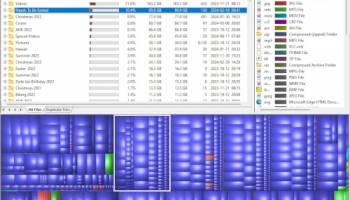
At its core, WinDirStat provides a comprehensive overview of your disk usage, presenting data in a colorful treemap format. This visualization allows users to quickly identify large files and directories that are occupying significant space on their drives. Each file type is represented by a color-coded block, making it easy to distinguish between different types of data at a glance. This feature is particularly useful for users who are visual learners or those who prefer a graphical representation of data over traditional lists.
One of the standout features of WinDirStat is its ability to scan entire drives or specific directories with remarkable speed and efficiency. Once the scan is complete, users are presented with a detailed breakdown of their storage usage, including the percentage of space each file or folder occupies. This information is invaluable for users looking to free up space on their hard drives, as it highlights areas where space can be reclaimed.
In addition to its visualization capabilities, WinDirStat offers a range of cleanup tools that allow users to manage their files directly from the interface. Users can delete unnecessary files, move data to different locations, or even open files directly from the application. This integration of analysis and action streamlines the process of disk management, saving users time and effort.
WinDirStat's user interface is straightforward and user-friendly, making it accessible to both novice and experienced users. The software is lightweight and does not require extensive system resources, ensuring that it runs smoothly even on older machines. Furthermore, WinDirStat is open-source, which means it is free to use and benefits from regular updates and community support.
While WinDirStat excels in many areas, it is worth noting that it is primarily designed for individual users rather than enterprise environments. Its features are tailored to personal disk management rather than large-scale networked systems. However, for personal use, it remains one of the most effective tools available for understanding and managing disk space.
In conclusion, WinDirStat is an indispensable utility for Windows users who need to gain insight into their disk usage and manage their storage efficiently. Its combination of visual appeal, functionality, and ease of use makes it a standout choice in the field of disk management software. Whether you're a casual user looking to free up some space or a power user managing multiple drives, WinDirStat offers the tools you need to keep your storage organized and optimized.
At its core, WinDirStat provides a comprehensive overview of your disk usage, presenting data in a colorful treemap format. This visualization allows users to quickly identify large files and directories that are occupying significant space on their drives. Each file type is represented by a color-coded block, making it easy to distinguish between different types of data at a glance. This feature is particularly useful for users who are visual learners or those who prefer a graphical representation of data over traditional lists.
One of the standout features of WinDirStat is its ability to scan entire drives or specific directories with remarkable speed and efficiency. Once the scan is complete, users are presented with a detailed breakdown of their storage usage, including the percentage of space each file or folder occupies. This information is invaluable for users looking to free up space on their hard drives, as it highlights areas where space can be reclaimed.
In addition to its visualization capabilities, WinDirStat offers a range of cleanup tools that allow users to manage their files directly from the interface. Users can delete unnecessary files, move data to different locations, or even open files directly from the application. This integration of analysis and action streamlines the process of disk management, saving users time and effort.
WinDirStat's user interface is straightforward and user-friendly, making it accessible to both novice and experienced users. The software is lightweight and does not require extensive system resources, ensuring that it runs smoothly even on older machines. Furthermore, WinDirStat is open-source, which means it is free to use and benefits from regular updates and community support.
While WinDirStat excels in many areas, it is worth noting that it is primarily designed for individual users rather than enterprise environments. Its features are tailored to personal disk management rather than large-scale networked systems. However, for personal use, it remains one of the most effective tools available for understanding and managing disk space.
In conclusion, WinDirStat is an indispensable utility for Windows users who need to gain insight into their disk usage and manage their storage efficiently. Its combination of visual appeal, functionality, and ease of use makes it a standout choice in the field of disk management software. Whether you're a casual user looking to free up some space or a power user managing multiple drives, WinDirStat offers the tools you need to keep your storage organized and optimized.
OS: Windows Server 2025, Windows 11, Windows Server 2022, Windows Server 2019, Windows Server 2016, Windows 10 32/64 bit, Windows Server 2012 R2, Windows Server 2012, Windows 2008 R2, Windows 8 32/64 bit, Windows 7 32/64 bit
Add Your Review or 64-bit Compatibility Report
Top File & Disk Management 64-bit downloads


FreeCommander XE Portable 2026 Build 941
FreeCommander XE Portable: A versatile file manager with dual-pane interface.
Freeware

Open Files from XLSX to XLS 5.2
Convert XLSX to XLS with Open files from XLSX to XLS program
Shareware | $29.00

Pitara 5.0.9583.34420

Pitara: Your all-in-one solution for seamless project management and collaboration.
Open Source


WinFindr 1.9
Effortlessly locate files and folders with WinFindr's intuitive search.
Shareware | $23.00


tail for Windows 2.1
tail for Windows is a UNIX/Linux like tail DOS Command for Windows.
Shareware | $29.99


FileMyster 1.2.5
Admin tool for seamless automatic sychronization between folders and computers
Freeware

Members area
Top 64-bit Downloads
-
HWiNFO64 6.28 B4200
x64 freeware download -
Windows 7 x64
x64 trialware download -
GRBackPro Server Backup
x64 11.2.0
x64 shareware download -
Windows 10 x64 22H2
x64 trialware download -
XtraTools Professional
x64 26.3.1
x64 shareware download -
EasyTune6 B24.0119.1
x64 freeware download -
DAR 2.7.14
x64 open source download -
Processor X32 or X64 1.5
x64 freeware download -
O&O MediaRecovery
64-bit 14.0.17
x64 demo download -
BusDog x64 0.2
x64 freeware download
Top Downloads
-
FreeCommander XE
Portable 2026 Build 941
freeware download -
FURY CTRL 2.0.65.0
freeware download -
FMDiff 4.0.5
demo download -
Open Files from XLSX to
XLS 5.2
shareware download -
Vim 9.2.0271
open source download -
iSunshare iBypass Genius 3.1.2.1
shareware download -
Shell Tools 2.0.1
freeware download -
HWiNFO64 6.28 B4200
freeware download -
EaseUS Key Finder 4.1.6 Build 20240910
demo download -
Pitara 5.0.9583.34420
open source download -
AnyMP4 Data Recovery 1.5.12
shareware download -
PCtransfer 1.0.0.1033
freeware download -
Software to Data
Recovery 5.8.4.1
shareware download -
Music Collection 3.9.7.3
freeware download -
WinFindr 1.9
shareware download