
WizMouse - X 64-bit Download
Popular x64 Tags
- freeware x64 download
- windows x64 download
- free x64 download
- web x64 download
- software x64 download
- folder x64 download
- utility x64 download
- convert x64 download
- monitor x64 download
- download x64 download
- tool x64 download
- memory x64 download
- video x64 download
- audio x64 download
- text x64 download
- password x64 download
- editor x64 download
- file x64 download
- security x64 download
- image x64 download
- database x64 download
- jpeg x64 download
- icon x64 download
- organizer x64 download
- viewer x64 download
- data x64 download
- print x64 download
- edit x64 download
- search x64 download
- pim x64 download
WizMouse 1.7.0.3
Sponsored links:

Antibody Software

WizMouse provides you with a more comfortable way to handle multiple opened windows. Once activated, this application allows you to scroll down or up using the mouse wheel on the window under the mouse pointer, rather than the active one.
As a consequence, clicking within a window in order to make the mouse wheel work is no longer required. Furthermore, it can convert mouse commands into scroll bar commands, in order to allow using the mouse wheel for applications that don't support it.
Features
Scrolls windows under the mouse without having to click first
Enables the mouse wheel in applications that don't support mouse wheels
Optionally reverse the mouse wheel direction (like OS X Lion "Natural" scrolling)
Mouse Touchpad users take note: WizMouse may not work with your touchpad as most touchpad drivers do not send mouse wheel messages the way a standard mouse does when scrolling. If you have this problem you'll need to use an external mouse to enable WizMouse functionality.
Logitech Mice users take note: Some users have reported issues when using WizMouse with Logitech mice. This appears to be caused by conflicts between the Logitech mouse driver software and WizMouse. Upgrading your Logitech drivers and/or installing the latest Logitech SetPoint software should solve any such issues.
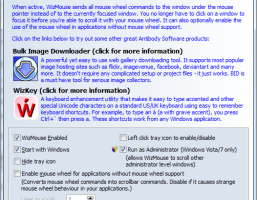
WizMouse is a mouse enhancement utility that makes your mouse wheel work on the window currently under the mouse pointer, instead of the currently focused window. This means you no longer have to click on a window before being able to scroll it with the mouse wheel. This is a far more comfortable and practical way to make use of the mouse wheel.
WizMouse can also optionally enable the mouse wheel in applications that don't support it. It does this by translating mouse wheel commands into scroll bar commands that all applications can understand and process.
Once WizMouse has been installed and is active, configure it by double clicking on the WizMouse icon in the system tray. If the tray icon has been hidden then launch WizMouse from the Windows start menu or desktop shortcut.
As a consequence, clicking within a window in order to make the mouse wheel work is no longer required. Furthermore, it can convert mouse commands into scroll bar commands, in order to allow using the mouse wheel for applications that don't support it.
Features
Scrolls windows under the mouse without having to click first
Enables the mouse wheel in applications that don't support mouse wheels
Optionally reverse the mouse wheel direction (like OS X Lion "Natural" scrolling)
Mouse Touchpad users take note: WizMouse may not work with your touchpad as most touchpad drivers do not send mouse wheel messages the way a standard mouse does when scrolling. If you have this problem you'll need to use an external mouse to enable WizMouse functionality.
Logitech Mice users take note: Some users have reported issues when using WizMouse with Logitech mice. This appears to be caused by conflicts between the Logitech mouse driver software and WizMouse. Upgrading your Logitech drivers and/or installing the latest Logitech SetPoint software should solve any such issues.
WizMouse is a mouse enhancement utility that makes your mouse wheel work on the window currently under the mouse pointer, instead of the currently focused window. This means you no longer have to click on a window before being able to scroll it with the mouse wheel. This is a far more comfortable and practical way to make use of the mouse wheel.
WizMouse can also optionally enable the mouse wheel in applications that don't support it. It does this by translating mouse wheel commands into scroll bar commands that all applications can understand and process.
Once WizMouse has been installed and is active, configure it by double clicking on the WizMouse icon in the system tray. If the tray icon has been hidden then launch WizMouse from the Windows start menu or desktop shortcut.
OS: Windows XP, Windows Vista, Windows Vista x64, Windows 7, Windows 7 x64, Windows 8, Windows 8 x64
Add Your Review or 64-bit Compatibility Report
Top Other 64-bit downloads


Caffeine 1.98
Keep your computer awake effortlessly with Caffeine, the ultimate productivity tool.
Freeware


Thaiphoon Burner 17.4.1.2
Designed for those who are in need of getting all available information
Freeware


Members area
Top 64-bit Downloads
-
EasyTune6 B24.0119.1
x64 freeware download -
Windows 7 x64
x64 trialware download -
SoftPerfect RAM Disk 26.2
x64 shareware download -
HWiNFO64 6.28 B4200
x64 freeware download -
BusDog x64 0.2
x64 freeware download -
GRBackPro Server Backup
x64 11.2.0
x64 shareware download -
HWMonitor (64-bit) 1.53
x64 freeware download -
Microsoft Security
Essentials Definition
Updates x64 1.67.7.0
x64 freeware download -
Disk Pulse Pro x64 16.1.28
x64 trialware download -
NiceCopier x64 13.02.03
x64 open source download
Top Downloads
-
Open Files from XLSX to
XLS 5.2
shareware download -
FMDiff 4.0.5
demo download -
Music Collection 3.9.7.0
freeware download -
File Compression 1.0
commercial download -
Caffeine 1.98
freeware download -
Shell Tools 2.0.1
freeware download -
Nomad.NET 3.2.0.2890
freeware download -
Hotkeycontrol 8.3
shareware download -
Vim 9.2.0173
open source download -
novelWriter 2.8.2
open source download -
EaseUS Key Finder 4.1.6 Build 20240910
demo download -
FastKeys 6.05
demo download -
WinToUSB 10.5 Build January 2
shareware download -
FURY CTRL 2.0.65.0
freeware download -
Notepad++ 8.9
open source download