
WoT Monitor Gadget - X 64-bit Download
Popular x64 Tags
- freeware x64 download
- windows x64 download
- free x64 download
- web x64 download
- software x64 download
- folder x64 download
- utility x64 download
- monitor x64 download
- convert x64 download
- download x64 download
- tool x64 download
- video x64 download
- memory x64 download
- audio x64 download
- text x64 download
- password x64 download
- editor x64 download
- file x64 download
- security x64 download
- database x64 download
- image x64 download
- jpeg x64 download
- icon x64 download
- organizer x64 download
- viewer x64 download
- data x64 download
- print x64 download
- edit x64 download
- search x64 download
- pim x64 download
WoT Monitor Gadget 2.8
Sponsored links:

Timur Software

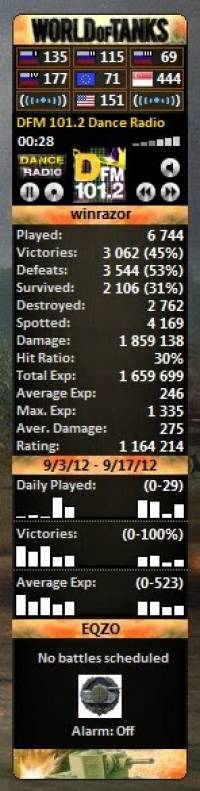
User achievements information is updated every 15 minutes by default (can be adjusted in the translations file) and also after pressing the title with user name. You can hide the unneeded features using check-boxes from the third settings panel.
Using this gadget new players can choose a version with lowest ping for the installation. Also you can check the ping of your version before starting the game. It is very important to save your network resources when gadget is running, therefore it automatically switches to ping per minute after one minute of intensive ping. You can DblClick at the top area of the gadget in order to wake it up. Fast ping Interval can be changed in the translations file.
You are enabled to choose a skin, select your region and switch radio-channels in the settings.
You are enabled to replace radio-player by banners or by your own picture.
In the "Displayed Name" field you can enter your user name or any other text. Also you can leave this field empty, enter your profile URL and save settings. In this case user name will be taken from the URL automatically.
Enter the address of your gaming profile in the "Profile URL" field, you can find it here.
Last 2-weeks statistics contains 3 bars with tooltips (numbers and percents):
1) Daily battles played.
2) Daily victories.
3) Daily average experience. (Daily experience / Daily battles played )
Using this gadget new players can choose a version with lowest ping for the installation. Also you can check the ping of your version before starting the game. It is very important to save your network resources when gadget is running, therefore it automatically switches to ping per minute after one minute of intensive ping. You can DblClick at the top area of the gadget in order to wake it up. Fast ping Interval can be changed in the translations file.
You are enabled to choose a skin, select your region and switch radio-channels in the settings.
You are enabled to replace radio-player by banners or by your own picture.
In the "Displayed Name" field you can enter your user name or any other text. Also you can leave this field empty, enter your profile URL and save settings. In this case user name will be taken from the URL automatically.
Enter the address of your gaming profile in the "Profile URL" field, you can find it here.
Last 2-weeks statistics contains 3 bars with tooltips (numbers and percents):
1) Daily battles played.
2) Daily victories.
3) Daily average experience. (Daily experience / Daily battles played )
OS: Windows XP, Windows Vista, Windows Vista x64, Windows 7, Windows 7 x64
Add Your Review or 64-bit Compatibility Report
Top Other 64-bit downloads


Windows 10 x64 22H2
Windows 10 x64 demonstrates new levels of flexibility, navigation & familiarity
Trialware

Thaiphoon Burner 17.4.1.2
Designed for those who are in need of getting all available information
Freeware

Caffeine 1.98
Keep your computer awake effortlessly with Caffeine, the ultimate productivity tool.
Freeware

BlueStacks 5 5.21.210.1023
A lightweight emulator developed specifically for low-spec computers
Freeware
BIOS Agent Plus 2.2019.1.31
Can automatically identify your computer's BIOS and other system info
Demo | $29.95


SoftPerfect RAM Disk 26.2
High-performance RAM disk software lets you have a disk stored in memory.
Shareware | $29.00
Portable Don't Panic 3.1.0 Build 30
Aplication that can close and open multiple programs with the click of a button
Open Source

Windows 7 x64
Windows 7 x64 is the next release of the Windows client operating system
Trialware | $199.99

Winabler 2.0.0.2
Drag-and-drop object enabler with standard Windows® menu object capture ability
Freeware
Members area
Top 64-bit Downloads
-
Windows 10 x64 22H2
x64 trialware download -
SoftPerfect RAM Disk 26.2
x64 shareware download -
Windows 7 x64
x64 trialware download -
XtraTools Professional
x64 26.2.1
x64 shareware download -
HWMonitor (64-bit) 1.53
x64 freeware download -
Windows 8 x64 RTM Build 9200
x64 trialware download -
7-Zip (x64 bit) 24.07
x64 open source download -
Lenovo Vantage 10.2001.10.0
x64 freeware download -
AkelPad (x64 bit) 4.9.8
x64 open source download -
Ashampoo WinOptimizer
FREE 26.00.12
x64 freeware download
Top Downloads
-
FreeCommander XE 2026 Build 941
shareware download -
Windows 10 x64 22H2
trialware download -
Windows 7 Service Pack 1 7601.17514.1011
freeware download -
Dr. Hardware 2026 26.0.0
shareware download -
FreeCommander XE
Portable 2026 Build 941
freeware download -
Thaiphoon Burner 17.4.1.2
freeware download -
Caffeine 1.98
freeware download -
RecoveryRobot Memory
Card Recovery 1.3.3
shareware download -
BlueStacks 5 5.21.210.1023
freeware download -
Revo Uninstaller 2.00
freeware download -
BIOS Agent Plus 2.2019.1.31
demo download -
Qemu Simple Boot 1.3
freeware download -
tinyMediaManager 5.2.6
shareware download -
Unlocker 1.9.2
freeware download -
DirPrintOK 7.52
freeware download