
Zed Axis - X 64-bit Download
Popular x64 Tags
- payroll x64 download
- invoice x64 download
- sales x64 download
- invoicing x64 download
- inventory x64 download
- budget x64 download
- business x64 download
- bookkeeping x64 download
- billing x64 download
- free x64 download
- financial x64 download
- accounting x64 download
- software x64 download
- excel x64 download
- purchase order x64 download
- time tracking x64 download
- time and expense x64 download
- online timesheet x64 download
- finance x64 download
- time tracking software x64 download
- management x64 download
- asp x64 download
- time x64 download
- timesheet x64 download
- forex x64 download
- tax x64 download
- shareware x64 download
- profit x64 download
- bizpep x64 download
- medlin x64 download
Zed Axis 13.0
Sponsored links:

Zed Systems

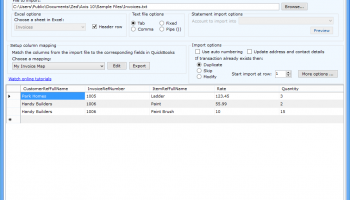
Zed Axis is the best way to import transaction data into QuickBooks, it will save you hours in data entry and reduce costly mistakes. Import invoices, sales receipts, sales orders, receive payments, credit memos, bills, checks, credit card payments, journals, timesheets from spreadsheets or text files directly into your QuickBooks company file. Open your file that you want to import, setup the mapping of columns in your file to the corresponding QuickBooks fields and sit back as Zed Axis imports thousands of rows of data which would have taken many hours by hand.
Import Module - Saves you hours in entering transactions into QuickBooks
Supports a wide range of import file formats - your import data can be Microsoft Excel (2007 or earlier) format, a text file (CSV and Tab), or a XML file.
Supports the full range of transaction types - if you need to import transaction data into QuickBooks then you can choose from the extensive list of transaction types including: Invoices, Sales Receipts, Sales Orders, Estimates, Credit Memo/Adjustment Notes, Receive Payments, Deposits, Purchase orders, Inventory adjustments, Bills, Vendor credits, Bill Payment - cheque, Bill Payment - credit card, Time Entries , Supplier Credits, Cheques, Credit Card Charges, Credit Card Credits, Journal Entries and Price Level lists.
Supports a wide range of fields - we have access to the full set of fields available when importing transaction data into QuickBooks. If you can't find the field you need then let us know and we will add it.
Intelligently creates items, customers, jobs, or employees if they are not in QuickBooks - if Axis finds that a customer, vendor, item or employee is not yet set up in QuickBooks it will create it for you during the import saving you even more time.
Set up a constant – you have the option to select a constant value like a date or a class that can be applied to all transactions. Just specify the constant in the mapping and it will be added for all the transactions that are included in that import. You can even save the constant as part of the saved mappings options.
Preview your data before you import it into QuickBooks - before you commit your import to QuickBooks you can preview the transactions and edit those if you need to.
Powerful data validation - finally Axis will check your data before importing into QuickBooks to ensure that it is in the format that QuickBooks can accept, if it finds an error it gives you the chance to correct it and reattempt the import.
Clear and concise error reporting and handling - with the error reporting feature you open a log file to examine the issue that is causing the problem and the data row that was rejected so that you can reattempt the import using only the data that was rejected.
Convert amounts from including tax to excluding tax – if you have QuickBooks and have been using the Australian or UK versions of QuickBooks and been unable to import data where amounts are including tax now Axis will automatically convert those to excluding tax before import.
Import transactions into MYOB – If you use MYOB Accounting software you can now import, orders, quotes and invoices from text files or spreadsheets into MYOB. Create customer and item records if they don’t already exist in MYOB
Retain import settings - To save you time and make importing even easier your import settings are preserved the next time you open Zed Axis. It will remember the location of the file you were importing, the mapping you were using and any other setting that you selected.
Option to check if transaction already exists - You can set an option in the importing options so that if the transaction already exists in it will either, duplicate it, skip it or replace it. More powerful ways of importing data into QuickBooks and MYOB
Import Module - Saves you hours in entering transactions into QuickBooks
Supports a wide range of import file formats - your import data can be Microsoft Excel (2007 or earlier) format, a text file (CSV and Tab), or a XML file.
Supports the full range of transaction types - if you need to import transaction data into QuickBooks then you can choose from the extensive list of transaction types including: Invoices, Sales Receipts, Sales Orders, Estimates, Credit Memo/Adjustment Notes, Receive Payments, Deposits, Purchase orders, Inventory adjustments, Bills, Vendor credits, Bill Payment - cheque, Bill Payment - credit card, Time Entries , Supplier Credits, Cheques, Credit Card Charges, Credit Card Credits, Journal Entries and Price Level lists.
Supports a wide range of fields - we have access to the full set of fields available when importing transaction data into QuickBooks. If you can't find the field you need then let us know and we will add it.
Intelligently creates items, customers, jobs, or employees if they are not in QuickBooks - if Axis finds that a customer, vendor, item or employee is not yet set up in QuickBooks it will create it for you during the import saving you even more time.
Set up a constant – you have the option to select a constant value like a date or a class that can be applied to all transactions. Just specify the constant in the mapping and it will be added for all the transactions that are included in that import. You can even save the constant as part of the saved mappings options.
Preview your data before you import it into QuickBooks - before you commit your import to QuickBooks you can preview the transactions and edit those if you need to.
Powerful data validation - finally Axis will check your data before importing into QuickBooks to ensure that it is in the format that QuickBooks can accept, if it finds an error it gives you the chance to correct it and reattempt the import.
Clear and concise error reporting and handling - with the error reporting feature you open a log file to examine the issue that is causing the problem and the data row that was rejected so that you can reattempt the import using only the data that was rejected.
Convert amounts from including tax to excluding tax – if you have QuickBooks and have been using the Australian or UK versions of QuickBooks and been unable to import data where amounts are including tax now Axis will automatically convert those to excluding tax before import.
Import transactions into MYOB – If you use MYOB Accounting software you can now import, orders, quotes and invoices from text files or spreadsheets into MYOB. Create customer and item records if they don’t already exist in MYOB
Retain import settings - To save you time and make importing even easier your import settings are preserved the next time you open Zed Axis. It will remember the location of the file you were importing, the mapping you were using and any other setting that you selected.
Option to check if transaction already exists - You can set an option in the importing options so that if the transaction already exists in it will either, duplicate it, skip it or replace it. More powerful ways of importing data into QuickBooks and MYOB
OS: Windows Vista, Windows Vista x64, Windows 7, Windows 7 x64, Windows 8, Windows 8 x64, Windows 10, Windows 10 x64
Add Your Review or 64-bit Compatibility Report
Top Accounting & Finance 64-bit downloads


StockProfits 2.5
Import stock trading information (symbol, price, quantity, date) report summary.
Freeware

Simply Accounts 2.0
Simply Accounts VAT Making Tax Digital(MTD) accounting software.
Shareware | $99.00

TimeClockFree 3.2.7
Time Clock Software Employee Time Attendance Tracking App - Open Time Clock Free
Freeware



Office to Flash Page Flip 2.6
Cool flip office software for virtually all office files!
Shareware | $128.00
tags: office to flash, flip office

Manager 24.6.27.1687
Setup accounting system with cashbook, invoicing, receivables, payables, taxes
Freeware
Members area
Top 64-bit Downloads
-
mbFXWords 2.80
x64 freeware download -
FontAgent Pro 10.0.15.0
x64 trialware download -
Microsoft Office 2016
x64 2405 B17628.20164
x64 trialware download -
Print to PDF Toolkit Pro 3.0
x64 shareware download -
Microsoft Office 2010
Service Pack x64 SP2
x64 freeware download -
CSV2IIF Portable 5.0.060
x64 demo download -
Foxit Reader 2023.3
x64 freeware download -
ABBYY FineReader
Professional 16.0.13
x64 trialware download -
Zed Axis 64bit 10.0
x64 trialware download -
WinEdt 11.2
x64 trialware download
Top Downloads
-
Quite Imposing Plus 6.0d
demo download -
Total CSV Converter 4.0
shareware download -
Active Barcode and QR
code Generator 1.24.8.15
freeware download -
Seavus Project Viewer 19.0
trialware download -
Miro for Windows 0.11.110
shareware download -
Flipping Book Writer 2.6
shareware download -
mbFXWords 2.80
freeware download -
SmarThru 4.04
freeware download -
SilentNotes 8.7.1
open source download -
LawTrust 5.1.1
shareware download -
HelpDesk 11.19.9557.25020
trialware download -
DeskWork Standard 4.0.2827
trialware download -
LiquiBase 5.0.2
trialware download -
CZ Excel Converter 1.9.4.6366
demo download -
QOwnNotes 26.3.21 Build 1294
demo download