
Chapter and Verse - X 64-bit Download
Popular x64 Tags
- ipod x64 download
- video x64 download
- avi x64 download
- software x64 download
- internet tv x64 download
- music organizer x64 download
- music x64 download
- audio x64 download
- codecs x64 download
- wma x64 download
- zip x64 download
- mpeg x64 download
- mp3 x64 download
- organize music files x64 download
- itunes x64 download
- file x64 download
- music file organizer x64 download
- fft x64 download
- organize x64 download
- music organizer download x64 download
- organizer x64 download
- music organizer software x64 download
- mp3 organizer x64 download
- tag x64 download
- files x64 download
- lite x64 download
- ogg x64 download
- album x64 download
- rename x64 download
- sort x64 download
Chapter and Verse 1.5.3.0
Sponsored links:

Loden Software

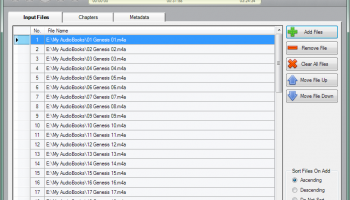
Chapter and Verse is a free software tool to create chapterized audiobooks for the iPod, iTunes and Quicktime.
Starting with Advanced Audio Coding (AAC) formatted files, the user can combine multiple input files into a single audiobook file with chapter marks. Chapters can be added, modified or deleted as desired for the combined audiobook. Chapters can be created automatically at the start of each input file and they can also be added at regular intervals specified by the user. If a single file with existing chapters is selected, the user can then add to, modify or delete the existing chapters. Chapter images can also be specified for the chapters and they will be shown during playback on iTunes, QuickTime and on selected iPods.
The user can specify fourteen (14) metadata or information tags (e.g. Title, Artist, Album, Composer and Comment tags) as well as the cover artwork for the combined audiobook.
A virtual copy of the audiobook is created to allow the user to test the changes and to be able to listen to the audiobook prior to building the combined audiobook. The user can then add a chapter at specific time or adjust an existing chapter in the audiobook based on the time position of the player during playback.
Project files containing all input file, chapter and metadata settings can be saved and opened to allow for later editing. Additional tools are provided to import/export metadata, artwork and chapters. The user can also query the audio properties of input files.
At the end of the audiobook build process, the user can choose to have the audiobook automatically added to their iTunes Library.
Starting with Advanced Audio Coding (AAC) formatted files, the user can combine multiple input files into a single audiobook file with chapter marks. Chapters can be added, modified or deleted as desired for the combined audiobook. Chapters can be created automatically at the start of each input file and they can also be added at regular intervals specified by the user. If a single file with existing chapters is selected, the user can then add to, modify or delete the existing chapters. Chapter images can also be specified for the chapters and they will be shown during playback on iTunes, QuickTime and on selected iPods.
The user can specify fourteen (14) metadata or information tags (e.g. Title, Artist, Album, Composer and Comment tags) as well as the cover artwork for the combined audiobook.
A virtual copy of the audiobook is created to allow the user to test the changes and to be able to listen to the audiobook prior to building the combined audiobook. The user can then add a chapter at specific time or adjust an existing chapter in the audiobook based on the time position of the player during playback.
Project files containing all input file, chapter and metadata settings can be saved and opened to allow for later editing. Additional tools are provided to import/export metadata, artwork and chapters. The user can also query the audio properties of input files.
At the end of the audiobook build process, the user can choose to have the audiobook automatically added to their iTunes Library.
OS: Windows XP, Windows Vista, Windows Vista x64, Windows 7, Windows 7 x64, Windows 8, Windows 8 x64, Windows 10, Windows 10 x64
Requirements: Chapter and Verse requires that Apple Quicktime and Windows Media Player be installed to run.
Add Your Review or 64-bit Compatibility Report
Top Other 64-bit downloads


ft2-clone 2.12
A versatile clone of the classic FastTracker 2 for modern music creation.
Open Source


DSP Filters 1.18.9
Powerful audio plug-ins for mixing and mastering with innovative features.
Demo | $100.00


iTools 4.5.1.9
iTools: A versatile tool for managing iOS devices with ease and efficiency.
Shareware
tags: iTools, sync iPod, iTools free download, iPhone organizer, Thinksky, iPhone, tools, iOS, iPad, iPad manager, download iTools, software, iPod, management
Members area
Top 64-bit Downloads
-
VLC Media Player x64 3.0.20
x64 open source download -
Media Player Classic -
HomeCinema - 64 bit 2.3.0
x64 open source download -
MCEBuddy 2.6.3
x64 trialware download -
PotPlayer 64bit 1.7.21397
x64 freeware download -
GUITAR RIG 5 PRO 7.0.2
x64 demo download -
Voxengo Stereo Touch x64 2.17
x64 freeware download -
Devastor x64 2.3.2
x64 demo download -
Mp4Gain 1.03
x64 shareware download -
MediaCoder PSP Edition
x64 0.8.65.5830
x64 freeware download -
Blue Cat's Triple EQ x64 4.45
x64 freeware download
Top Downloads
-
FreeTube 0.23.15 Beta
open source download -
Little AlterBoy 5.4.1
trialware download -
Auremo 0.24.9
open source download -
ft2-clone 2.12
open source download -
VLC Media Player x64 3.0.20
open source download -
Screenbits 9.13.1.0
trialware download -
Cyclop 1.3.7
demo download -
Screenbox 0.18.0
open source download -
Soundbase 2012.10.10
freeware download -
Nero 7 Ultra Edition 7.10.1
shareware download -
Audio Reader XL 2026 26.1.3
shareware download -
Video Jaguar 1.0
shareware download -
CamStudio 2.7.4 r354
open source download -
4Videosoft MTS Converter 6.2.22
shareware download -
DSP Filters 1.18.9
demo download