
Context Menu Audio Converter - X 64-bit Download
Popular x64 Tags
- ipod x64 download
- video x64 download
- avi x64 download
- software x64 download
- internet tv x64 download
- music organizer x64 download
- music x64 download
- audio x64 download
- codecs x64 download
- wma x64 download
- zip x64 download
- mpeg x64 download
- mp3 x64 download
- organize music files x64 download
- itunes x64 download
- file x64 download
- music file organizer x64 download
- fft x64 download
- organize x64 download
- music organizer download x64 download
- organizer x64 download
- music organizer software x64 download
- mp3 organizer x64 download
- tag x64 download
- files x64 download
- lite x64 download
- ogg x64 download
- album x64 download
- rename x64 download
- sort x64 download
Context Menu Audio Converter 1.0.146.216
Sponsored links:
license: Trialware ($15.00)
downloads: 64
size: 23.60 MB
updated: 2026-02-09
tags: Context Menu Audio Converter, download Context Menu Audio Converter, Context Menu Audio Converter free download, Audio Converter, Convert Audio, Audio Encoder, Converter, Conversion, Audio, Song
Add to Basket

3delite

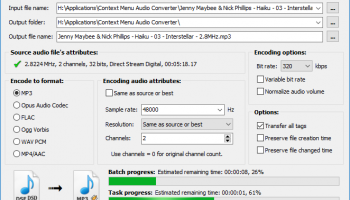
"Context Menu Audio Converter" by 3delite is a versatile and user-friendly tool designed to simplify the process of audio file conversion directly from the Windows context menu. This innovative software integrates seamlessly into your operating system, allowing you to convert audio files with just a right-click, eliminating the need for cumbersome, multi-step conversion processes.
One of the standout features of Context Menu Audio Converter is its extensive format support. Whether you're dealing with MP3, WAV, FLAC, AAC, OGG, or a myriad of other audio formats, this tool has you covered. The software ensures high-quality conversions, preserving the integrity of your audio files while offering flexibility in output options to suit your specific needs.
The user interface is minimalistic yet highly functional. Once installed, the software adds a context menu entry to your Windows Explorer, making it incredibly easy to access. Simply right-click on the audio file you wish to convert, select the desired output format, and let the software handle the rest. This streamlined process is perfect for users who require quick and efficient conversions without the hassle of navigating through complex menus or settings.
Customization is another key strength of Context Menu Audio Converter. Users can configure various settings to tailor the conversion process to their preferences. Options such as bitrate, sample rate, and channel selection are readily available, allowing for precise control over the output quality. Additionally, batch processing capabilities enable the conversion of multiple files simultaneously, saving valuable time and effort.
Performance-wise, Context Menu Audio Converter is robust and reliable. It leverages advanced algorithms to ensure fast and accurate conversions, even with large audio files. The software is lightweight, ensuring it doesn't bog down your system resources, and it operates smoothly on a wide range of Windows versions.
Security and privacy are also prioritized by 3delite. The software is free from adware, spyware, and other malicious components, providing a safe and trustworthy user experience. Regular updates from the developer ensure compatibility with new audio formats and continuous improvements in functionality.
In summary, Context Menu Audio Converter by 3delite is an indispensable tool for anyone who frequently works with audio files. Its seamless integration, extensive format support, and user-centric design make it a standout choice for both casual users and audio professionals. Whether you need to convert a single file or manage a large batch of audio files, this software delivers efficiency and quality with minimal effort.
One of the standout features of Context Menu Audio Converter is its extensive format support. Whether you're dealing with MP3, WAV, FLAC, AAC, OGG, or a myriad of other audio formats, this tool has you covered. The software ensures high-quality conversions, preserving the integrity of your audio files while offering flexibility in output options to suit your specific needs.
The user interface is minimalistic yet highly functional. Once installed, the software adds a context menu entry to your Windows Explorer, making it incredibly easy to access. Simply right-click on the audio file you wish to convert, select the desired output format, and let the software handle the rest. This streamlined process is perfect for users who require quick and efficient conversions without the hassle of navigating through complex menus or settings.
Customization is another key strength of Context Menu Audio Converter. Users can configure various settings to tailor the conversion process to their preferences. Options such as bitrate, sample rate, and channel selection are readily available, allowing for precise control over the output quality. Additionally, batch processing capabilities enable the conversion of multiple files simultaneously, saving valuable time and effort.
Performance-wise, Context Menu Audio Converter is robust and reliable. It leverages advanced algorithms to ensure fast and accurate conversions, even with large audio files. The software is lightweight, ensuring it doesn't bog down your system resources, and it operates smoothly on a wide range of Windows versions.
Security and privacy are also prioritized by 3delite. The software is free from adware, spyware, and other malicious components, providing a safe and trustworthy user experience. Regular updates from the developer ensure compatibility with new audio formats and continuous improvements in functionality.
In summary, Context Menu Audio Converter by 3delite is an indispensable tool for anyone who frequently works with audio files. Its seamless integration, extensive format support, and user-centric design make it a standout choice for both casual users and audio professionals. Whether you need to convert a single file or manage a large batch of audio files, this software delivers efficiency and quality with minimal effort.
OS: Windows 11, Windows 10 32/64 bit, Windows 8 32/64 bit, Windows 7 32/64 bit
Add Your Review or 64-bit Compatibility Report
Top Other 64-bit downloads


ft2-clone 2.12

A versatile clone of the classic FastTracker 2 for modern music creation.
Open Source

DSP Filters 1.18.9
Powerful audio plug-ins for mixing and mastering with innovative features.
Demo | $100.00


OnionMedia 1.2.24.0
OnionMedia: Streamline your media management with ease and efficiency.
Open Source

Members area
Top 64-bit Downloads
-
Media Player Classic -
HomeCinema - 64 bit 2.3.0
x64 open source download -
VLC Media Player x64 3.0.20
x64 open source download -
MCEBuddy 2.6.3
x64 trialware download -
Devastor x64 2.3.2
x64 demo download -
GUITAR RIG 5 PRO 7.0.2
x64 demo download -
PotPlayer 64bit 1.7.21397
x64 freeware download -
Mp4Gain 1.03
x64 shareware download -
ProgDVB (64 bit) 7.60.9
x64 freeware download -
Voxengo Stereo Touch x64 2.17
x64 freeware download -
Blue Cat's StereoScope
Multi x64 2.41
x64 demo download
Top Downloads
-
FreeTube 0.23.15 Beta
open source download -
Little AlterBoy 5.4.1
trialware download -
Auremo 0.24.9
open source download -
ft2-clone 2.12
open source download -
Nero 7 Ultra Edition 7.10.1
shareware download -
Video Jaguar 1.0
shareware download -
Screenbits 9.13.1.0
trialware download -
DSP Filters 1.18.9
demo download -
Cyclop 1.3.7
demo download -
Melodics 5.0.133.0
demo download -
Media Player Classic -
HomeCinema - 64 bit 2.3.0
open source download -
Soundbase 2012.10.10
freeware download -
DSpeech 1.72
freeware download -
CamStudio 2.7.4 r354
open source download -
4Videosoft MTS Converter 6.2.22
shareware download