
Destiny Item Manager Shortcut for Chrome - X 64-bit Download
Popular x64 Tags
- mozilla x64 download
- internet explorer toolbar x64 download
- browser x64 download
- netscape x64 download
- toolbar x64 download
- ie toolbar x64 download
- firefox x64 download
- free toolbar x64 download
- favorites organizer x64 download
- internet explorer x64 download
- favorites x64 download
- internet x64 download
- bookmarks x64 download
- add ons x64 download
- browser toolbar x64 download
- bookmark manager x64 download
- explorer x64 download
- theme x64 download
- addons x64 download
- cache x64 download
- skin x64 download
- web x64 download
- backup x64 download
- golf x64 download
- anarchy bar anarchy x64 download
- golf pro x64 download
- mhfs rss rss feed reader x64 download
- golf leader x64 download
- womens golf x64 download
- ladies golf x64 download
You are here: X-64-bit Download
\ Network & Internet
\ Browser Tools \ Destiny Item Manager Shortcut for Chrome
Destiny Item Manager Shortcut for Chrome 11.0.0
Sponsored links:
license: Freeware
downloads: 38
size: 0 kB
updated: 2024-08-07
tags: Manager, Extension, Destiny, Object, Destiny Manager, Item, Item Manager, Destiny Item Manager Shortcut for Chrome, Chrome, Shortcut, Game Manager, download Destiny Item Manager Shortcut for Chrome, Destiny Item Manager Shortcut for Chrome free download
Add to Basket

Destiny Item Manager

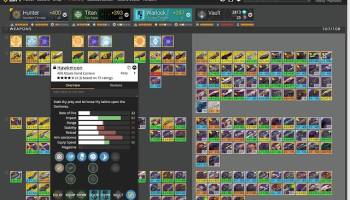
Destiny Item Manager Shortcut for Chrome, developed by the team at Destiny Item Manager, is an indispensable tool for any dedicated Destiny 2 player. This Chrome extension is designed to streamline your gaming experience by providing quick and seamless access to the Destiny Item Manager (DIM) platform directly from your browser.
At its core, the Destiny Item Manager Shortcut for Chrome serves as a bridge between your everyday web activities and your in-game inventory management. With just a single click, you can open DIM in a new tab, allowing you to effortlessly manage your gear, organize your vault, and optimize your loadouts without the need to manually navigate to the DIM website.
One of the standout features of this extension is its simplicity and ease of use. The installation process is straightforward, and once added to your Chrome browser, the extension icon sits unobtrusively in your toolbar. This ensures that it’s always within reach but never in the way. The user interface is clean and intuitive, mirroring the sleek design of the DIM platform itself.
Functionality-wise, the extension doesn’t disappoint. It provides all the robust features of the full DIM experience, including drag-and-drop item transfers, loadout creation, and powerful search and filter options. Whether you’re in the middle of a raid and need to quickly swap gear or you’re planning your next big PvP session, the Destiny Item Manager Shortcut for Chrome ensures that your inventory is always just a click away.
Moreover, the extension is regularly updated to keep pace with the evolving needs of the Destiny 2 community. The developers are highly responsive, often incorporating user feedback to enhance functionality and user experience. This commitment to continuous improvement ensures that the extension remains a reliable companion for both new and veteran players alike.
In terms of performance, the Destiny Item Manager Shortcut for Chrome is lightweight and efficient. It doesn’t bog down your browser or interfere with other extensions, making it a seamless addition to your Chrome ecosystem. The extension’s quick access capabilities mean that you can spend less time managing your inventory and more time enjoying the game.
In conclusion, the Destiny Item Manager Shortcut for Chrome is a must-have for any Destiny 2 enthusiast looking to optimize their gameplay experience. Its ease of use, robust functionality, and seamless integration with the DIM platform make it an invaluable tool for managing your in-game inventory. Whether you’re a casual player or a hardcore raider, this extension will undoubtedly enhance your Destiny 2 journey.
At its core, the Destiny Item Manager Shortcut for Chrome serves as a bridge between your everyday web activities and your in-game inventory management. With just a single click, you can open DIM in a new tab, allowing you to effortlessly manage your gear, organize your vault, and optimize your loadouts without the need to manually navigate to the DIM website.
One of the standout features of this extension is its simplicity and ease of use. The installation process is straightforward, and once added to your Chrome browser, the extension icon sits unobtrusively in your toolbar. This ensures that it’s always within reach but never in the way. The user interface is clean and intuitive, mirroring the sleek design of the DIM platform itself.
Functionality-wise, the extension doesn’t disappoint. It provides all the robust features of the full DIM experience, including drag-and-drop item transfers, loadout creation, and powerful search and filter options. Whether you’re in the middle of a raid and need to quickly swap gear or you’re planning your next big PvP session, the Destiny Item Manager Shortcut for Chrome ensures that your inventory is always just a click away.
Moreover, the extension is regularly updated to keep pace with the evolving needs of the Destiny 2 community. The developers are highly responsive, often incorporating user feedback to enhance functionality and user experience. This commitment to continuous improvement ensures that the extension remains a reliable companion for both new and veteran players alike.
In terms of performance, the Destiny Item Manager Shortcut for Chrome is lightweight and efficient. It doesn’t bog down your browser or interfere with other extensions, making it a seamless addition to your Chrome ecosystem. The extension’s quick access capabilities mean that you can spend less time managing your inventory and more time enjoying the game.
In conclusion, the Destiny Item Manager Shortcut for Chrome is a must-have for any Destiny 2 enthusiast looking to optimize their gameplay experience. Its ease of use, robust functionality, and seamless integration with the DIM platform make it an invaluable tool for managing your in-game inventory. Whether you’re a casual player or a hardcore raider, this extension will undoubtedly enhance your Destiny 2 journey.
OS: Windows 11, Windows 10 32/64 bit
Add Your Review or 64-bit Compatibility Report
Top Browser Tools 64-bit downloads


Teleparty (formerly Netflix Party) 5.5.6

Teleparty: Sync and chat while streaming Netflix, Disney+, Hulu, and more.
Trialware | $3.99

Gtraffic bot 2.0.8
Auto generate Google organic traffic with Windows application bot
Shareware | $75.00

LanguageTool for Chrome 10.0.12
LanguageTool for Chrome: Enhance your writing with advanced grammar checks.
Shareware | $48.71

TagSpaces Web Clipper for Chrome 4.1.1
Organize your files effortlessly with TagSpaces' intuitive tagging system.
Freeware

Toggl Track for Firefox 4.11.8
Effortlessly track time and boost productivity with this intuitive Firefox extension.
Shareware | $9.00

RegExp Download Organizer 0.5.2
Effortlessly manage and organize your downloads with RegExp Download Organizer.
Open Source

Web Translator 8.31
Translate Website, Webpages, Text up to 53 languages worldwide.
Shareware | $39.00

FireShot for Google Chrome 1.10.05
Compact and powerful tool for quick web page Captures and editing
Freeware

RSS Feed Reader 8.0.28
Stay updated with real-time news and blog feeds using RSS Feed Reader.
Shareware | $7.99

Drag 19.1.1
Drag transforms Gmail into a collaborative workspace for team productivity.
Trialware | $12.00
Members area
Top 64-bit Downloads
-
Internet Explorer 8 for
Windows Vista 64-bit and
Windows Server 2008
64-bit
x64 freeware download -
Adobe Flash Player 10
for 64-bit Windows Preview 2
x64 freeware download -
SSuite NetSurfer Extreme
x64 1.8.14.14
x64 freeware download -
Firefox 64bit x64 127.0.2
x64 open source download -
Google Chrome x64 bit 126.0.6478.127
x64 freeware download -
SoftPerfect Bandwidth
Manager 3.3.0
x64 shareware download -
Xlight FTP Server
Standart x64 3.9.4.2
x64 trialware download -
Radio Downloader 64-bit 0.32
x64 open source download -
SSuite NetSurfer Browser
x64 2.30.16.8
x64 freeware download -
HTTPNetworkSniffer
64-bit 1.63
x64 freeware download
Top Downloads
-
Internet Explorer 8 for
Windows Vista 64-bit and
Windows Server 2008
64-bit
freeware download -
Adobe Flash Player 10
for 64-bit Windows Preview 2
freeware download -
Google Chrome 145.0.7632.68
freeware download -
TeamViewer Host 15.74.6
freeware download -
Teleparty (formerly
Netflix Party) 5.5.6
trialware download -
BrowseEmAll 9.7.0
trialware download -
uTorrent (µTorrent) 3.6.0 B47124
open source download -
Gtraffic bot 2.0.8
shareware download -
LanguageTool for Chrome 10.0.12
shareware download -
TagSpaces Web Clipper
for Chrome 4.1.1
freeware download -
Toggl Track for Firefox 4.11.8
shareware download -
RegExp Download
Organizer 0.5.2
open source download -
X-Browser 1.4
freeware download -
Yandex Browser 24.6.1.766
freeware download -
SSuite NetSurfer Extreme
x64 1.8.14.14
freeware download