
Enable Viacam - X 64-bit Download
Popular x64 Tags
- webcam software x64 download
- webcam x64 download
- web cam x64 download
- ip cam x64 download
- screen x64 download
- camera x64 download
- chat x64 download
- motion detection x64 download
- broadcast x64 download
- video chat x64 download
- web x64 download
- videochat x64 download
- image x64 download
- cam x64 download
- surveillance x64 download
- video conference x64 download
- yahoo x64 download
- messenger x64 download
- security x64 download
- motion x64 download
- video x64 download
- network x64 download
- mjpeg x64 download
- conferencing x64 download
- streaming x64 download
- alarm x64 download
- icq x64 download
- intrusion x64 download
- msn x64 download
- netcam x64 download
Enable Viacam 2.1.0
Sponsored links:

Cesar Mauri Loba

First install and configure your web camera before using eViacam. It's very important to configure your camera in manual exposure mode and adjust this parameter to get about 25 fps or more. Most modern cameras can deliver 30fps. Please check your web camera manual when necessary.
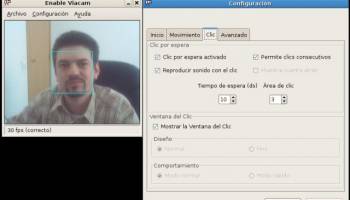
Once installed run evicam (evicam.exe for Windows). The application should open, automatically detect your camera and begin streaming the live video.
Place the camera to get a frontal view of your face. The width of your face in the image should be a third of the width of the frame. Centre the tracking box around your face either moving the camera or displacing the on-screen blue box with the mouse (clicking at the corner).
Enable the tracking function from the File menu. Try moving your head and see the result. You should adjust the sensitivity (X and Y axis speed) from the options dialog. You should be able to reach all the screen area with the mouse pointer.
For clicking simply stop the pointer over the desired position. In few moments a click will be generated automatically (you can adjust the dwell time in the options dialog). You can use the docked window at the top of the screen for selecting the different kinds of clicks.
Once installed run evicam (evicam.exe for Windows). The application should open, automatically detect your camera and begin streaming the live video.
Place the camera to get a frontal view of your face. The width of your face in the image should be a third of the width of the frame. Centre the tracking box around your face either moving the camera or displacing the on-screen blue box with the mouse (clicking at the corner).
Enable the tracking function from the File menu. Try moving your head and see the result. You should adjust the sensitivity (X and Y axis speed) from the options dialog. You should be able to reach all the screen area with the mouse pointer.
For clicking simply stop the pointer over the desired position. In few moments a click will be generated automatically (you can adjust the dwell time in the options dialog). You can use the docked window at the top of the screen for selecting the different kinds of clicks.
OS: Windows XP, Windows Vista, Windows Vista x64, Windows 7, Windows 7 x64, Windows 8, Windows 8 x64, Windows 10, Windows 10 x64
Add Your Review or 64-bit Compatibility Report
Top Web/Video Cams 64-bit downloads


AnyCam 6.0.9.4

AnyCam: Effortless IP camera management and live streaming solution.
Shareware | $34.00


AbelCam 4.4.3
AbelCam does it all: cam server, video broadcast, motion detection, ftp upload
Freeware
tags: web cam, logitech, orbit, sphere, windows, tilt, pan, zoom, web server, video streaming, motion detection

OnSiteMonitor 2.2
Turns your home computer into a Home Security & Home Automation System
Shareware | $79.00


Zoom Rooms 7.0.0 (7486)
Transform your meeting spaces with seamless video conferencing solutions.
Trialware | $469.00

Ivideon Server 3.14.0 Build 11543
Ivideon Server: Streamline video surveillance with cloud-based solutions.
Freeware

AbelCam 4.4.3
AbelCam does it all: cam server, video broadcast, motion detection, ftp upload
Freeware
tags: web cam, logitech, orbit, sphere, windows, tilt, pan, zoom, web server, video streaming, motion detection


Members area
Top 64-bit Downloads
-
Linphone 5.0.8
x64 freeware download -
MAPIViewer 64-bit 3.4
x64 freeware download -
WeChat 3.9.6
x64 freeware download -
NK2Edit x64 3.46
x64 freeware download -
MOBILedit Forensic
Express 7.4.1.21502
x64 demo download -
AdiIRC 64bit 4.4
x64 freeware download -
SIP Communicator for
Windows (x64 bit) 2.10.5550
x64 open source download -
OutlookAddressBookView
x64 2.44
x64 freeware download -
KeyLemon 4.0.3
x64 trialware download -
Funambol x64 10.0.3
x64 open source download
Top Downloads
-
Skype 8.150.0.125
freeware download -
Find Unused Contacts 4.11
freeware download -
VSee 4.28 (52330)
shareware download -
Paltalk 2.4.0 Build 112318
shareware download -
PC SMS Software 8.0.1.3
shareware download -
Beeper 4.2.653
open source download -
Clyton 37.0
shareware download -
Windows Communicator 3.1
shareware download -
cwtch 1.16.2
open source download -
Wavebox 10.146.26.2
demo download -
Total Webmail Converter 1.4
shareware download -
Linphone 5.0.8
freeware download -
LINE 9.9.0 Build 3633
freeware download -
Mail.dll 3.0
shareware download -
Microsoft Outlook 2016 16.0.6741
trialware download